
A post on Figma's community forum describes selecting a component and variable library in Figma Make and getting back "colors with almost no contrast and font sizes that make no sense." The same user reports that results were about 90% better with no library selected at all. That's the failure to measure any tool against: it either builds with your team's existing components, or it builds a parallel UI you'll reconcile later.
The best design-to-code AI tools don't compete on one ladder, because they start from different inputs. A screenshot, a Figma file, a written prompt, and an existing codebase carry very different amounts of structure.
Pick by what you're holding. A Figma file goes to a converter such as Figma's built-in code generation, Anima, or Builder.io Visual Copilot. A screenshot goes to screenshot-to-code. A prompt goes to v0, Lovable, or Bolt. An existing codebase goes to a coding agent that reads your design system over the Model Context Protocol (MCP).
TL;DR
- Use Figma's built-in code generation if you pay for Figma; screenshot-to-code only when no design file exists; v0, Lovable, or bolt.diy depending on deploy target, billing, and model-key needs; and Figma MCP with Code Connect mapping when you have a codebase and design system.
- Before adopting any tool, generate one screen you have components for and check the output for hardcoded hex colors and pixel values, and for newly declared components where imports from your library should be.
- You can run bolt.diy, screenshot-to-code, and Penpot on a server you control, but each carries a caveat: bolt.diy's commits paused from February to October 2026 and its last tagged release dates from May 2025, screenshot-to-code needs a model API key, and self-hosted Penpot trails the cloud release.
- Component reuse is strongest when a tool has explicit mapping, such as Figma MCP with Code Connect or Builder.io's design-system indexing, but generated output still needs review, so budget cleanup time on every route.
Match the Tool to What You're Starting From
A screenshot holds pixels and nothing else. A Figma file adds component names, variables, and layout rules, and a codebase holds the components themselves, so the input decides which kind of tool has anything to work with.
| Starting input | Tool category | Tools to try | What you get back | Where it breaks |
|---|---|---|---|---|
| Finished Figma file | Figma converter | Figma's in-canvas code generation, Figma Make, Anima, Builder.io Visual Copilot, Locofy | Framework code or a prototype from selected frames | Approximates styles unless components are mapped to code |
| Screenshot or mockup | Image-to-code | screenshot-to-code | A best-effort reconstruction | No component identity, states, or breakpoints |
| Prompt only | Prompt-to-UI | v0, Lovable, Bolt.new or bolt.diy, Google Stitch | A generated app or set of screens | Nothing to match against |
| Existing codebase and design system | Coding agent over MCP | Figma MCP or Penpot MCP with an agent such as Claude Code or OpenCode | Edits in your repo | Setup overhead; reuse improves but isn't guaranteed |
The One-Screen Test for Component and Token Reuse
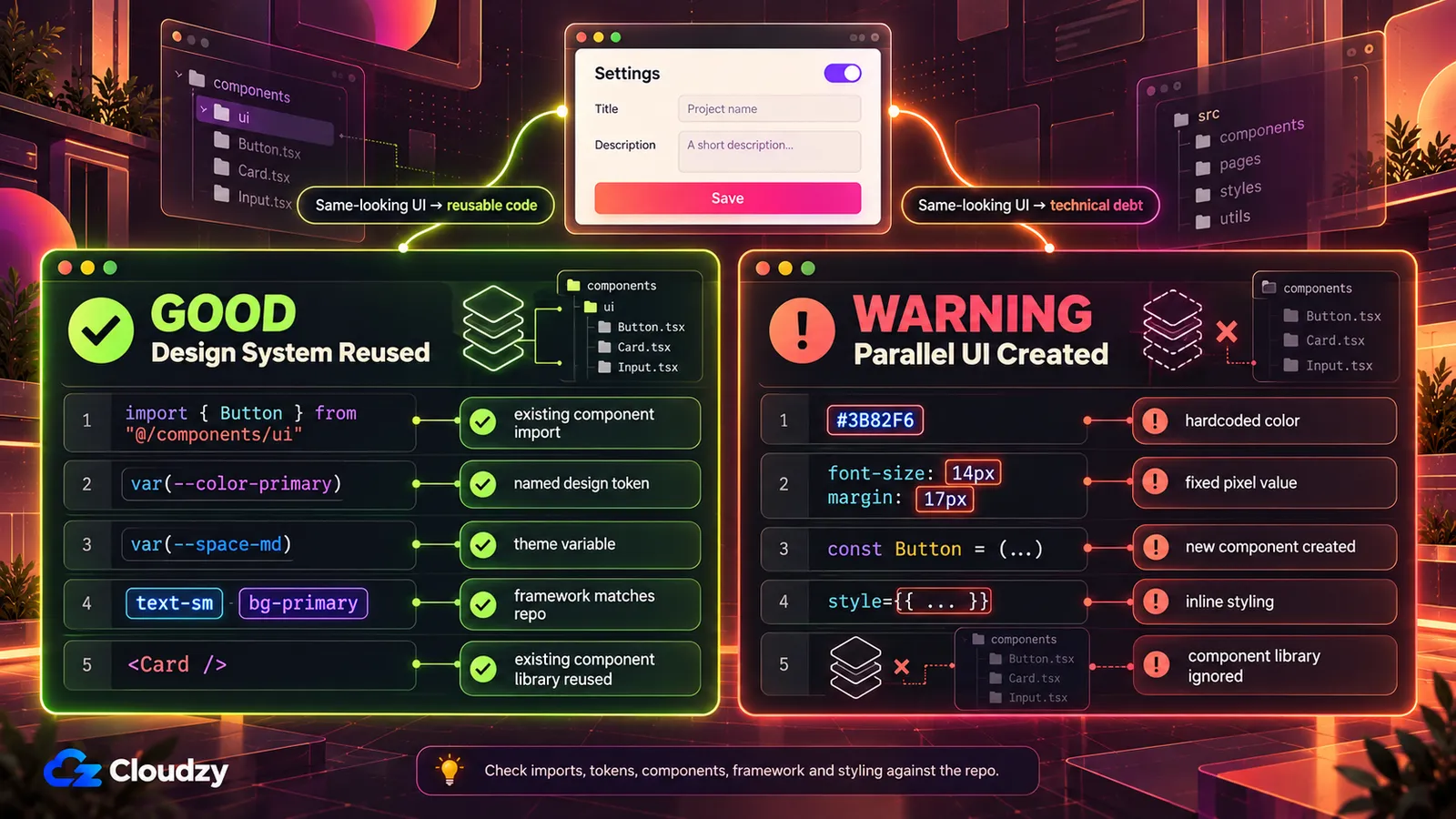
The Make user who got better results with no library selected didn't need a week of use to find the problem. It showed up in the first generated pages, which is why a single screen is enough to test any candidate:
- Pick a screen your team built from existing components, such as a settings form or a pricing card.
- Generate that screen with the tool you're considering, using the same kind of input you'd use for new work.
- Search the output for hardcoded values: raw hex colors like
#3B82F6, pixel font sizes likefont-size: 14px, and fixed spacing. Compare that against how often it uses your token names, CSS variables, or theme classes. - Check the imports. Output that declares a fresh
ButtonorCardinstead of importing yours from the component library has built a parallel UI. - Confirm the framework and styling approach match the repo. Plain HTML with inline styles is a rewrite, whatever the preview looks like.
In the 2025 Stack Overflow Developer Survey, 66% of developers named "AI solutions that are almost right, but not quite" as their biggest AI frustration. That's a finding about AI coding tools in general, not a design-to-code study, but a screen that looks correct while hardcoding every color is "almost right" in exactly that sense.
Note
Run this check before a tool is rolled out across the team. One generated screen costs a few minutes; a month of merged output with hardcoded values costs a cleanup sprint.
The check reads the code. Whether the rendered screen still matches the design is a separate question for a self-hostable tool like BackstopJS, which runs visual regression checks.
If You Have a Finished Figma File
The Figma-to-code AI tools in this group all start from the same file, and the practical difference between them is where the code ends up: on the canvas, in a hosted prototype, or in a third-party export.
Figma's Built-In Code Generation
You select a frame, component, or section in Figma Design, open the agent, and ask for HTML and CSS, React components, or a specific framework. Figma says you can point the agent at your design system so the output references your tokens, variables, and component structure instead of generic placeholders. The same page states it's available on all paid Figma plans. It is in open beta as of October 2026, so credit use and limits may change.
The output stays in the file as a thread your developers can open. There's no hosting or deploy step, which is a limitation if you wanted a running prototype and a feature if you wanted code to paste into your repo.
Figma Make
Figma Make is a separate, prompt-driven surface. Per Figma, Make outputs HTML, CSS, and JavaScript for front-end prototypes, with a built-in editor for changes. You can try it on the free Starter plan, and it supports a Supabase integration for simulating live data.
Figma's own surfaces do different jobs. Make produces a working prototype from a prompt plus a frame. The in-canvas generator turns selected frames into code using the file's library. Figma MCP lets a coding agent in your repo read components and variables directly.
Anima, Builder.io Visual Copilot, and Locofy
Builder.io's Visual Copilot lists output for React, Qwik, and Angular, plus Kotlin and Flutter for mobile, styled with Tailwind CSS or CSS Modules. For reuse, the same page names Custom Component Mapping, which ties Figma components to components in your codebase. Builder's docs now mark manual component mapping as deprecated in favor of component indexing and label it an Enterprise-plan feature, so check the current docs and your plan first.
Anima's free plan allows 5 code generations in the Figma plugin, alongside 5 chat messages per day and 5 Figma imports in its AI Playground. As of October 2026, Enterprise pricing starts at $500 a month, paid annually.
Anima also runs an MCP server, and code generated through it counts against the same code-generation allowance. Locofy is another Figma-file converter in this category.
Which Figma Converter to Start With
Start with Figma's built-in code generation if your team pays for Figma: it reads the file's library without an export step, and on a paid plan the one-screen test adds no new subscription. Switch to Builder.io Visual Copilot when you want output that imports your codebase components (check its docs for how mapping or component indexing applies to your plan), or when you want the Kotlin or Flutter mobile output it lists by name.
Use Figma Make for a clickable prototype you'll show to people. Code you plan to merge belongs in Figma's in-canvas code generation or Builder.io Visual Copilot.
If You Only Have a Screenshot
screenshot-to-code is the open-source default here: MIT-licensed, around 80,000 GitHub stars, and still receiving commits in 2026. Give it an image and it returns HTML with Tailwind or CSS, React, or Vue, among other stacks. A hosted version exists at screenshottocode.com if you'd rather not run anything.
Screenshot-to-code AI can only work with what the image shows, so the limit sits in the input. A screenshot carries no component identity, no variables, no hover or focus states, and no responsive breakpoints. Whatever comes back is a reconstruction of one static frame at one width, and every token has to be guessed from pixel colors.
screenshot-to-code is the right tool when no design file exists, such as matching a reference layout or rebuilding a legacy page nobody has a Figma file for. If a Figma file does exist, start from it instead, because the file holds the information the screenshot throws away.
If You Only Have a Prompt
With no design system to match, the trade-offs move to three other places: how the tool charges you, how much of the code you can edit, and how far the generated app can grow.
v0
v0's free plan comes with a 7-message daily limit, plus Vercel deploys, GitHub sync, and a visual Design Mode. Paid usage is billed per token, and the v0 model token rates differ across four model tiers, from v0 Mini to v0 Max Fast. The cost of a session depends on which tier you pick and how long the conversation runs.
Lovable
Lovable bills in credits. In Default Mode the cost varies with task complexity, while Plan Mode costs 1 credit per message. The free plan includes a daily grant of 5 build credits, capped at 30 a month.
One commenter in a Reddit thread comparing Bolt and Lovable wrote that Bolt gave "almost full control" over the code, while Lovable seemed to show only code diffs "with no edit-access." That's one user's report, so check the current editor before assuming it still holds.
Bolt.new and bolt.diy
Bolt.new is the hosted product. bolt.diy is its open-source counterpart, which lets you choose the LLM for each prompt from 21-plus providers, including local models through Ollama. It has no hard database requirement; Supabase is an optional integration. Check its commit history and license terms before you build on it.
Google Stitch
Google relaunched Stitch in March 2026 with an infinite canvas, voice interaction, and a design agent, according to Winbuzzer's report on the redesign. The same report says designs export to Figma format or code frameworks such as React, and that an MCP server connects Stitch to Claude Code, Gemini CLI, Cursor, and Antigravity. That puts Stitch between the prompt route and the codebase route: it starts from a prompt, but it can hand designs to an agent working in your repo.
Which Prompt Tool to Start With
In a Hacker News discussion of Lovable and Bolt, one commenter argued that with the backend outsourced to Supabase, the ceiling for building useful software with those two is "incredibly low." That commenter disclosed they were building a competing product, so read it as an informed opinion with a stake, not a measurement.
Holding a Figma file doesn't automatically rule this route out either. In the same Reddit thread about Bolt and Lovable, another commenter said they'd never pulled in Figma because it seemed "harder and more annoying than just prompting" for the design they wanted.
Pick v0 when your team deploys on Vercel and wants GitHub sync on day one. Pick Lovable when you want to plan a build in fixed-cost Plan Mode messages before spending build credits, and check its editor first if you expect to change code by hand.
Pick bolt.diy when you need to bring your own model keys or run a local model, and treat it as a prototyping tool unless its renewed activity holds up. Try Stitch when you want prompt-generated designs you can later hand to a coding agent in your repo over its MCP server.
If You Already Have a Codebase and a Design System
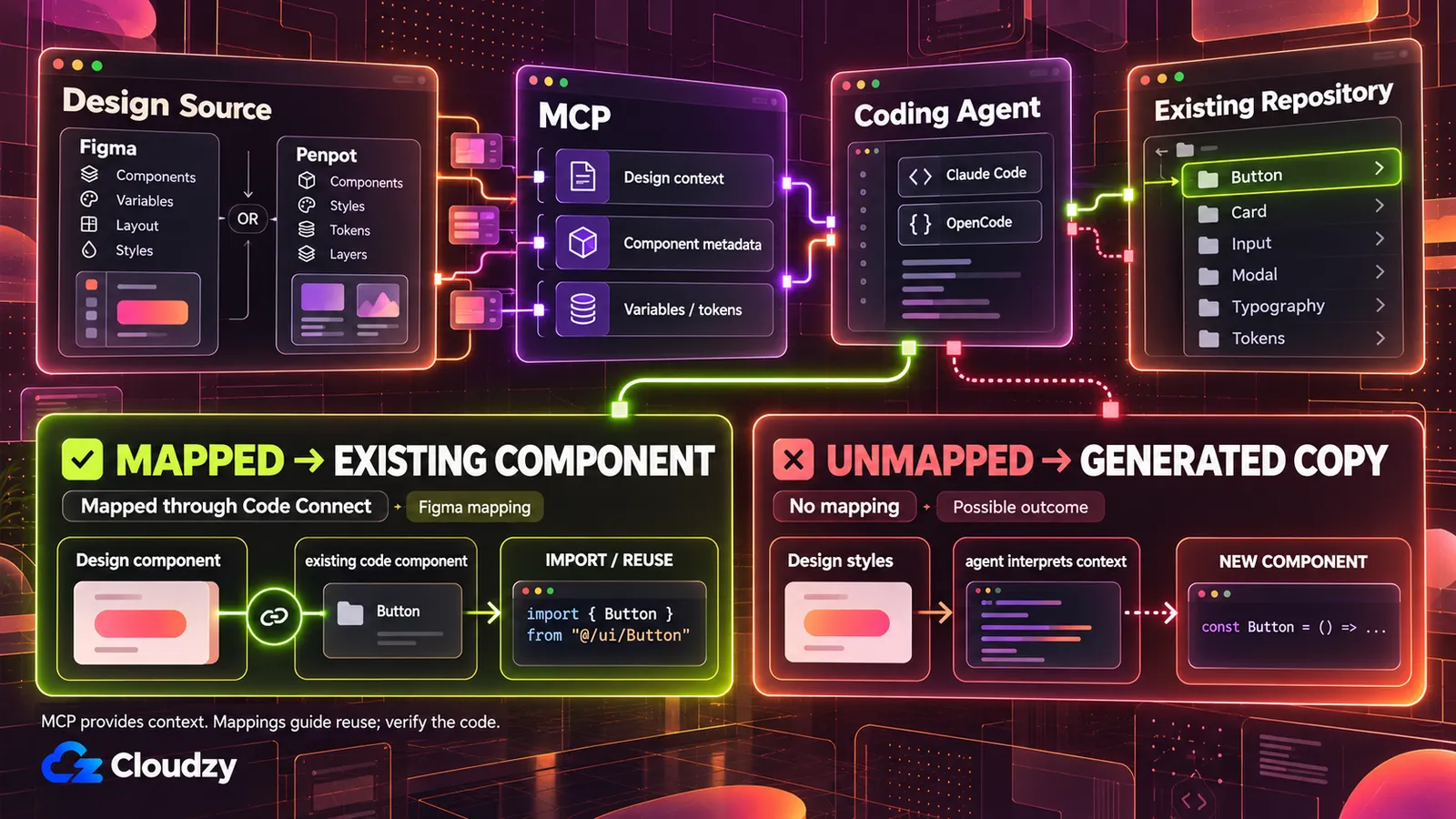
This route works inside your repo, where the agent reads the components themselves. The trade is setup work, and even then the documented mechanisms improve the odds of reuse; none of them is documented to guarantee it.
Figma MCP
According to Figma's Help Center, the Figma MCP server can generate code from selected frames after reading components, variables, layout data, FigJam content, and Make resources. It uses Code Connect to keep that code aligned with your components, and the remote server can write back to the canvas.
It comes in two versions: a remote server, which Figma recommends for most users, and a desktop server for specific organization and enterprise cases.
Mechanically, MCP gives your coding agent a structured feed of the design. When the agent inspects a frame, the server sends the frame's components, styles, and variables, and Figma's blog explains that when those elements are mapped to code via Code Connect, the agent can pull from your code resources. Without that mapping, it still gets styling context and writes the component from scratch.
The agent is your choice. Figma's setup guide is written for Claude Code, and OpenCode's MCP documentation covers both local and remote servers. Choosing Claude Code or OpenCode comes down to managed convenience versus provider control, and nothing about that choice is specific to design work.
Penpot MCP
Penpot is the open-source equivalent, and its documentation describes three key pieces: an MCP server, an MCP plugin running inside Penpot that connects your open file, and the MCP client where you write prompts. You configure it from the Integrations page of your Penpot account with a personal MCP key. Through it, an agent can read and modify components, styles, tokens, and layers.
The project's structure moved recently. The standalone penpot-mcp repository carries a notice that it was archived in February 2026, with its contents integrated into the main Penpot repository. Guides written against the old repo may describe a different setup.
Claude Design
Anthropic launched Claude Design in April 2026 as an Anthropic Labs research preview for Pro, Max, Team, and Enterprise subscribers. During onboarding, Claude builds a design system for your team by reading your codebase and design files, applies it to later projects, and packages finished designs into a handoff bundle for Claude Code.
UXPin, which sells design tooling of its own, wrote this during launch week:
"Designers who tested Claude Design this week reported wrong fonts, incorrect button colours, and inconsistent spacing within their first few sessions."
Which Codebase Setup to Start With
Use Figma MCP with a coding agent when your design system lives in Figma and you're willing to do the Code Connect mapping, since that mapping is what separates imported components from restyled copies.
Use Penpot MCP when you want an open-source design tool your agent can read and edit. Penpot itself self-hosts, but its MCP docs describe the setup through a Penpot account, so confirm the flow on your own instance before you depend on it.
Use Claude Design when your team pays for Claude and wants the least setup, and run the one-screen test before trusting its version of your design system.
Running the Open-Source Options on Your Own Server
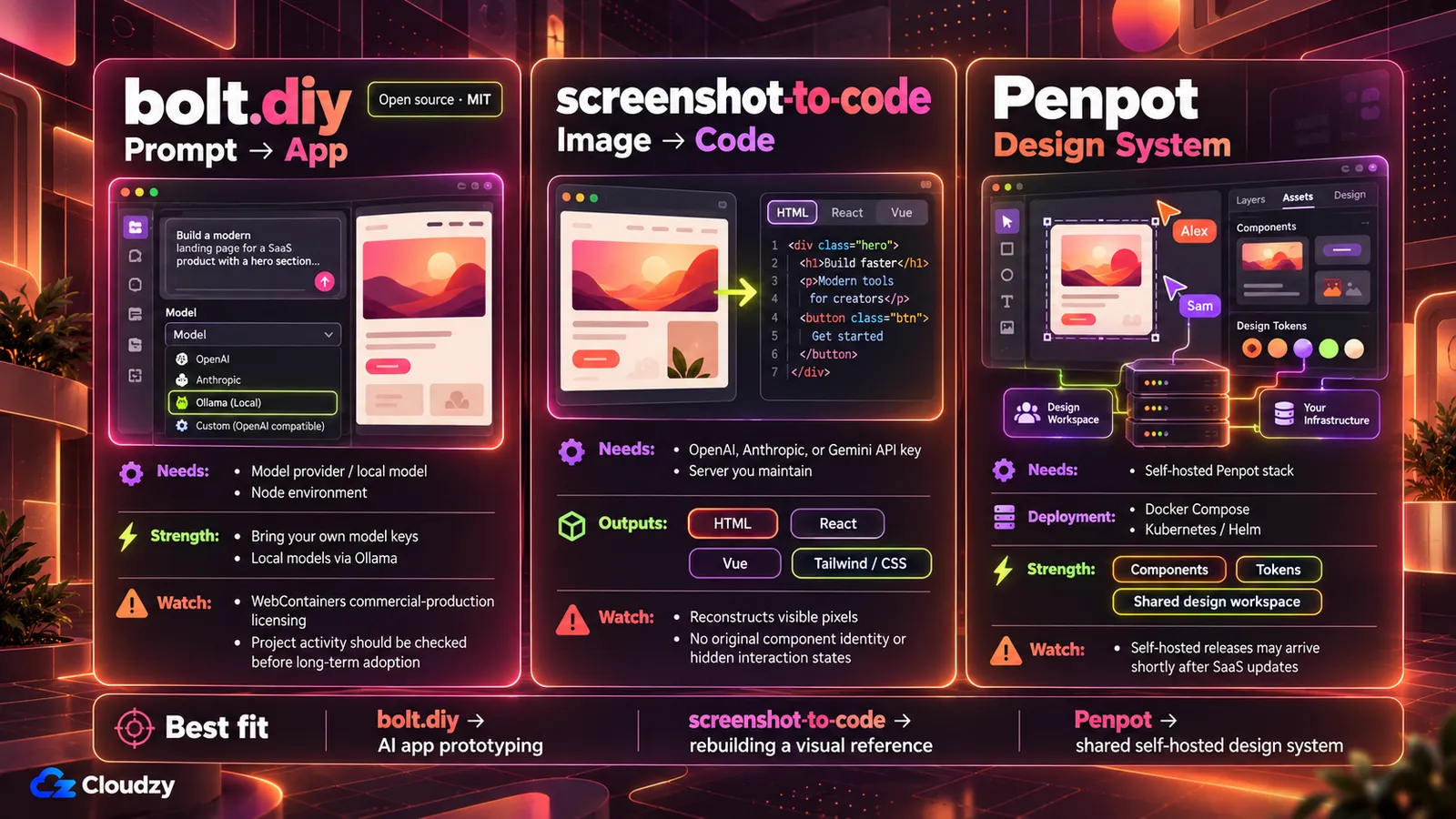
Three of these tools can run on a server you control, which trades a vendor's hosting for your maintenance and, for bolt.diy and screenshot-to-code, a credit meter for your model keys. As of October 2026, each carries a trade-off.
bolt.diy. The project went without a commit from February 7 to October 4, 2026, and its last tagged release, v1.0.0, shipped in May 2025, per the repository's commit history. The project is MIT-licensed, but it depends on the WebContainers API (the in-browser runtime that executes generated code), which requires licensing for production usage in a commercial, for-profit setting.
Prototypes and proofs of concept don't need that license. In practice, bolt.diy is reasonable for prototyping with your keys; recheck its activity before you build a product on it.
screenshot-to-code. Running it yourself needs at least one model provider key, from OpenAI, Anthropic, or Gemini, plus a server you maintain. The running cost is model usage per generation, billed by whichever provider's key you configure.
Penpot. Penpot self-hosts through Docker Compose, the official Helm chart on Kubernetes, OpenShift, or Rancher. Its docs note that self-hosted Docker images publish shortly after SaaS updates, so a new cloud feature reaches your instance with a lag.
Where to run them depends on who uses them. A laptop is fine for trying bolt.diy or screenshot-to-code solo. A server fits once a team shares a Penpot instance, or once the tools need to stay reachable while your laptop is closed.
There's no official minimum for bolt.diy, so treat around 4 GB RAM and 2 vCPU with NVMe storage as a starting point for a single Node app like it. Penpot's help center says 4 CPUs and 16 GB of RAM are sufficient to support thousands of users and that you can be conservative when allocating resources; for a small team's instance plus a coding agent on the same server, closer to 8 to 12 GB RAM is a reasonable start. If the agent will also run in a browser IDE on that machine, sizing for Code Server with Claude Code is its own calculation.
Self-hosting means you run the server, apply the updates, and keep the model keys safe. If you'd rather skip the install step, we offer one-click deployments of bolt.diy for standing up a prototyping environment and Penpot for a shared design workspace on a Linux VPS with root access. Coding agents such as Claude Code and OpenCode deploy the same way, as separate apps. The maintenance stays yours; the setup doesn't.
Frequently Asked Questions
Which Is Better, Figma Make or v0?
Your starting point decides it. Figma Make works inside Figma, takes a frame plus a prompt, and outputs HTML, CSS, and JavaScript for front-end prototypes. v0 starts from a prompt alone, deploys to Vercel, and syncs with GitHub. Choose Make when the design exists in Figma and v0 when you're starting from a description.
Can AI Convert a Screenshot Into Working Code?
Yes. The open-source screenshot-to-code project turns a screenshot into HTML, React, or Vue code using an OpenAI, Anthropic, or Gemini API key. The result is a reconstruction of one static frame, though, with no component identity, interaction states, or responsive breakpoints, so a Figma file gives better input when one exists.
Is There an Open-Source Alternative to v0, Bolt, or Lovable?
Yes. bolt.diy is the open-source counterpart of Bolt.new and the self-hostable option among the prompt-to-app tools covered here. It's MIT-licensed and works with your model keys, including local models through Ollama. Its commits paused from February to October 2026, and its WebContainers dependency needs a commercial license for production, for-profit use, so check both its activity and the license before building a product on it.
Why Does AI-Generated Code Ignore My Design System?
Many tools see your design as pixels or a flattened frame and approximate its colors, fonts, and spacing from that. Tools that read variables and component structure directly, such as Figma MCP, can import your real components when those are mapped to code through Code Connect. Without that mapping, the agent uses your styles as context and writes new components.



Discussion
Comments
Sign in to join the discussion.