

Framer bills per site. Put 20 client sites on the Pro plan and you're paying for 20 Pro plans, every month, before anyone adds an editor seat. That bill is a good reason to start pricing up Framer alternatives. It isn't the only reason to leave, though, and each reason points somewhere different.
Staying is still the right call for some sites. Take a design-led site that leans on Framer's motion and interaction work (the thing Framer does best, in my view). If it sits comfortably inside the Pro plan's 150 pages, I'd leave it where it is. Rebuilding a site that works and fits its plan buys you nothing but hours. The trouble starts when the bill, the CMS, or the lock-in stops fitting the business.
Match Your Reason to the Right Framer Alternative
The best Framer alternative depends on why you're leaving. Outgrown the CMS: Webflow, or Ghost for publications. One site that costs too much: a lower Framer plan or a cheaper hosted builder. Per-site bills across many client sites: WordPress on one VPS. Want to own the site: Webstudio's self-hosted export.
Whichever row you land on, Framer has no official code export, so moving a site means rebuilding it on the new platform. Framer's own help article on exporting confirms it.
| Reason you're leaving | Where to go | What you give up |
|---|---|---|
| The CMS outgrew the plan | Webflow for design-led sites; Ghost for publications | Still per-site pricing on Webflow; theme-based design on Ghost |
| One site costs too much | A lower Framer plan, or a cheaper hosted builder | Some motion and interaction polish |
| Per-site bills across many client sites | WordPress on one VPS | A clunkier editor, plus maintenance you now own |
| You want to own the site | Webstudio, exported and self-hosted (hand-code only if your team codes) | Static export loses dynamic features; the full JavaScript export needs the CLI and server setup |
The CMS Side Outgrew the Plan
Prices below are each vendor's listed starting prices as of September 2026, on yearly billing where offered. They change often, so check the linked pricing pages before you quote a client.
Picture a client's resource library: case studies, guides, webinars, authors, categories, and a changelog. That's six collections already, and the Pro plan includes 10 collections and 2,500 CMS items.
You can buy your way past that. Framer sells extra collections from $40 per 10 and extra items from $20 per 10,000. With add-ons, a Pro site can reach up to 40,000 CMS items and 40 collections. Do the sums first. Say you stretch one Pro site to 40 collections and 22,500 items, roughly what Webflow's Premium plan includes. At those listed rates, that adds at least $160 a month, on top of the plan itself.
Webflow's Premium site plan starts at $25 a month billed yearly. Its pricing table puts 20,000 CMS items and 40 collections inside that price. The catch: Webflow charges per site too, so it fixes the CMS problem, not the portfolio problem. You're also learning a new editor from scratch. Webflow leans on its built-in tutorials and Webflow University to get you there.
Some sites stopped being marketing sites a while ago. They're publications. A blog with a newsletter and a members area belongs on a publishing tool, and that's where Ghost(Pro) fits. Ghost(Pro)'s Publisher plan starts at $29 a month billed yearly for up to 1,000 members. The price climbs as your audience grows. It's also the first tier that allows custom themes. You design with themes and Ghost's design settings, so canvas-style layout work stays behind on Framer.
Quick Verdict: If Framer's CMS limits are pushing you out, move a growing design-led site to Webflow's Premium plan. The CMS allowance comes with the plan price. If the site's main job is publishing posts and sending emails, Ghost(Pro) wins. You stop paying a design tool to act as a newsletter platform.
One Site, Similar Polish, a Smaller Bill
Check the plan you're on before rebuilding anything. Framer's Basic plan starts at $10 a month on yearly billing, with a custom domain, 30 pages, and 2 CMS collections. If your site fits in that, the cheaper Framer alternative is sitting inside Framer, and you keep all the motion work.
If it doesn't fit, the hosted builders are the next stop. Squarespace and Wix both cover multi-page small-business sites without you touching a server. Wix says its plan prices vary by location, so look up the price in your currency. For a single-page site, Carrd Pro starts at $9 a year (yes, a year). If you need a custom domain, Pro Standard starts at $19 a year.
Will anyone miss Framer's scroll and interaction effects? On a five-page local business site, I doubt many visitors will. On a portfolio or a product launch where motion is the point, they will.
Quick Verdict: If one Framer site costs more than it's worth and has outgrown Basic, rebuild it on Squarespace or Wix. For a single page, Carrd is enough. That holds as long as the site doesn't lean on animation. Still fits Basic? Drop a plan instead (the cheapest migration is the one you don't do).
Per-Site Bills Are Stacking Up Across Client Sites
A Framer alternative for agencies has one job: stop your costs climbing with every client you sign. Three things decide whether a move does that. The Framer bill at your portfolio size, what one server changes (and what it doesn't), and the order you move sites in. Get the order right and no client gets a mid-contract price shock.
What the Framer Bill Looks Like at 5 and 20 Sites

Framer's paid plans are bought per site. I'd price client business sites on Pro, since that's the tier with site redirects and a staging environment. On yearly billing, it adds up like this:
| Portfolio | Pro plans per month (from) | Per year (from) |
|---|---|---|
| Five client sites | $150 | $1,800 |
| Twenty client sites | $600 | $7,200 |
Then come seats. An additional editor starts at $20 a month, and a content editor who only updates the CMS starts at $10. Framer's pricing page bills editors per seat. (Framer's pricing table also says Pro Experts get free editor access on client projects, so see if that covers you before counting seats.)
One agency owner's estimate is uglier. In an r/framer thread on the price changes, the poster has about 15 clients on Framer. They expected those clients' costs to rise "something like 400%" as growing sites moved off legacy plans. That's the poster's own estimate, and it was about a Scale plan that Framer's pricing page no longer lists. One reply pointed out that Webflow had raised its prices that year too. Its advice: staying on grandfathered plans for another year might cost clients less than a rebuild.
Currency makes it worse. In a thread about Framer squeezing agency margins, the poster works outside the US and Europe. Their explanation: with a weak local currency, a per-site fee becomes a deal-breaker for local clients. Should you absorb that cost? The top-voted reply said no. The monthly fee is the client's business overhead, because "You are the builder, not the hosting provider."
What One Server Replaces, and What It Doesn't
Can one server replace 20 Pro plans? On infrastructure cost, usually. On effort, no. Swap them for one server and the per-site Framer hosting line becomes one server bill. That bill stays relatively flat until you need more resources.
WordPress on a VPS (a rented server with root access, where you install and run the software yourself) can host many client sites at once. Ghost can sit alongside it for clients whose sites are mostly blogs.
For sizing, a handful of low-traffic marketing sites fits roughly in the 4 to 8 GB RAM range. Size up as client count and traffic grow. A single WordPress landing page needs less than that. That's why one server stretches so far.
The new cost structure has three parts:
- The server, priced by its resources rather than by how many sites it runs.
- A page-builder licence, if you use one to get closer to Framer's design workflow. Confirm how many sites each licence covers.
- Your hours, which are the easiest thing to leave off the quote.
For a team that doesn't code, the editor is the downgrade I'd worry about most. In an r/framer thread on switching platforms, one commenter said flatly that "WordPress will never be the way to go." They also wrote: "If you leave framer you leave freedom." Even the price-change commenter who called WordPress the cheapest option rated its UI the worst of the lot.
Then there's the ownership shift. Framer handled hosting for you. On your own server, WordPress core and plugin updates, backups, security, and uptime for every client site are your job. That top-voted advice flips here: self-host, and you are the hosting provider. I'm not a sysadmin, so this is the part I'd be most careful promising a client. Know what running an unmanaged server involves before you sign anyone up.
Skip this path if you've only got a few client sites, if your team won't take on updates and backups, or if clients hired you for Framer-level motion. Shared WordPress hosting is cheaper again, and it's the route the agency-margins poster sketched out. You get less control than on your own server, though. There's also a point where shared hosting stops being enough.
If you do go this way, our WordPress VPS gives you a self-managed server with a one-click LAMP image. You still run the WordPress setup wizard yourself, and any VPS will run it.

Launch a faster WordPress VPS with instant deployment.
Get WordPress VPSMoving a Portfolio Without Surprising Clients
Don't migrate 20 sites in one month. Here's the order I'd use:
- Put new clients on the new stack from day one. No price change to explain.
- Move existing sites at renewal or at their next redesign, when a new stack and a new price are part of the same conversation.
- Keep the most design-heavy, highest-paying sites on Framer longest, as long as their fees cover the plan.
Pro Tip
Pull every client's contract renewal date into one list before you pick an order. That list is your migration schedule.
Quick Verdict: Past a handful of client sites, one server can cut infrastructure costs if you'll own the maintenance. If you won't, putting clients on their own Framer subscriptions keeps those hosting costs out of your margin without forcing a rebuild.
You Want a Site You Can Take With You
Every hosted route so far keeps your live site on someone else's platform. The exits below trade some of Framer's convenience for a copy you control. They differ a lot in how much control you get, and in how much work it takes.
Webflow's Export and Hand-Coding
Webflow does let you leave with your code, with conditions. Webflow's pricing page says you can export your site and host it anywhere on any paid Workspace plan. CMS content isn't included in the code export; you export Collections separately as CSV. Webflow's native form processing and site search also stop working on the exported site. That's a one-way snapshot: less lock-in than Framer, but still some.
A hand-coded or static site is the cleanest exit of all. It's plain files you can host anywhere, often built with a static site generator like Hugo. It's only an exit if someone on your team writes code. One r/framer poster went back to hand-coding small client pages because of Framer's pricing. The first reply came from someone who "knows zero code and all design." Not everyone can switch to code, they pointed out.
Third-party tools also claim to convert a published Framer site into code. I wouldn't build a client portfolio on one without testing what it keeps and what it breaks.
Webstudio: Build Hosted, Host the Export Yourself
Want a self-hosted website builder that's still visual? Several commenters in the r/framer pricing and switching threads above landed on Webstudio. Webstudio is an open-source visual builder, licensed AGPL-3.0-or-later, and its GitHub page pitches it as a Webflow alternative.
There's a split to understand first. Webstudio's self-hosting docs say self-hosting the Builder in production "is more difficult and currently not recommended." The sites you build are different: the docs say you can self-host those for production. So you design in Webstudio's hosted Builder, export the project, and host the exported site yourself.
The export comes in two flavours, from two different places:
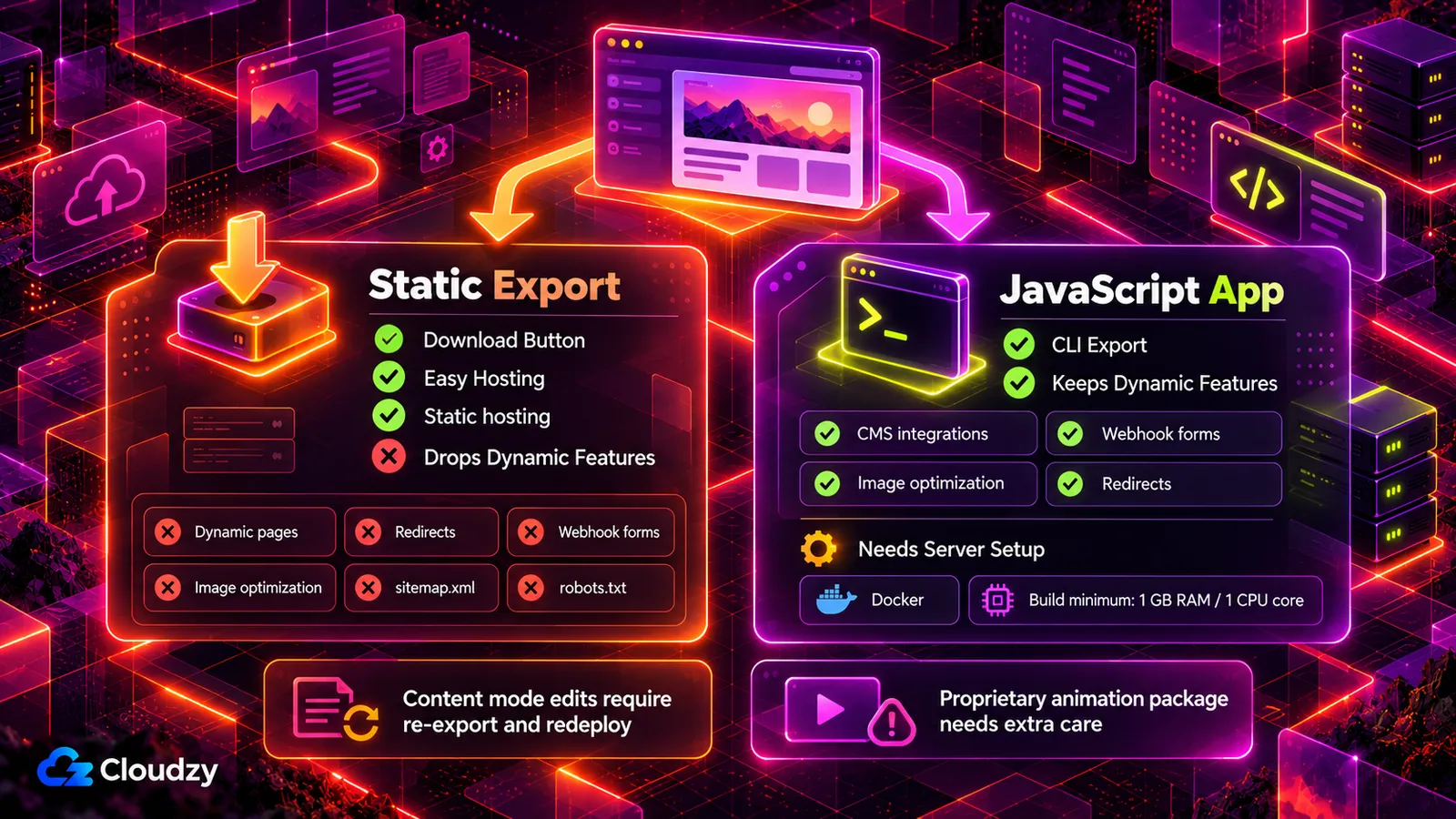
- Static site: what the Download button in the Builder gives you. It runs on any static host, but drops dynamic pages, redirects, webhook forms, image optimization, sitemap.xml, and robots.txt.
- JavaScript app: only available through the Webstudio CLI, a command-line tool. It keeps CMS integrations, webhook forms, image optimization, and redirects, but needs hosting that runs server code. Webstudio ships a Dockerfile for it, a build recipe for Docker (software that packages an app so it runs the same on any server). The Docker build needs at least 1 GB of memory and 1 CPU core.
The JavaScript app is where a VPS comes in. Docker runs the site, and Coolify (a self-hosted dashboard that deploys and manages those containers) gives you a web interface for running it. The export itself still happens on the command line, and I'd tell a non-coding team that upfront.
Before you commit, check three more things. Clients can edit text and images in Webstudio's Content mode, inside blocks you've set up in the hosted Builder. Sending a client a Content-mode share link takes Webstudio's Pro tier, per the docs, so factor the tier into the quote. Content-mode changes also have to be published before they go live. And the self-hosting docs say an exported project is deployed independently of the Builder. My read: edits made in Content mode won't reach a self-hosted copy until someone exports and redeploys.
Motion is the second check. Webstudio's optional animation components package is proprietary and needs a separate licence agreement, which matters for motion-heavy sites. The third is the docs. In an r/selfhosted thread asking for open-source Framer alternatives, one commenter went looking for an installer or Docker image. They called the documentation "very confusing and incomplete."
Quick Verdict: If owning the site is why you're leaving Framer, pick Webstudio's self-hosted export. For the full JavaScript export, someone still has to handle the CLI and server deployment; the static download is easier, but it drops dynamic features.
The WordPress portfolio route and a Dockerized Webstudio export end the same way: a server you now have to keep running. Our Linux VPS gives you root access with a 99.95% uptime SLA. That takes the hardware side of the job off your plate. The Coolify VPS installs Coolify in one click, ready to run that export.

Build on a Linux VPS with root access, NVMe, and AMD EPYC power.
View Linux PlansFrequently Asked Questions
Can You Export Code From a Framer Site?
Not officially. Framer has no built-in code export, so moving a site to another host means rebuilding it on the new platform. Third-party converter tools exist, but they aren't Framer products.
Is There an Open-Source Framer Alternative?
Yes: Webstudio, an open-source (AGPL) visual builder you can use to build a site, export it, and host the result yourself. Webstudio's Builder is open-source too, but its documentation currently doesn't recommend self-hosting the Builder in production.
Is There a Free Framer Alternative?
Framer's free plan is one option, with one catch. Free Framer projects get 10 CMS collections and 1,000 pages, but you need a paid plan to connect a custom domain. Webflow's free Starter plan is much tighter: a webflow.io domain, 2 static pages, and 50 CMS items. Open-source software like WordPress or Webstudio costs nothing to use, but hosting the site still costs money.


Discussion
Comments
Sign in to join the discussion.