
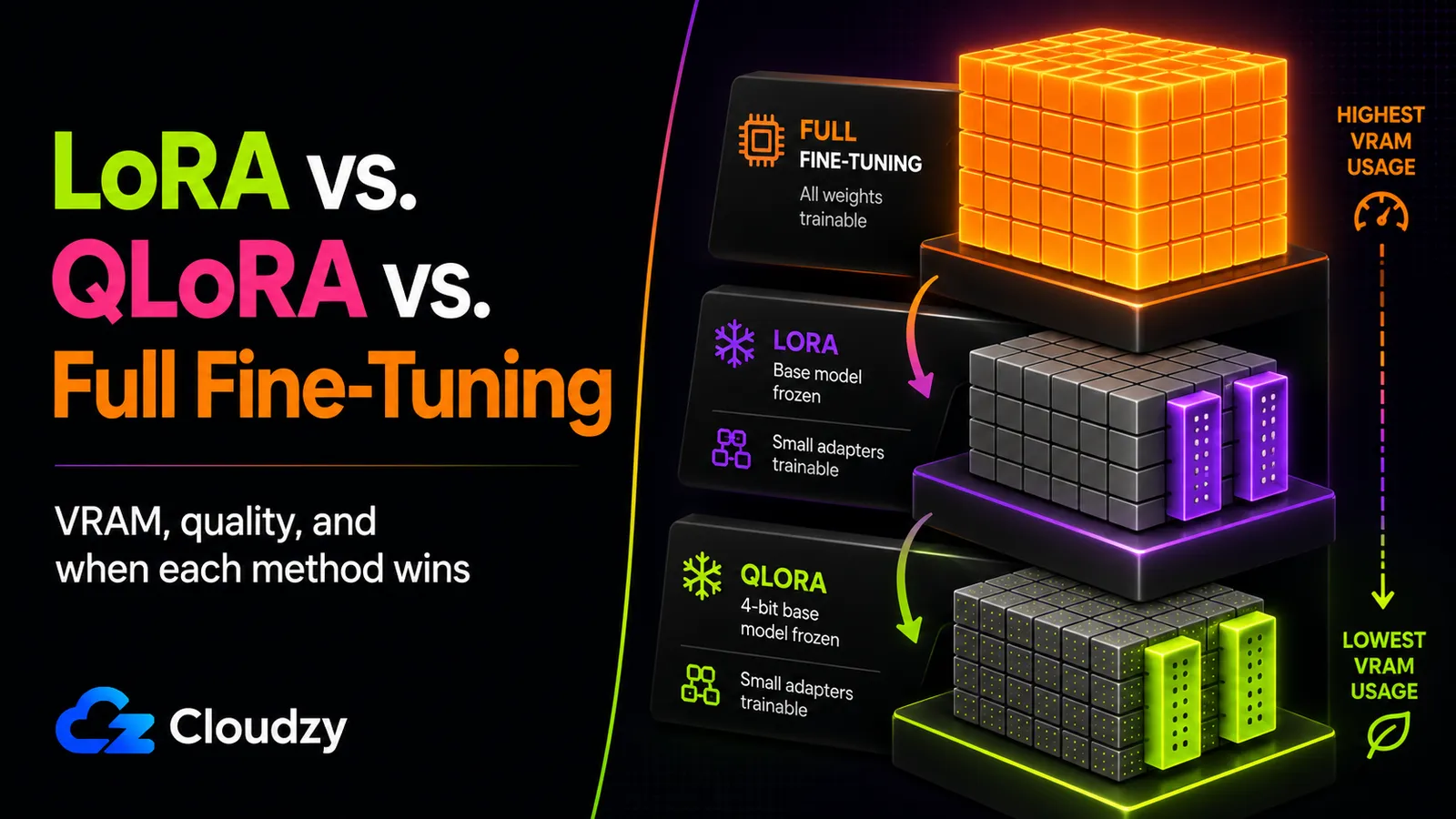
You've decided to fine-tune a 7B model on your own data. Then you hit the first real fork: three method names, each with a different answer attached. Unsloth's docs say start with QLoRA. Axolotl says it depends on your hardware. Half the blog posts you've skimmed say "use LoRA for most things" and move on. Meanwhile you're staring at a single GPU, not sure it can even run one of them.
This is the decision that sits upstream of everything else. The method you pick sets your VRAM budget, the VRAM budget picks your hardware, and the hardware picks your cost. Get the method wrong and you either burn money on GPU memory you didn't need or you spend a weekend chasing out-of-memory crashes on a card that was never going to fit the job.
So let's settle it. Here's what actually differs between LoRA, QLoRA, and full fine-tuning, what each one costs you in memory and quality, and a rule for routing your own case to one of them.
The Short Version
- The default is QLoRA. For most single-GPU fine-tuning, start with QLoRA. Axolotl's table puts a 7-8B QLoRA run at roughly 10-14 GB of VRAM, assuming short context and small micro-batches. That fits many 12-24 GB consumer or prosumer cards, but not every low-VRAM card. Reach for plain LoRA when you have memory to spare and want faster steps; reserve full fine-tuning for the rare cases that need it.
- The VRAM gap is large. Fine-tuning a 7B model takes roughly 60-80 GB for full fine-tuning, 16-24 GB for LoRA, and 10-14 GB for QLoRA, per Axolotl's published figures. That spread is the whole reason the parameter-efficient methods exist.
- Quality loss is task-dependent, not flat. On most instruction-following and structured-output tasks, LoRA and QLoRA land within a few percent of full fine-tuning. The gap widens on complex reasoning like math. That's where full fine-tuning still earns its cost.
- Full fine-tuning is the exception, not the baseline. You climb to it for large distribution shifts, pre-training-scale changes, or reasoning-critical tasks where benchmarks show the gap, not as the safe default.
What This Guide Doesn't Cover
This is a method-selection guide, not an implementation walkthrough. A few things are deliberately out of scope:
- LoRA variants (DoRA, VeRA, LoRA+). The three core methods are the decision that matters first; the variants are refinements you reach for later.
- Step-by-step code. No install commands or training scripts here. That's a separate hands-on walkthrough, not covered here.
- Multi-GPU training (FSDP, DeepSpeed ZeRO) and dataset preparation: both are large topics on their own.
- RLHF, DPO, and preference optimization. These are a different objective class from supervised fine-tuning.
- Whether you should fine-tune at all. If you're not sure fine-tuning is the right tool versus retrieval, that comparison deserves its own answer before you pick a method here.
What Actually Differs Between LoRA, QLoRA, and Full Fine-Tuning?
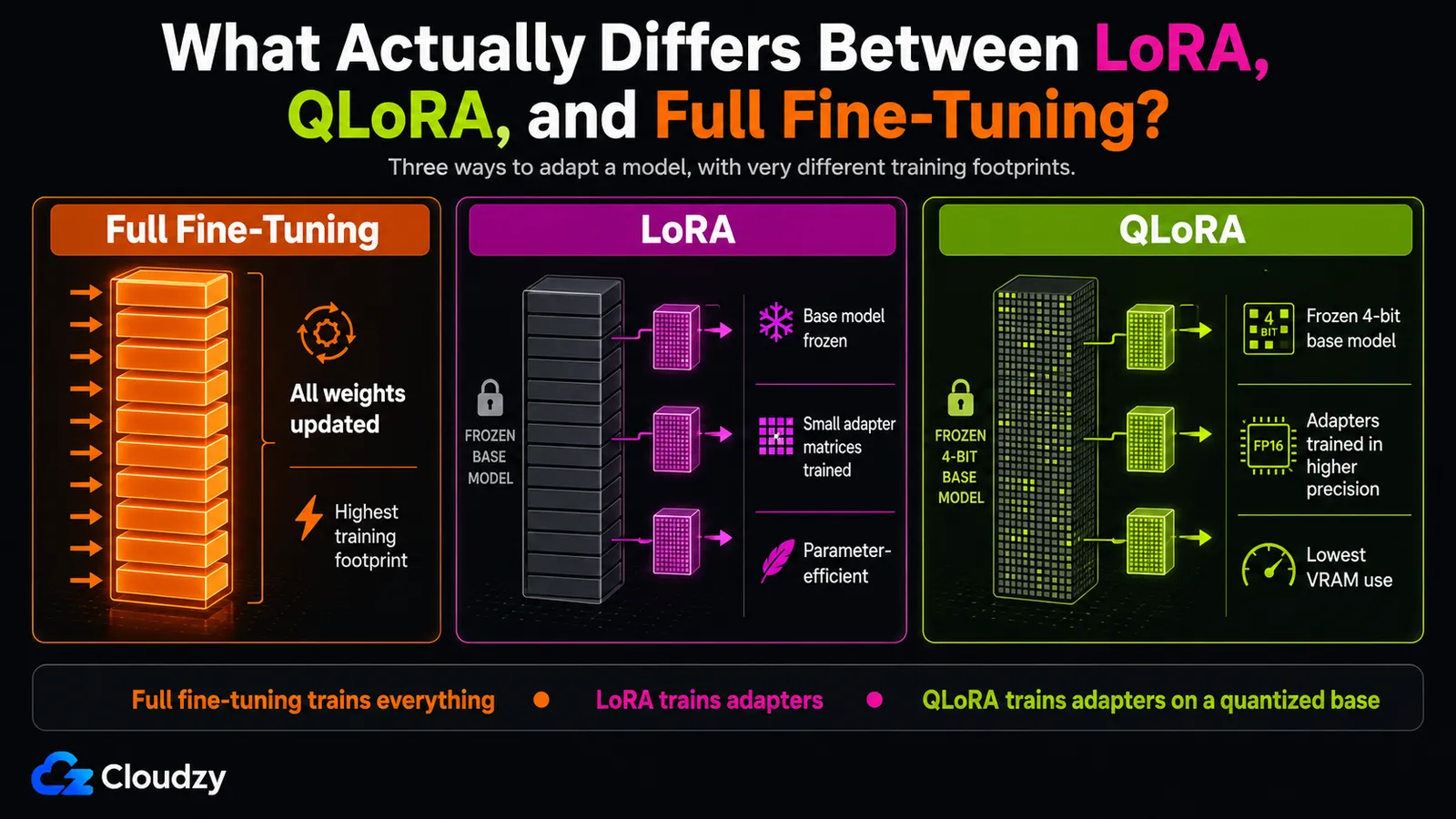
Full fine-tuning updates every parameter in the model. LoRA freezes the base model and trains small low-rank adapter matrices instead (roughly 0.1-2% of the parameter count). QLoRA adds one more move on top of LoRA: it quantizes the frozen base model down to 4-bit precision (using a data type called NF4, NormalFloat) so the base takes far less memory to hold while you train the adapters.
The cleanest way to hold the three in your head is as a ladder, each rung removing one cost from the one below it.
Full fine-tuning is the bottom rung, and the heaviest. Every weight is trainable, so the optimizer has to track a gradient and optimizer state for every parameter in the model. That's where the memory goes, and we'll get to the math in the next section.
LoRA (Low-Rank Adaptation) freezes the original weights and injects small trainable matrices into the model's layers. Only those matrices learn; the base model is along for the ride. The LoRA paper reports this cuts trainable parameters by up to 10,000x for a 175B model and reduces GPU memory roughly 3x at that scale, while performing "on-par or better than fine-tuning in model quality" on the models the authors tested. Because so few parameters change, the trained result is tiny. Hugging Face's PEFT blog gives two useful reference points: a 40 GB full checkpoint for bigscience/mt0-xxl, and a separate LoRA example where the saved adapter is only 19 MB. The point is still the same: PEFT checkpoints are usually tiny compared with full model checkpoints.
QLoRA takes LoRA and shrinks the part that LoRA left untouched: the frozen base. Quantizing those weights to 4-bit NF4 means the base model occupies a fraction of the memory it would at 16-bit, with the adapters still training at full precision on top. The QLoRA paper describes NF4 as "information theoretically optimal for normally distributed weights," which is a precise way of saying the 4-bit representation is chosen to match how model weights are actually distributed, so you lose less than a naive 4-bit rounding would cost you.
That's the entire conceptual stack: full fine-tuning trains everything, LoRA freezes the base and trains adapters, QLoRA compresses the frozen base and trains adapters. Everything else (VRAM, quality, when to use which) follows from those three choices.
How Much VRAM Does Each Method Need?
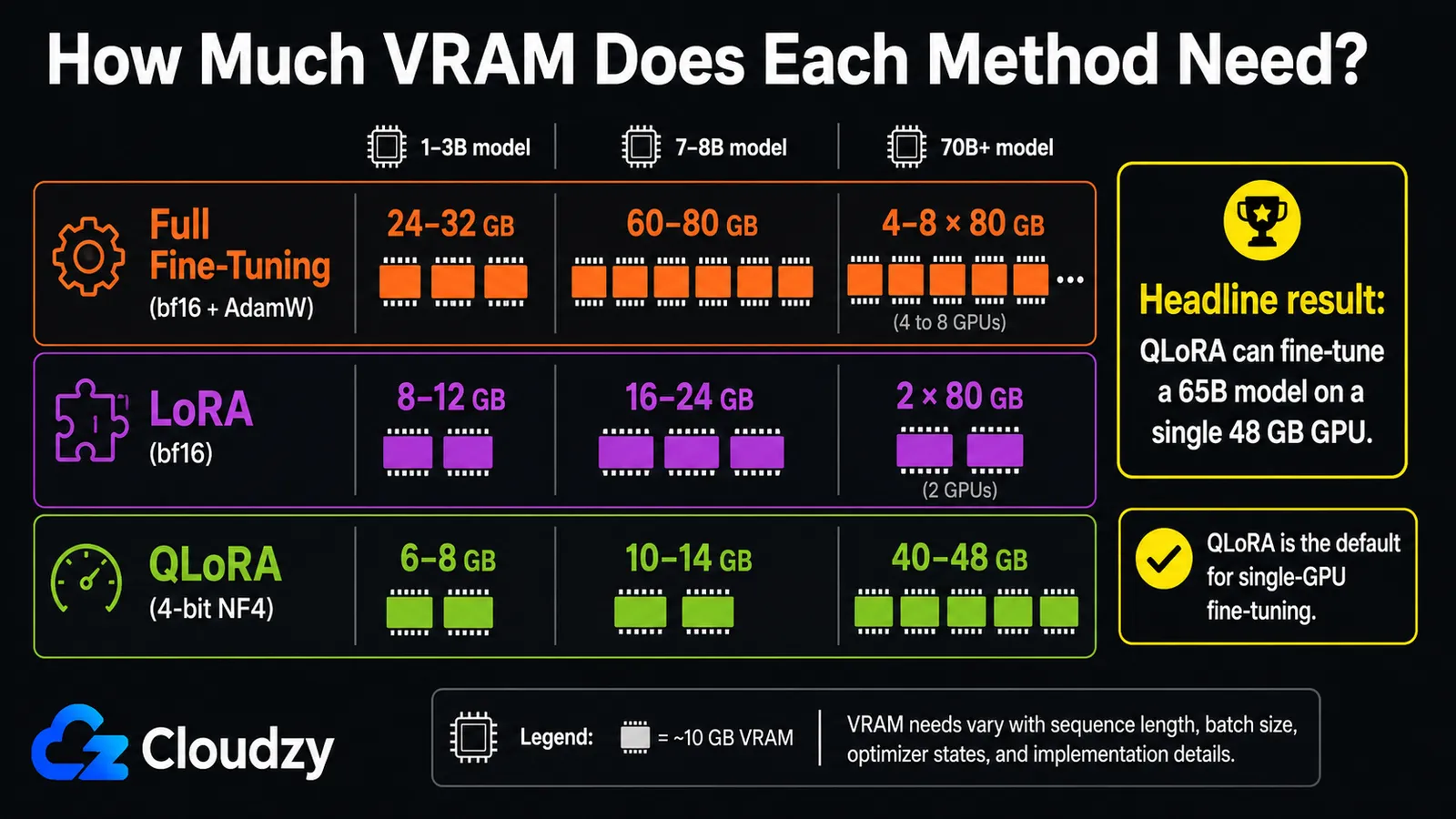
For a 7B model, the rough numbers are about 60-80 GB for full fine-tuning, 16-24 GB for LoRA, and 10-14 GB for QLoRA, according to Axolotl's published table. The practical consequence: QLoRA commonly fits many single 12-24 GB consumer or prosumer GPUs under short-context, small-batch settings, while full fine-tuning of a 7B model needs data-center memory or a multi-GPU setup.
Why is full fine-tuning so heavy? Short math. When you train every parameter, the GPU holds three things per parameter: the weight itself, its gradient, and the optimizer state (Adam-style optimizers keep two extra values per weight). That's why the memory bill runs several times the size of the model alone. LoRA freezes the base, so it pays that gradient-and-optimizer tax only on the tiny adapter matrices. QLoRA additionally stores the frozen base at 4-bit instead of 16-bit, cutting the largest remaining cost.
Here's how the three methods compare across model sizes, drawn from Axolotl's documentation plus the QLoRA paper for the large-model figures:
| Method | 1-3B model | 7-8B model | 70B+ model |
|---|---|---|---|
| Full fine-tuning (bf16 + AdamW) | 24-32 GB | 60-80 GB | 4-8x 80 GB |
| LoRA (bf16) | 8-12 GB | 16-24 GB | 2x 80 GB |
| QLoRA (4-bit NF4) | 6-8 GB | 10-14 GB | 40-48 GB |
Sources: Axolotl docs for all three methods across model sizes; the QLoRA paper independently reports fine-tuning a 65B model on a single 48 GB GPU "while preserving full 16-bit finetuning task performance," which lines up with the 70B QLoRA figure. Hugging Face's 4-bit quantization blog separately shows a 13B model trained on a single 16 GB T4 and a 33B model on a 24 GB GPU with QLoRA. Those are useful waypoints if your target sits between the table's rows.
The single number worth memorizing: a 65B model on one 48 GB card. That's the headline QLoRA result, and it reframes what "I only have one GPU" means.
Section takeaway: the VRAM hierarchy is full >> LoRA > QLoRA, and the jump from full to QLoRA is large enough to move a job from a multi-GPU rack to a single card.
Does LoRA or QLoRA Actually Cost You Quality?
For most instruction-following and structured-output tasks, LoRA and QLoRA land within a few percent of full fine-tuning. The gap widens on complex reasoning (math especially), where full fine-tuning still pulls clearly ahead. So the answer isn't "near-equivalent" or "worse." It's task-dependent, and the task type tells you which side of that line you're on.
The clearest task-by-task evidence comes from a September 2023 Anyscale study on Llama 2. On ViGGO, a structured functional-representation task, LoRA reached roughly 95% of full fine-tuning's accuracy on 7B and 13B models: a 2% gap the authors treated as an acceptable trade. On SQL generation, LoRA nearly matched full fine-tuning, and the LoRA 13B model actually beat the full fine-tuned 7B. On GSM8k, a math-reasoning benchmark, LoRA consistently underperformed full fine-tuning on 7B and 13B, with the gap narrowing only at 70B. The Anyscale team's read is that LoRA's low-rank approximation may not capture a skill as intricate as multi-step math.
One caveat on those numbers: that study ran on Llama 2 in September 2023. The task-type pattern (structured output close, complex reasoning further apart) is the durable takeaway and has held up in spirit since. But the exact percentages may differ on a newer base model like Llama 3 or Mistral, so treat the figures as the shape of the trade-off, not a guarantee for your model.
QLoRA's quality story is its own. The QLoRA paper reports that Guanaco, its 65B model trained with QLoRA, reached 99.3% of ChatGPT's performance on the Vicuna benchmark. Strong, but bound to that specific benchmark and that 2023 comparison, not a general "QLoRA equals ChatGPT" claim. Against plain LoRA, Axolotl characterizes QLoRA as carrying a "slight degradation due to quantization noise": the 4-bit base introduces small errors that LoRA's full-precision base doesn't. For most work this is invisible; for a task sensitive to small precision shifts, it's the kind of thing worth checking rather than assuming.
Pro Tip
The most common quality surprise isn't QLoRA-versus-LoRA. It's a fine-tuned model that comes out worse than the base model you started from. It usually means the training did something you didn't intend: too aggressive on a narrow dataset, or evaluated only on the new task while general capability quietly regressed. Always test the fine-tuned model on a few prompts outside your training distribution before you trust it. A regression there is the signal to dial back, not ship.
Section takeaway: quality parity is task-dependent. Structured output and instruction-following are safe for LoRA/QLoRA; complex reasoning is where full fine-tuning still earns its cost.
When Should You Pick Each Method?
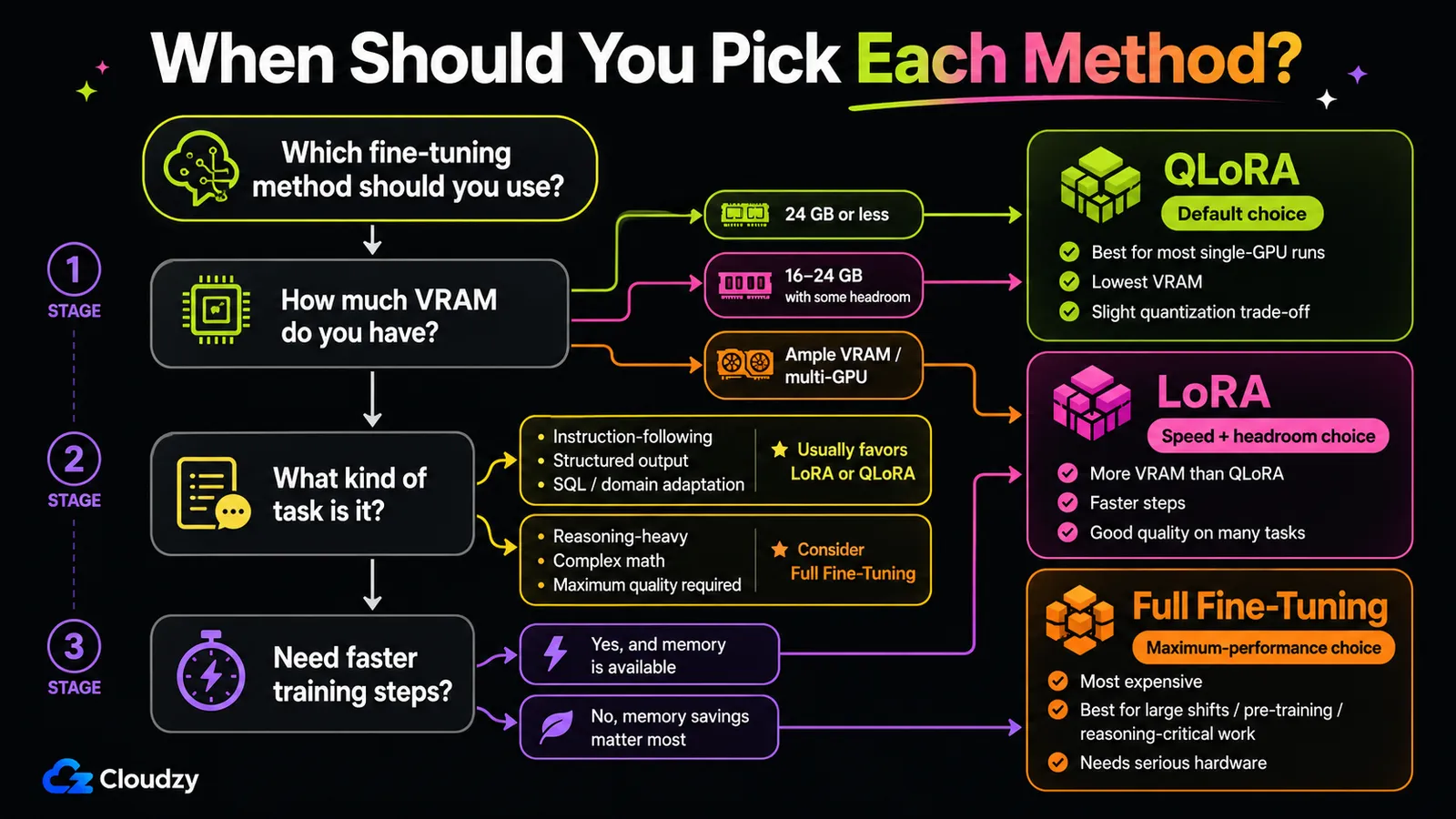
Start with QLoRA for most single-GPU fine-tuning. Move up to plain LoRA when you have the VRAM headroom and want faster steps or a slightly higher quality ceiling. Reserve full fine-tuning for the cases that genuinely need it: large distribution shifts, pre-training-scale changes, or reasoning-critical tasks where the benchmark gap is real. Route by three inputs, in order: VRAM available, task type and quality requirement, then speed.
Here's the routing as "do this, not that":
1. Check your VRAM first. If you're on a single card with 24 GB or less (most consumer and prosumer GPUs), QLoRA is your method by default, because it's the only one of the three that reliably fits a 7B model in that envelope. Don't reach for full fine-tuning on a single consumer card; the table above tells you it won't fit a 7B job, and you'll spend the weekend learning that the hard way.
2. Then check your task and quality bar. If your task is instruction-following, structured output, SQL, or general domain adaptation, the Anyscale evidence says LoRA and QLoRA give you near-full quality. Stay on the default. If your task is reasoning-heavy (multi-step math, complex logical chains) and quality is non-negotiable, that's your first real reason to consider climbing to full fine-tuning, because that's the one task type where benchmarks show a consistent gap.
3. Then weigh speed. QLoRA trades some per-step speed for its memory savings: the 4-bit base has to be dequantized on the fly. If you have the VRAM to run plain LoRA (16-24 GB for a 7B), you get faster steps and skip the quantization noise, which makes LoRA the better pick when memory isn't the binding constraint and you're iterating a lot.
When is full fine-tuning the right answer? Axolotl's guidance is direct: it's required for pre-training, and it's the choice "when you have ample GPU memory or multi-GPU setups, and need maximum performance." Outside those conditions (and for the large majority of practitioner fine-tuning, which is adapting an existing model to a specific behavior or domain), the parameter-efficient methods give you most of the quality for a fraction of the hardware.
Unsloth puts the default plainly:
"We recommend starting with QLoRA, as it is one of the most accessible and effective methods for training models."
That's the rule. Default to QLoRA, climb to LoRA for speed when you have the memory, climb to full fine-tuning only when the task or the scale forces it.
Section takeaway: QLoRA is the default; LoRA is the speed-and-headroom upgrade; full fine-tuning is the exception you justify with a distribution shift, pre-training, or a reasoning benchmark.
What Do People Get Wrong About Fine-Tuning Methods?
Two misconceptions cause most of the wasted weekends. The first is treating fine-tuning as a way to teach a model new facts, when its primary effect is shaping behavior. The second is assuming you can buy quality by turning a knob: that a higher LoRA rank, or full fine-tuning over QLoRA, automatically buys you a better model. Both are half-true, which is exactly why they mislead.
Does Fine-Tuning Teach a Model New Facts?
This one has a genuine expert divide, so it's worth getting the nuance right rather than picking a side. Several practitioner guides call "fine-tuning teaches new facts" the number-one misconception: their point is that fine-tuning is far better at shaping how a model responds than at reliably injecting specific facts it never saw in pre-training. Unsloth's docs push back directly, calling the claim that fine-tuning can't teach new knowledge "false," and describing fine-tuning as a way to "inject and learn new domain-specific information."
Both are partly right, and the reconciling read is this: fine-tuning is reliable at shaping behavior and reinforcing knowledge that's already latent in the base model, and it can encode domain-specific patterns. What it's unreliable at is implanting discrete facts that were entirely absent from pre-training. The more your goal looks like "memorize this specific document," the more likely you're reaching for the wrong tool, and retrieval may serve you better. So the practical guidance survives the disagreement: lean on fine-tuning for behavior and style, be skeptical of it as a fact-injection mechanism.
Does a Higher LoRA Rank Always Improve Quality?
No, and this is the easiest knob to over-turn. The intuition is that a higher rank gives the adapter more capacity, so more must be better. Databricks tested this empirically and found that doubling the rank "does not seemingly result in any perceivable increase in output quality." What moved the needle in their experiments was which layers they targeted (adapting all linear layers rather than just the attention blocks) not cranking the rank number. The takeaway worth drawing: spend your tuning effort on target modules and data quality before you spend it inflating rank.
Is LoRA Quality Always Equal to Full Fine-Tuning?
Not universally, and a recent research paper pins down a specific failure mode. "LoRA vs Full Fine-tuning: An Illusion of Equivalence" by Shuttleworth et al. finds that LoRA training can introduce "intruder dimensions" (high-ranking singular vectors absent in fully fine-tuned models) and links them to forgetting in continual-learning scenarios, where the same model is fine-tuned repeatedly. This is a specific caveat rather than a blanket refutation: if you're doing one round of fine-tuning for one task, the broad quality-parity evidence still holds. If you're chaining fine-tunes and care about preserving the base model's general ability, this is the failure mode to watch.
Frequently Asked Questions
What Is the Difference Between LoRA, QLoRA, and Full Fine-Tuning?
Full fine-tuning updates every parameter in the model. LoRA freezes the base model and trains small low-rank adapter matrices instead, roughly 0.1-2% of the parameters. QLoRA does what LoRA does and also quantizes the frozen base model to 4-bit NF4 precision, so the base takes much less memory to hold while the adapters train. The result is a clear memory ladder: full fine-tuning is heaviest, LoRA is lighter, QLoRA is lightest.
How Much VRAM Do I Need to Fine-Tune a 7B Model?
For a 7B model, Axolotl's figures put full fine-tuning at roughly 60-80 GB, LoRA at 16-24 GB, and QLoRA at 10-14 GB. QLoRA is the only one of the three that commonly fits many single 12-24 GB consumer or prosumer GPUs; full fine-tuning of a 7B model needs data-center-class memory or multiple GPUs.
Is QLoRA Quality Worse Than LoRA or Full Fine-Tuning?
It depends on the task. For most instruction-following and structured-output work, QLoRA lands within a few percent of full fine-tuning, and Axolotl describes only a "slight degradation due to quantization noise" versus plain LoRA. The gap widens on complex reasoning tasks like math, where full fine-tuning showed a consistent advantage in a 2023 Anyscale study on Llama 2.
When Is Full Fine-Tuning Actually Worth It?
Full fine-tuning is worth its cost for pre-training, large distribution shifts, and reasoning-critical tasks where benchmarks show a real quality gap. It's also the path when you have ample GPU memory or a multi-GPU setup and need maximum quality. For the common case (adapting an existing model to a specific behavior or domain), LoRA or QLoRA gives you most of the quality at a fraction of the hardware.
Does Fine-Tuning Teach a Model New Facts?
Partly. Fine-tuning is reliable at shaping behavior and reinforcing knowledge already latent in the base model, and it can encode domain-specific patterns. It's unreliable at implanting discrete facts that were entirely absent from pre-training. There's a genuine expert disagreement here. Unsloth's docs argue fine-tuning can teach new knowledge, while other guides call this the top misconception, and the reconciling view is to use fine-tuning for behavior and style, and reach for retrieval when the goal is recalling specific facts.
Where This Leaves You
The method choice comes down to one default and two escape hatches: start with QLoRA, climb to LoRA when memory isn't the constraint and you want faster steps, climb to full fine-tuning only when a distribution shift, pre-training, or a reasoning benchmark forces it.
With the method settled, the next decision is the hardware it implies. Your method choice just told you whether you're shopping for a single consumer card or data-center memory. If you want to compare specific cards for AI workloads, our H100 vs RTX 4090 benchmark covers that ground. Sizing the GPU for the method you picked, and a step-by-step walkthrough for running the training job itself, are their own separate guides.
Discussion
Comments
Sign in to join the discussion.