
The best free firewall for a Linux VPS is not one tool. It is a host firewall (the layer every server needs) and, if you run a web app, a web application firewall on top. This guide covers both, names the strongest free or open-source firewall options for each layer, and states what each one costs you in RAM and setup effort. It is scoped to Linux VPS operators. It is not a Windows roundup.
The Short Version
- "Best free firewall" means four different products: Linux host firewalls, network firewall distros, web application firewalls (WAFs), and Windows consumer tools. Only the first and third belong on a VPS.
- On the host layer, use the simplest tool that fits your distro: UFW on Ubuntu, firewalld on RHEL-family, and either UFW or direct nftables on Debian depending on how much control you need. Modern frontend tools generally sit on nftables, but nftables itself is the default and recommended framework on Debian.
- A WAF is a separate, complementary layer for web apps. It is not a replacement for the host firewall.
- SafeLine is the lightest free WAF (1 GB RAM). BunkerWeb is the most full-featured but wants 8 GB. Haltdos Community is a third free option with a web UI.
What This Guide Skips
A few firewall categories that show up in other "best free firewall" lists do not apply here, and naming them once saves you from chasing the wrong tool.
- Windows and consumer endpoint firewalls (ZoneAlarm, Comodo, TinyWall). Wrong operating system, wrong machine.
- Paid commercial and enterprise firewalls (Cisco ASA, Palo Alto, Fortinet). Out of the "free" scope.
- Cloud WAF SaaS (Cloudflare, Sucuri). Valid, but DNS/proxy-based and outside this self-hosted VPS scope. Cloudflare does offer a free baseline WAF ruleset, while fuller managed-rule and OWASP ruleset coverage depends on plan.
- Running pfSense or OPNsense as a gateway on a shared VPS. Architecturally unsuitable without NIC passthrough. Explained in the network-distro section.
What "Best Free Firewall" Actually Means (Four Categories)
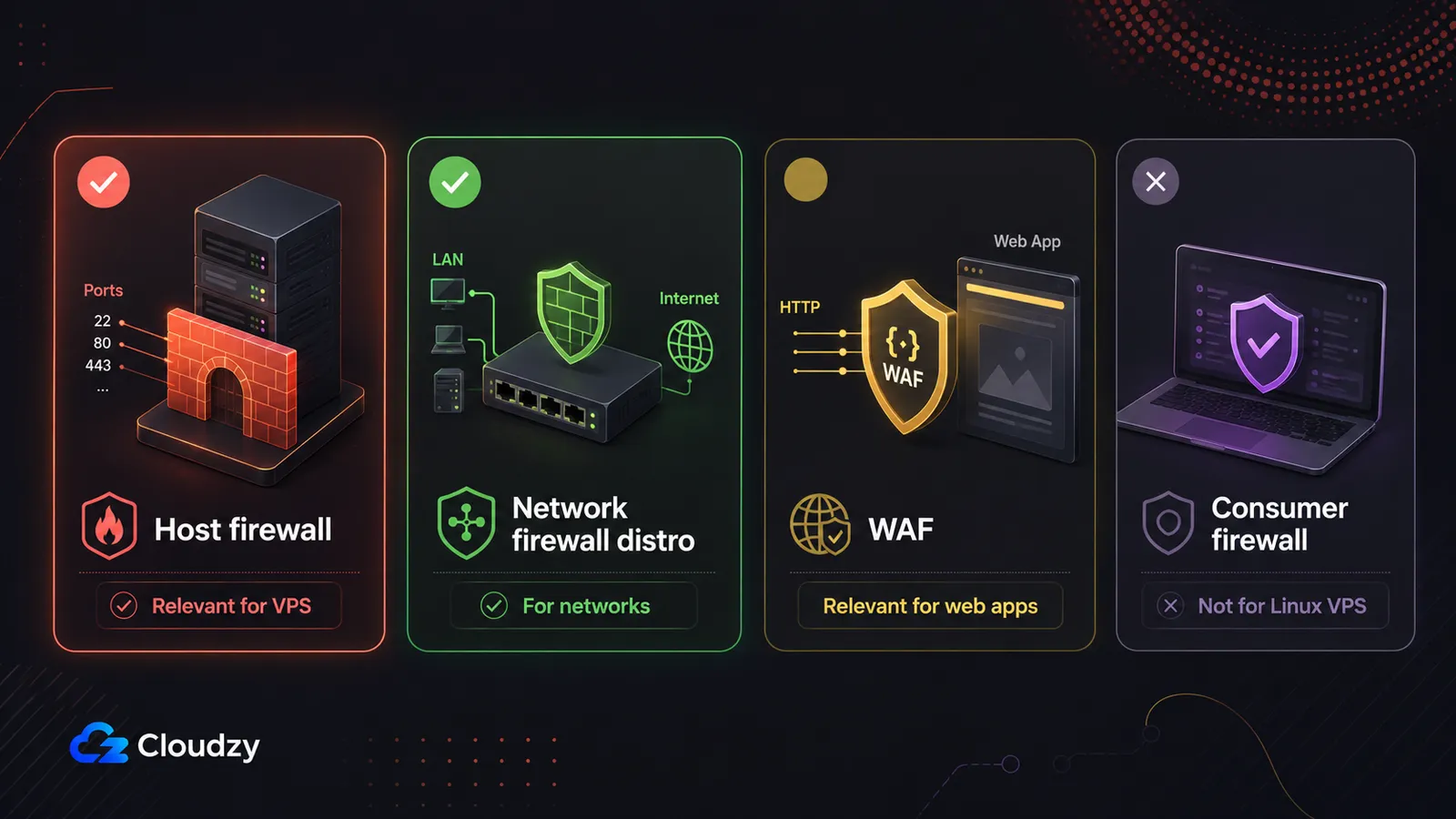
The reason the search term sends you in circles is that it covers four products that solve four different problems on four different machines. Sort yourself into a category first, then pick a tool.
- Linux host/VPS firewalls: software that runs on the same machine as your services and controls which ports are reachable. UFW, firewalld, and nftables. This is the layer every VPS needs.
- Network firewall distros: full operating systems built around a firewall engine, deployed on a dedicated machine or VM to protect a whole network. OPNsense, pfSense, IPFire. These are for a homelab or an office LAN, not for the VPS you are trying to protect.
- Web application firewalls (WAFs): reverse proxies that inspect HTTP traffic for web-layer attacks such as SQL injection, XSS, and the rest of the OWASP Top 10. SafeLine, BunkerWeb, Haltdos, ModSecurity. These are for a web app or API running on your VPS.
- Consumer/Windows endpoint firewalls: desktop software that controls per-application internet access on Windows. Named here only to exclude it.
For a VPS, categories 1 and 3 are the ones you run. Category 2 runs on a different machine. Category 4 runs on a different operating system. The right free or open-source firewall option for your situation is whichever tool in category 1, and possibly category 3, fits your distro and your traffic.
Quick verdict: For most VPS operators, use UFW for the host, and add SafeLine if you run a web app and want a WAF without standing up an 8 GB server.
Section key takeaway: On a VPS you are choosing among host firewalls and WAFs. Network distros and consumer tools are different products for different machines.
Host Firewalls: UFW vs nftables vs firewalld
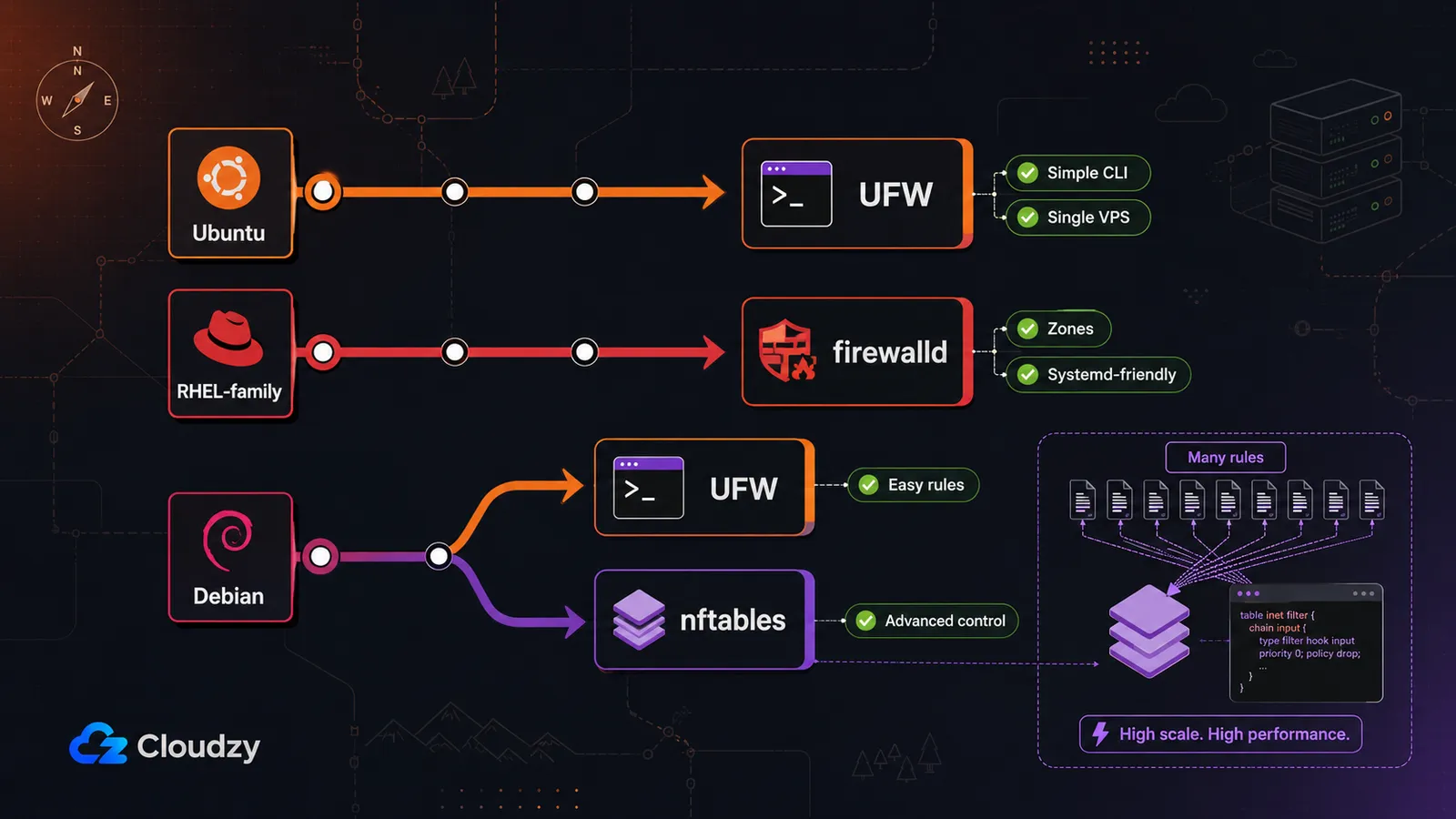
The host firewall is the one layer you always need. It controls which ports on your server accept connections, and on a fresh VPS it is the difference between a locked-down box and an open one. On Ubuntu, that firewall is usually UFW. On RHEL-family distros, it is firewalld. On Debian, UFW is a simple host-firewall frontend, but Debian's default and recommended firewalling framework is nftables.
The three options split cleanly by distro and by how much control you need:
| Tool | Distro default | Interface | Best for | Complexity |
|---|---|---|---|---|
| UFW | Ubuntu, common simple option on Debian | CLI | A single VPS, the common case | Low |
| firewalld | RHEL, CentOS, AlmaLinux, Rocky | CLI (zone-based) + systemd | RHEL-family servers, zone-based rules | Medium |
| nftables | The engine under both | Config file / CLI | Thousands of rules, fine-grained control, high throughput | High |
UFW is Ubuntu's default firewall configuration tool and a common simple choice on Debian, but Debian's default firewalling framework is nftables. For one VPS, UFW is still the easiest starting point when you only need a small set of allow/deny rules. The CLI is the simplest of the three, rules persist automatically across reboots, and a few commands cover everything most VPS operators need. Its limit is advanced rules: complex set-based logic or fine-grained matching is awkward in UFW.
firewalld is the default on RHEL, CentOS, AlmaLinux, and Rocky. It is zone-based, integrates with systemd, and is more capable than UFW for segmenting traffic by interface or trust level. That power costs setup time. If you are on an RHEL-family VPS, firewalld is already there and is the path of least resistance.
nftables is the kernel-level engine that sits underneath both. You use it directly when you genuinely need its rule scale or speed: thousands of rules, high-performance filtering, or control that a frontend does not expose. According to Better Stack's UFW vs nftables comparison, nftables runs 10 to 100 times faster than iptables once thousands of rules are present. That figure is nftables versus iptables, not UFW versus iptables. For a typical VPS with a handful of allow rules, you will not feel that difference, and the steeper learning curve and lack of a friendly UI are not worth paying. There is also a security angle to keep in view: nftables has had real kernel bugs, including CVE-2025-40206, so keep your kernel patched. That is a reason to stay current, not a reason to avoid the backend you are already running.
If you want the how-to for UFW rules, the Cloudzy UFW command guide covers the commands step by step. This section is about choosing the tool, not writing the rules.
Pro tip: "iptables is deprecated" does not mean you have work to do. nftables replaced iptables as the kernel backend, and UFW and firewalld already sit on nftables on modern distros. Your existing UFW rules do not need rewriting; the frontend command is the same, only the engine underneath changed. If you are coming from raw iptables and want to understand the transition, the Cloudzy iptables rules reference still applies, since the rules you wrote map onto the new backend.
Section key takeaway: Use your distro's normal path: UFW on Ubuntu, firewalld on RHEL-family, and UFW or direct nftables on Debian depending on how much control you need. Reach for nftables directly only when you genuinely need its rule scale or speed.
Network Firewall Distros: Where OPNsense and pfSense Fit (and Why Not on Your VPS)
OPNsense, pfSense, and IPFire are full operating systems for a dedicated machine or VM that protects an entire network. They are not something you run on the VPS you are trying to protect. They are worth knowing because the search results will put them in front of you, so here is where they fit and where they do not.
When you would actually want one: a homelab or a small-office LAN, on dedicated hardware or a VM with NIC passthrough, sitting between your network and the internet. Whether you are protecting a rack of office machines or a personal lab you expose to the internet, this is the category that does the job.
Why it is the wrong tool on a shared VPS: these distros expect to control the traffic between multiple network interfaces. On a shared VPS that means NIC passthrough, which most providers do not expose. Without it you are running a network-gateway OS on a machine that has no network to gate. If you have a single VPS, this whole category is the wrong layer, and UFW plus a WAF is the right one.
The three free options as of 2026, in brief:
- OPNsense (BSD-licensed, current stable CE series: 26.1, with 26.1.11 released July 1, 2026). Fully open source, frequently updated, and not split into the same CE/Plus model as pfSense. That makes it the cleaner free network-appliance pick for many users who want a fully open-source firewall distro without feature-tier confusion.
- pfSense Community Edition (current CE release: 2.8.1, released September 2025). Still free and open source, with a larger documentation and community library than OPNsense. The catch is the CE/Plus split: pfSense CE remains the free community product, while pfSense Plus is the separate commercial path for Netgate appliances, cloud deployments, and third-party hardware. For current Plus terms, check Netgate's pfSense Plus page rather than trusting a number from a comparison post.
- IPFire (latest 2.29 Core Update 202, per the IPFire release blog). A lighter footprint than the other two, with a smaller community. A reasonable pick when you want a leaner appliance and do not need OPNsense's plugin breadth.
These summaries are based on current documentation and release notes. Test any network firewall distro in a VM before relying on it for a real network.
Section key takeaway: If you have a network to protect and a spare machine, OPNsense is the free pick in 2026. If you have a single VPS, this whole category is the wrong layer.
Web Application Firewalls: SafeLine vs BunkerWeb vs Haltdos
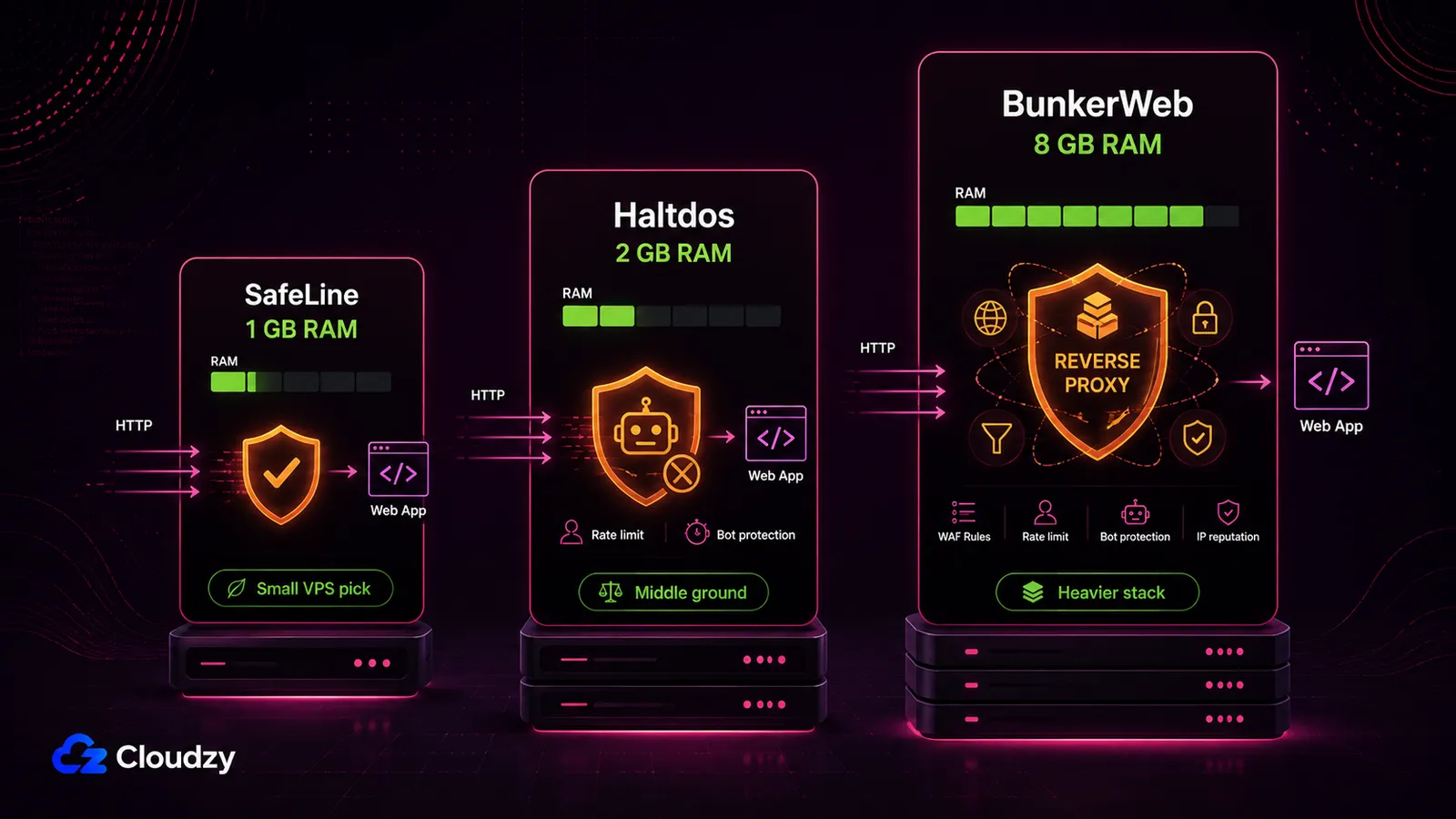
A host firewall controls which ports are open. A WAF does something different: it inspects HTTP traffic for web-layer attacks like SQL injection, XSS, and the rest of the OWASP Top 10, which a port-based firewall cannot see. If you run a web app or an API on your VPS, a WAF is a second, complementary layer. It is not a replacement for the host firewall; the two sit at different points in the stack.
For VPS deployments, start with the resource footprint. The WAF that fits your RAM budget is usually the one you can actually keep running.
| WAF | RAM floor | License | Deployment | Management UI |
|---|---|---|---|---|
| SafeLine | 1 GB | GPL-3.0 license | Docker | Web UI |
| BunkerWeb | 8 GB | AGPLv3 | Docker (NGINX reverse proxy) | Web UI |
| Haltdos Community | 2 GB | Free community edition | VM, Docker, or hardware | Web UI |
SafeLine is the lightest entry point. Its GitHub repository identifies it as a self-hosted WAF/reverse proxy under a GPL-3.0 license. Third-party installation coverage lists its minimum as 1 CPU core, 1 GB RAM, and 5 GB of disk, with Docker 20.10.14 or newer and Docker Compose 2.0.0 or newer. SafeLine uses semantic analysis rather than only relying on a traditional rule list, but its published detection-rate numbers should be treated as project/vendor-provided claims rather than independent benchmark results. On resources alone, SafeLine is still the small-VPS pick.
BunkerWeb is the most full-featured and the heaviest. It is an NGINX-based reverse-proxy WAF under AGPLv3, built on ModSecurity with the OWASP Core Rule Set. The cost is RAM. BunkerWeb's own documentation lists 2 vCPUs and 8 GB of RAM as the minimum recommended specification, and 4 vCPUs with 16 GB for production with many services.
Haltdos Community is the third free option. Its community edition page lists OWASP Top 10 coverage, DDoS and bot protection, rate limiting, built-in rules, and a web-based management GUI. Its documentation lists 2 GB RAM, 60 GB disk, and at least 2 vCPU as minimum requirements, with deployment support for VM, Docker, or hardware.
SafeLine, BunkerWeb, and Haltdos are all available as one-click deployments in the Cloudzy marketplace, and they also run on any VPS by hand. Whether you are protecting a customer-facing API or a personal service you expose to the internet, the layer is the same; the choice is mostly about how much RAM you are willing to give it.
Section key takeaway: A WAF is a separate layer from your host firewall. SafeLine is the lightest free option; BunkerWeb is the most full-featured but needs a much bigger server.
If you have decided a WAF belongs on your server, the deployment step is where the marketplace can save time. SafeLine and BunkerWeb both run in Docker, which usually means a Compose file, reverse-proxy configuration, and first-run debugging. Cloudzy's marketplace options for SafeLine, BunkerWeb, and Haltdos can skip the initial install step, but you still need to configure upstream routing, DNS, TLS, false-positive handling, and host firewall rules. The host firewall layer itself is lightweight and usually available from the distro packages; make sure it is installed, configured, and enabled before exposing services. Size the plan to the WAF: 1 GB is fine for SafeLine, but BunkerWeb's 8 GB floor means a larger instance. You can deploy a WAF on a Cloudzy Linux VPS and run your host firewall on the same box.
One Docker caveat: if your app or WAF runs in Docker, do not assume UFW alone controls every published container port. Docker creates its own firewall rules by default, so bind backend containers to localhost or private Docker networks where possible, and only expose the WAF-facing ports you actually intend to publish.
Do You Need Both a Host Firewall and a WAF?
Yes, if you run a public web app, they protect different layers. The host firewall (UFW or firewalld) controls which ports are open and is the baseline for every VPS. A WAF inspects the HTTP traffic flowing through those open ports for application-layer attacks. The WAF does not replace the host firewall; it sits behind it.
The host firewall is non-negotiable. Every VPS needs it, web app or not, because it is what stops the rest of the internet from reaching services you never meant to expose. The WAF is conditional. Add it when you serve HTTP or HTTPS traffic that could be attacked at the application layer: a public API, a CMS, anything that takes user input over the web. A static site or an internal-only service behind a VPN may not need a WAF at all; in that case the host firewall alone is the right answer, and adding a WAF is overhead you do not need. Match the layers to what you actually run, not to a checklist.
Section key takeaway: Host firewall is the baseline for every VPS. Add a WAF when you expose a web app to the internet.
Frequently Asked Questions
Is iptables Deprecated on Linux?
In effect, yes. nftables replaced iptables as the kernel packet-filtering backend on modern Linux. But this is a backend change, not a call to action. UFW and firewalld already sit on nftables on current distros, and your existing UFW rules do not need rewriting. The frontend commands are unchanged; only the engine underneath them moved.
Is pfSense Still Free in 2026?
Yes. pfSense Community Edition, currently 2.8.1, is free and open source. The catch is the CE/Plus split: pfSense CE remains the free community product, while pfSense Plus is the separate commercial path for Netgate appliances, cloud deployments, and third-party hardware. For the current Plus terms and any subscription cost, check Netgate's pfSense Plus page rather than relying on a figure from a third-party comparison.
Can I Run pfSense or OPNsense on a VPS?
Technically possible, but architecturally unsuitable on a shared VPS. These are network-gateway operating systems that expect to control traffic between multiple network interfaces, which needs NIC passthrough that most VPS providers do not expose. On a single VPS, what you actually want is a host firewall (UFW or firewalld) and, for web apps, a WAF.
Do I Need a WAF if I Already Have a Firewall on My Linux Server?
They protect different layers, so it depends on what you run. A host firewall controls which ports are open; a WAF inspects the HTTP traffic flowing through them for web-layer attacks like SQL injection and XSS. If you serve a public web app or API, add a WAF on top of the host firewall. If you run only a static site or an internal service, the host firewall alone is enough.
What Is the Best Free WAF for a Small Linux VPS?
SafeLine is the lightest free option, with a 1 GB RAM minimum running in Docker, which fits a small VPS. BunkerWeb is more full-featured but needs 8 GB of RAM, so it is not a small-server deployment. Haltdos Community is a third free option with a web UI; check its documentation for current resource requirements before sizing your server.



Discussion
Comments
Sign in to join the discussion.