
Your app runs. You started the dev server, opened http://localhost:3000, and it does what it's supposed to do. Then someone asks for a link, and you find out that the URL on your screen means nothing to anybody but you.
There are three ways to give a localhost app a public URL without a VPS, plus one faster option when the other person is on your local network, and choosing between them isn't a tool question. It's a question of how long the thing has to stay reachable, and whether it can run somewhere other than your laptop. Below is each path, the command that gets a URL, and the exact thing that'll make that URL stop working.
TL;DR
- Someone on your Wi-Fi needs to see it: bind the dev server to all network interfaces and hand over your LAN IP. Ready in seconds, dead the moment your visitor leaves your network.
- You need a link anyone can open, for the next hour: run a tunnel (
cloudflared, ngrok, localtunnel, localhost.run). Public HTTPS URL in about a minute, no router changes, and it dies with the process that started it. - It has to stay up while your laptop is closed: push the app to a free hosting tier. That decouples the app from your laptop and introduces new rules about credit cards, commercial use, and whether your data survives a restart.
- Your app needs no server code at request time: build it and put the static output on a static host. It can stay online without your laptop and has no app process to wake up, as long as the host's account and usage limits still fit.
- One default worth knowing:
next devandpython -m http.serveralready listen on every network interface with no flag. If you assumed your dev server was private to your laptop, it isn't.
Which Path Fits Your App
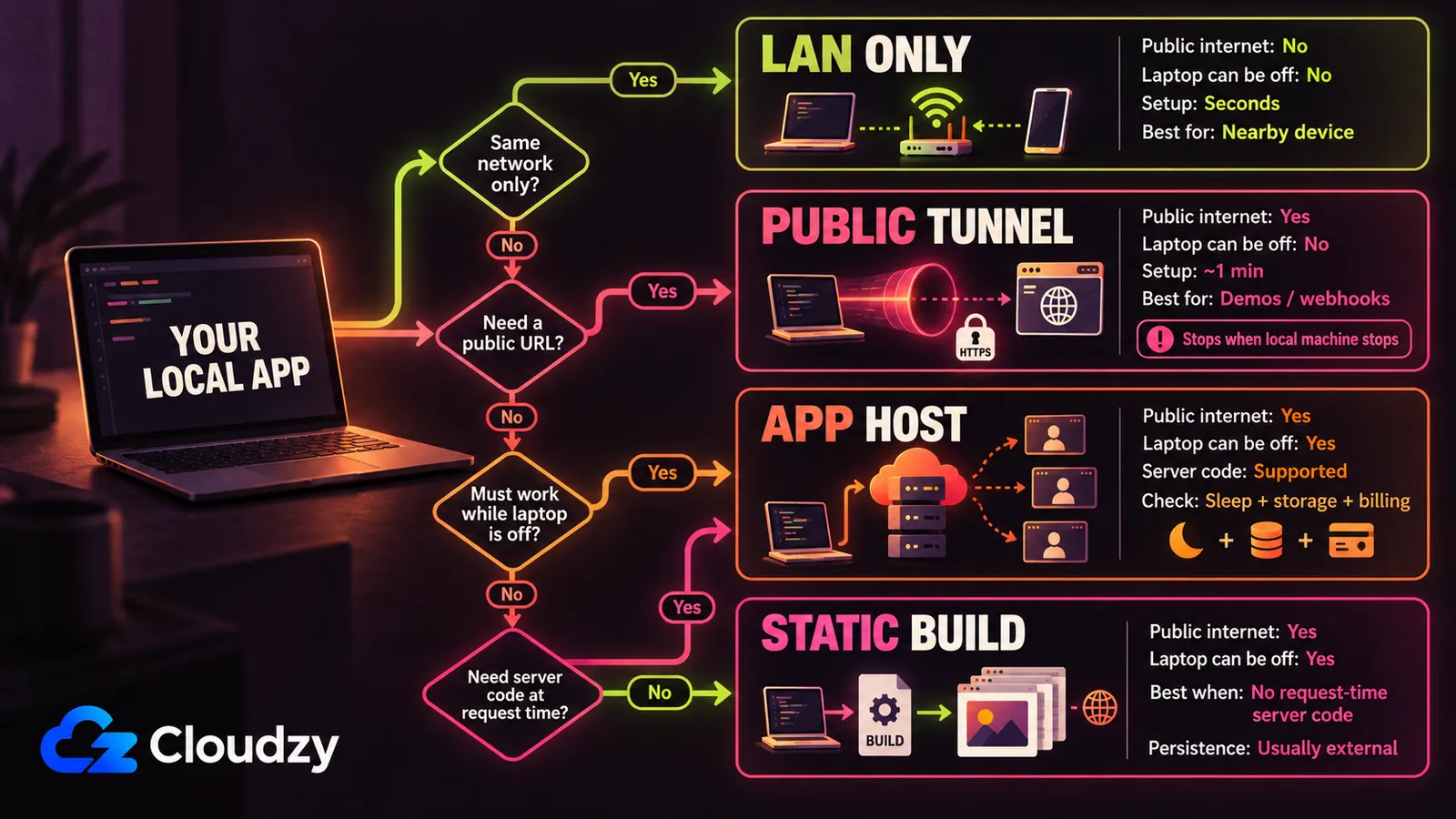
Three of these four paths give your app a public internet URL; the first only reaches your own network, which makes it both the fastest and the most limited. Sort them by how long the URL has to survive and the choice mostly makes itself.
| Path | Time to a URL | How long it lasts | What kills it | Who it's for |
|---|---|---|---|---|
| Same network | Seconds | While you're both on the network | Your visitor moves to different Wi-Fi | A colleague at the next desk, or your own phone |
| Tunnel | About a minute | While the process runs | Closing the laptop, killing the terminal, hitting the tier's caps | A demo, a client walkthrough, a webhook test |
| Free hosting tier | 10 to 30 minutes | Indefinitely, with conditions | Spin-down, an ephemeral filesystem, or the plan's terms | Something that has to answer while you sleep |
| Static build | 10 to 20 minutes | Indefinitely | Needing server-side code at request time | Apps that can be fully generated at build time or run client-side |
Which rows are open to you depends on three things you can check inside your own project:
- Does the app need your server code to run at request time? A Flask or FastAPI route, a
server.jsendpoint, or request-specific server logic needs a server-side host. Build-time server code does not automatically rule out a static deployment: Next.js Server Components can run duringnext build, and staticGETRoute Handlers can be prerendered. If every runtime request can be served as static assets or sent directly from the browser to an external API, the static path is still open. - Does it read or write a file it needs to keep? A database file (
.db,.sqlite), an uploads folder, a JSON file it edits. If yes, check the host's storage model before you deploy. Render free web services and Koyeb free instances use ephemeral local storage, while Vercel Functions have a read-only filesystem with temporary/tmpspace. Put persistent state in a durable volume, database, or object store instead of assuming the app's local disk will survive. - Does it need a secret at runtime? A key in a
.envfile works untouched on the first two paths, since the app is still running on your machine. On the other two you re-enter it in the provider's environment settings, and it must not be sitting in the repo you push.
Share It on Your Own Network
next dev already listens on every network interface on your machine (that's all 0.0.0.0 means when you see it), and so does python -m http.server. Neither needs a flag, so the dev server you've got running right now is probably already reachable from your phone on the same Wi-Fi.
Next.js documents -H as the way to change that hostname, with a default of 0.0.0.0, and Python's docs say the module binds itself to all interfaces unless you pass --bind 127.0.0.1. That makes this the fastest way to share a localhost app: no account, no install, no deploy. The other common dev servers have to be told.
# Already listening on all interfaces. Nothing to add.
next dev
python -m http.server 8000
streamlit run app.py

# Needs the flag.
npm run dev -- --host             # Vite
flask run --host=0.0.0.0
uvicorn main:app --host 0.0.0.0   # FastAPI
Vite's server.host documentation says it defaults to localhost and takes --host on the CLI or server.host: '0.0.0.0' in the config file. Uvicorn defaults to 127.0.0.1, which covers FastAPI since that's what runs it. Streamlit leaves server.address unset, and its config reference notes that setting it restricts access to that one address: unset means unrestricted.
Then you need the address to hand over. That's your machine's own IP on the local network, not localhost:
# macOS
ipconfig getifaddr en0

# Linux
hostname -I

# Windows (PowerShell)
ipconfig | findstr IPv4
Give your visitor http://<that-address>:3000 and they're in. The catch is the shape of the whole path: that address doesn't mean anything outside your network. The second they're on different Wi-Fi, or on cellular, or at home, the link is dead to them.
Note
if the command runs fine and the other device still can't connect, it's the OS firewall, not the command, almost every time. Apple's firewall documentation says macOS raises an alert for an app you haven't allowed and denies the connection until you act. Windows instead asks which network profile applies, keeping separate rules for private and public networks. Choose Private on a home or office network. Never Public.
Put It Behind a Tunnel
A tunnel is a small program that runs alongside your app and gives it a public HTTPS address. One command gets you a free tunnel to localhost in about a minute, and it's worth knowing up front that the URL dies the moment that command does:
cloudflared tunnel --url http://localhost:3000Nothing changes on your router, because of the direction the connection travels. Your machine opens an outbound connection to the provider's edge, the same kind your browser makes to load any page, and the provider holds it open and pushes inbound requests back down it. Inbound ports on your side stay closed, which is why this works on hotel Wi-Fi, on a phone hotspot, and on a home connection whose router you don't control.
Note
that last case deserves a sixty-second check before you consider port forwarding instead. Open your router's status page, find the WAN IP it reports, and compare it to your actual public IP from any "what is my IP" lookup. If the WAN IP sits inside 100.64.0.0/10, CGNAT is the likely cause. If the WAN IP and public IP simply differ, you know there's another NAT layer upstream, but that could be CGNAT or ordinary double NAT. In either case, port forwarding on this router alone may not be enough. That range is reserved by RFC 6598 for shared address space, which is what your ISP puts you behind when it runs out of addresses.
The options differ mostly in what they want from you first.
Cloudflare quick tunnels are the command above: no account, no domain, a random trycloudflare.com subdomain. Cloudflare caps them at 200 in-flight requests, returning 429s past that, doesn't support Server-Sent Events, and says in the same docs that free tunnels are for testing and development, not for deploying a production website.
ngrok takes a signup first, then ngrok http 3000. The current free plan gives you $5 of one-time included usage that doesn't renew monthly, up to 3 online endpoints, 1 GB of transfer, 20,000 HTTP/S requests, and an interstitial warning page your visitor clicks through. You also get a free auto-assigned development domain, which ngrok announced in 2023 to kill the old complaint about the URL changing on every restart.
localtunnel needs no signup and no install beyond npx: npx localtunnel --port 3000. You get a random subdomain, and the README is explicit that --subdomain requests a name and doesn't guarantee it.
localhost.run installs nothing, because it uses the SSH client your OS already ships: ssh -R 80:localhost:3000 localhost.run. Its docs note that no download is necessary and no account setup is needed for free domains.
VS Code has this in the Ports panel, handy if you already live in the editor. It wants a GitHub or Microsoft sign-in, and the default will trip you up: a forwarded port is Private, which means your visitor gets asked to sign in with your account until you flip the port to Public. (Fine for a teammate. Useless for the client who just wants to click a link.)
Tailscale Funnel also does this, with two constraints that usually decide it: the URL can only live on your own tailnet's domain, and it can only listen on ports 443, 8443, and 10000.
Whichever you pick, be clear about what you handed out. With a public tunnel that has no access controls, everything the dev server serves is reachable by anyone holding that URL, including routes you never linked to and any debug interface you left on. Fine for a fifteen-minute demo. Much less fine for a URL you paste into a public Discord.
The expiry gets you sideways because it can look like the app broke. Most of the quick routes here still depend on tunnel software running on your laptop: stop cloudflared, ngrok, localtunnel, or the localhost.run SSH session and forwarding stops. Tailscale Funnel is an exception when you run it with --bg, which keeps the Funnel configuration running in the background and restores it after a reboot. None of these can serve your local app while the laptop itself is offline. You can leave a tunnel running for days, and it'll work right up until the lid closes or you hit the request cap.
A tunnel is the right tool for a demo and the wrong tool for hosting: its uptime is your laptop's uptime.
Let the App Leave Your Machine
This is the first path where your laptop stops being load-bearing, and the first where the terms matter more than the tooling. What ends it here isn't a clock. It's a spin-down, a filesystem reset, or a plan deciding your app isn't the kind of thing it wants on a free instance.
The options below range from ongoing free plans to short trials. Some can keep an app online indefinitely within their limits; others stop after a fixed trial or require a paid account for compute. Check the billing, sleep, and storage rules before you deploy.
Free-tier terms below were checked against each provider's own pricing or documentation page on 7 September 2026.
| Provider | Commercial use? | Data survives a restart? | The catch |
|---|---|---|---|
| Netlify | Allowed | Yes, with Netlify Blobs or Database | No card to start; using all monthly Free-plan credits pauses projects until the next billing cycle unless you upgrade |
| Render | Not stated | Lost on restart | No card to start; sleeps after 15 idle minutes; free Postgres expires 30 days after creation |
| Cloudflare Pages / Workers | Not stated | Yes, with KV, D1, R2, or Durable Objects | 500 Pages builds a month; Workers free is 100,000 requests a day |
| Vercel | Not on Hobby | Lost on restart | Hobby is personal use only; the function filesystem is read-only |
| GitHub Pages | Not allowed | Static output only | No online business, e-commerce, or commercial SaaS; 10-minute deploy timeout |
| PythonAnywhere | Not stated | Yes | Free accounts reach only an allowlist of external hosts; the free web app expires after a month unless renewed |
| Fly.io | Not stated | Yes, with a Fly Volume | No ongoing free tier: 2 machine-hours or 7 days; trial Machines automatically stop after 5 minutes of running, and the trial includes 20 GB of volume storage; apps stop when the trial ends until you add a card |
| Koyeb | Not stated | No durable local storage | Card required; Koyeb places and cancels a $29 pre-authorization hold, but signup selects Pro by default and charges its prorated cost unless you switch to Starter |
| Hugging Face Spaces | Not stated | Lost on restart | Static Spaces are free; Gradio and Docker generally require a paid plan, but eligible free personal accounts can host up to two Gradio Spaces on ZeroGPU |
| Railway | Not stated | Yes, if the app uses the included 0.5 GB volume | 30-day trial with $5 in one-time credit, then a $0 Free plan with $1 of resource credit per month; no card required |
"Not stated" means that provider's own pages don't answer for their free tier. Treat it as unknown rather than as a yes or a no.
Three of those rows deserve an extra look before you start. Fly.io has no ongoing free tier: its trial ends after 2 machine-hours or 7 days. Koyeb includes a free instance, but its signup and billing flow needs attention before you deploy. Hugging Face keeps Static Spaces free, while new Gradio and Docker Spaces require a paid account except for the limited ZeroGPU carve-out. Railway no longer belongs in this warning list: after its 30-day trial with $5 of credit, it now moves to a $0 Free plan with $1 of resource credit per month.
Then there's the data question, which is where a working app quietly becomes a broken one. Render's free web services run on an ephemeral filesystem, and its docs are blunt that anything written there, uploaded images and local SQLite databases explicitly included, is lost on every redeploy, restart, and spin-down. Vercel's functions run on a read-only filesystem with only a temporary scratch space, so a SQLite file your app writes isn't safe there either. If your app keeps state in a file, move it to durable storage: a hosted database, object store, or persistent volume where the platform supports one.
Spin-down is worth feeling before you commit. On Render's free tier, 15 idle minutes put the service to sleep, and the next request wakes it over about one minute, showing a loading page to whoever clicked your link. For a portfolio piece, a shrug. For a client opening the link on a call, a bad sixty seconds.
PythonAnywhere has a subtler version of the trap. There's no idle spin-down, but a free web app carries a one-month expiry and stops unless you click the renewal link PythonAnywhere emails you, and free accounts get restricted outbound internet access and reach only an allowlist of external hosts. An app that calls an API outside that allowlist sits there perfectly online and fails every request to that non-allowlisted API (an awful way to debug, since nothing anywhere looks down).
Ship It as a Static Site
If nothing your app does requires server code at request time, a static host is the closest option here to set-and-forget: it can stay online without your laptop, and there is no app process waiting to wake up. The host's account and usage limits still apply. More apps qualify than you'd expect, which is why the first of those three questions is worth answering before you assume you need a server-side host.
The rule is narrower than "does it have a backend." Your app qualifies if every request it makes goes either to your own static files or straight from the browser to somebody else's API. Fetching Supabase or a public API from the browser is fine, with the one caveat that a key sitting in browser code is a key you've published. Needing your own code to run on a server for each request is what closes the door.
If it qualifies, the shape is short:
npm run build # Vite writes to dist/, a Next.js static export writes to out/Then deploy that build output to a static host. Cloudflare Pages, Netlify, and Vercel can build from a connected repo. GitHub Pages can publish static files from a branch or use GitHub Actions to run your framework's build and deploy the generated output.
GitHub Pages has the constraints sharp enough to matter up front. Static only, one user or organization site per account, and usage limits stating it's not free hosting for a business, an e-commerce site, or commercial SaaS. If your app will take payments, that rules it out before you start.
This path has no app-process expiry. It keeps working while the hosting account remains active and within its limits, and it stops fitting once the app needs server-side work at request time.
Where the Free Paths End
The free paths fail in different places, not all at once. A static host already solves laptop uptime and gives you a stable provider URL. A free app host can do the same, and some now include persistent storage. A VPS starts to make sense when the requirements stack up: your own server-side process needs to stay online, you need predictable persistent storage, and the free plan's resource or usage rules no longer fit.
That threshold is worth respecting. One demo isn't a reason to buy a server, and neither is a low-traffic static project. Stay on a tunnel for short-lived sharing, stay on a static host while the app is genuinely static, and stay on a free app host while its limits fit what you're running.
Move to a VPS when you need an always-on server you control and you're willing to own the operational work that comes with it. Our Linux VPS is one option, and a comparable VPS from another provider can do the same job. Size the server for the app instead of assuming the smallest plan will be enough.

Build on a Linux VPS with root access, NVMe, and AMD EPYC power.
View Linux PlansTwo things change once you do. The push-to-git deployment workflow a platform host gave you is no longer automatic. You can recreate it with a self-hosted PaaS such as Coolify or Dokku, or build your own CI/CD path, and either way you now own updates and maintenance.
The other change is that the box holds more than the app. It'll happily run Code Server and Claude Code if you'd rather your editor lived there too, which is either a nice bonus or a whole new weekend, depending on you.
Frequently Asked Questions
Why Did My Public URL Stop Working After I Closed My Laptop?
Because the tunnel was tied to the process that created it, not to your app. Closing the laptop or killing the terminal ends that process, the public URL goes dead, and your app is fine. Restarting the tunnel gives you a new URL unless the tool assigns you a reserved domain. If the link needs to survive your laptop sleeping, the app has to leave your machine.
Do I Need a Domain Name to Put a Local App on a Public URL?
No, in almost every case. A Cloudflare quick tunnel, ngrok's assigned development domain, localtunnel, localhost.run, and the free hosting tiers above all assign you a subdomain on their own domain at no cost. The exception is a Cloudflare named tunnel, which needs a domain you've already added to Cloudflare DNS.
Can Someone on a Different Wi-Fi Network Open My Local IP Address?
No. An address like 192.168.1.42 points at whatever device happens to hold it on the network you're currently joined to, which on any other network is a different device or nothing at all. Anyone outside your Wi-Fi needs a tunnel, a free hosting tier, or a static host instead.
Which of These Work if My App Has a Login and a Database?
The same-network and tunnel paths work unchanged because the app is still running on your machine. A static deployment can also work if login and database requests go directly from the browser to a hosted service and no private server-side code has to run for each request. If your own authentication or database code needs a server at request time, use a server-side host instead. On a free app host, keep persistent data in durable storage rather than assuming the app's local filesystem will survive.
Discussion
Comments
Sign in to join the discussion.