
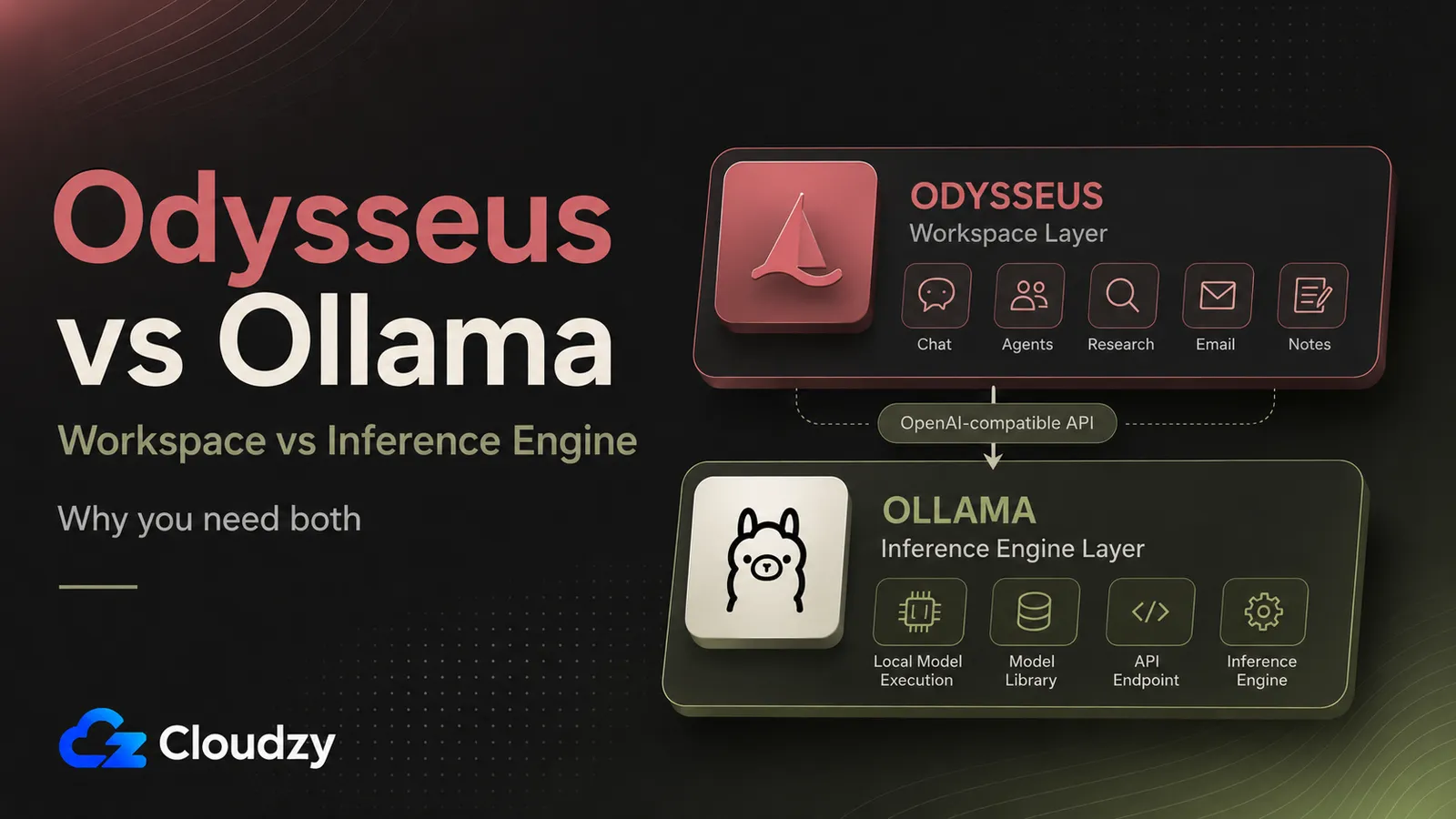
People are searching "Odysseus vs Ollama" like they have to pick one. That's the wrong question, and it's easy to see why it got asked. Odysseus went viral after its May 31, 2026 launch, and a lot of the launch coverage framed it as a "ChatGPT alternative" and skipped the part that matters: what layer it sits on.
Here's the short answer. Odysseus is the workspace: the chat UI, the agents, the research tools. Ollama is the engine it talks to, the thing that runs the model. They're not competing products. They're two floors of the same building.
I connected these two and ran them together, so the rest of this is what each one does, whether you need both, and what it takes to host the stack yourself.
TL;DR
- Odysseus is a self-hosted AI workspace; Ollama is a local inference engine. They're not competitors. Odysseus calls Ollama's API to get model responses, the same way an app calls a database.
- You probably want both. Odysseus gives you the experience (chat, agents, deep research, email, notes); Ollama runs the actual language model locally and privately.
- Ollama is the easiest default, not the only backend. Odysseus can also point at other local inference servers or at cloud APIs like OpenAI, Anthropic, and OpenRouter. The trade-off is simple: local backends keep inference on your machine; cloud APIs move it off-box.
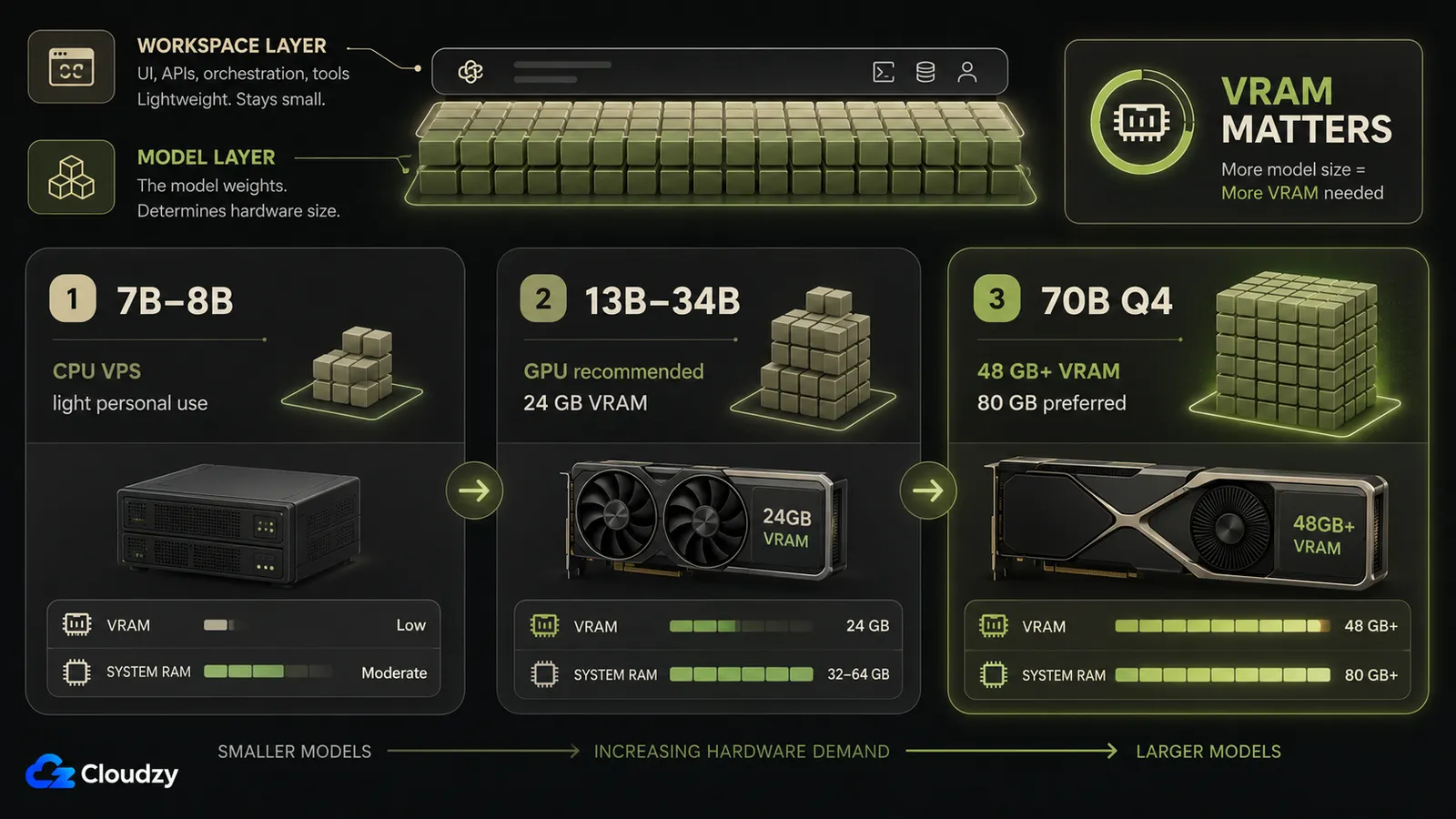
- The model decides your hardware. A CPU VPS runs a 7B model; anything 13B and up wants a GPU. That's a VRAM question, not a system-RAM question.
What Odysseus Is
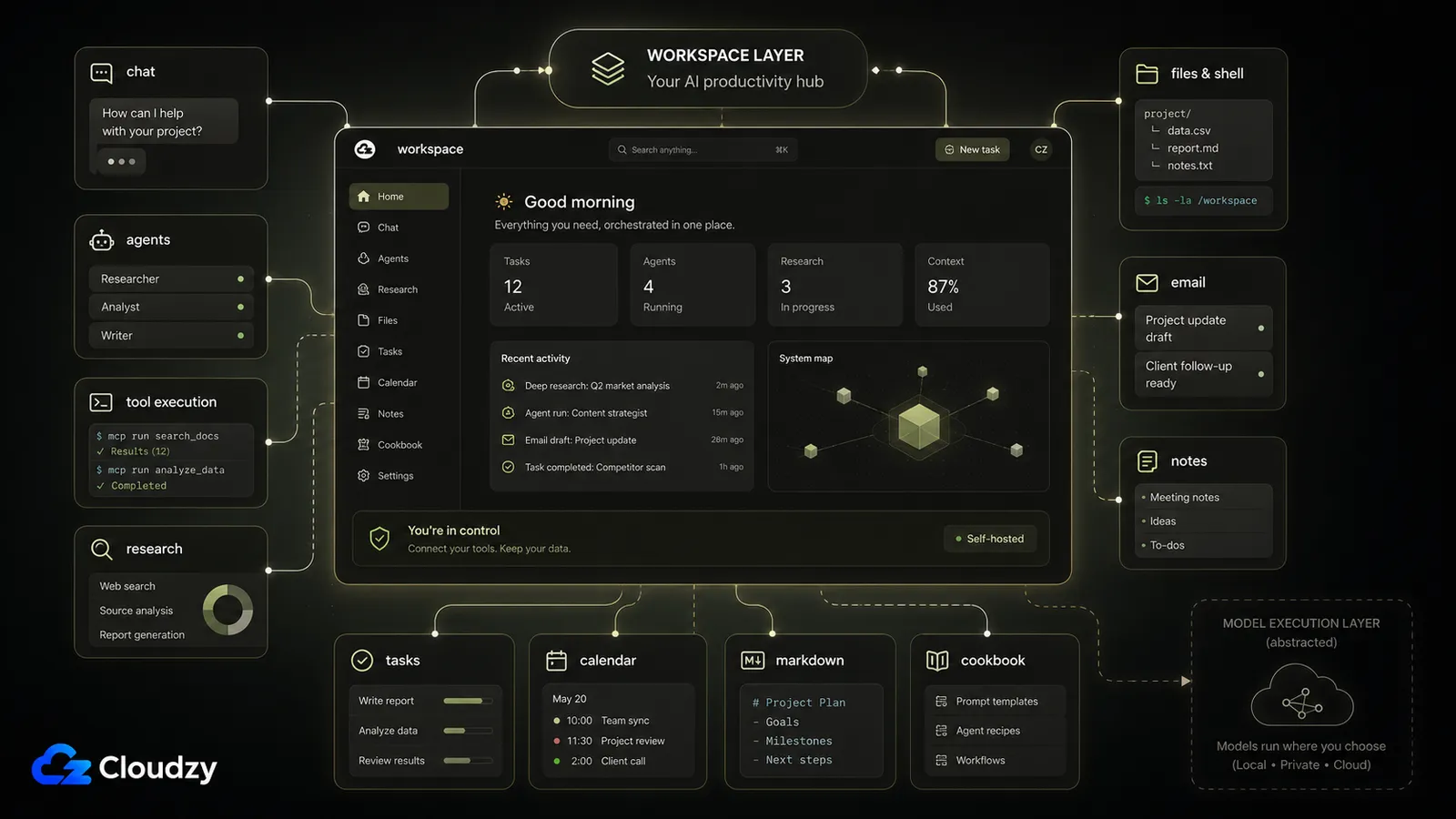
Load up Odysseus and you get a chat window at localhost:7000, but the chat is the smallest part of it. Behind that window is a full workspace: autonomous agents with MCP tool execution, file and shell access, a deep-research mode that runs multi-step web research and writes up a report, a Markdown document editor with AI writing, an email assistant that triages your IMAP/SMTP inbox, plus notes, tasks, and a CalDAV calendar. There's a Model Cookbook that recommends models and download paths based on your hardware, and a built-in web search running on a SearXNG container it deploys alongside itself.
What Odysseus does not do is run the model. Every one of those features (the agent deciding which tool to call, the research assistant summarizing a page, the email triage picking a tag) is a request that gets sent somewhere else to a model that produces the text. Odysseus orchestrates. It doesn't infer.
That's why a typical deployment is around four Docker containers (ChromaDB for the vector store, SearXNG for search, ntfy for notifications, and the main Odysseus image) and none of them is the language model. The model lives in a separate process that Odysseus points at.
It's licensed AGPL-3.0-or-later, which matters more than it sounds like it should, and I'll come back to that. One heads-up on tool use: function-calling-capable models are recommended for the agent features, so keep that in mind when you're picking what to run.
What Ollama Does, and Why It's a Different Layer
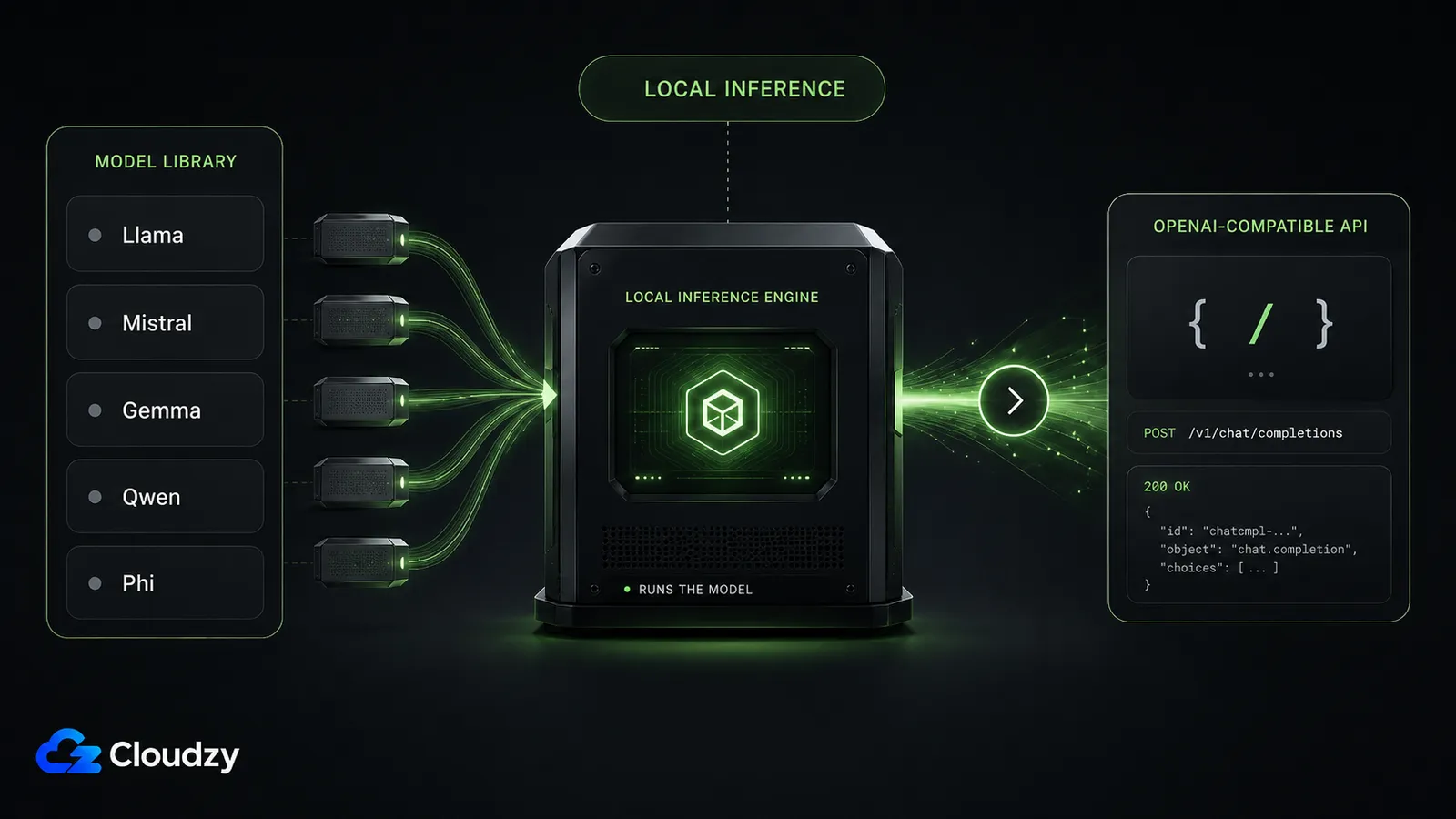
Ollama is the process that actually loads a language model into memory and runs it. It's a local inference engine built on the llama.cpp backend, and the thing that makes it useful to Odysseus is that it exposes an OpenAI-compatible REST API. Odysseus talks to that API exactly the way any app talks to a database: send a request, get a response, don't care how the work got done inside.
At the time of writing, the latest Ollama release is v0.31.1 (June 30, 2026), it's MIT-licensed, and it pulls from a large model library at ollama.com/library: Llama 3, Mistral, Phi-3, Gemma, Qwen, and plenty more with a single command. No UI, no agents, no workspace. It runs models and answers API calls. That's the whole job.
One thing worth clearing up, because it trips people up: the free, open-source Ollama local runner (the MIT-licensed thing this whole article is about) is different from Ollama's hosted cloud options. When someone quotes you a monthly price for "Ollama," they're usually talking about hosted cloud usage or a paid cloud tier, not the local runner. The runner you install on your own box costs nothing. Your only cost is the machine it runs on.
If you want to go deeper on Ollama specifically, and how it stacks up against a GUI-first tool, we've got a full Ollama vs LM Studio breakdown that covers that comparison.
The takeaway: Ollama is a server, not an app. It runs models and answers API calls; the experience layer is somebody else's job.
So Do You Need Both?
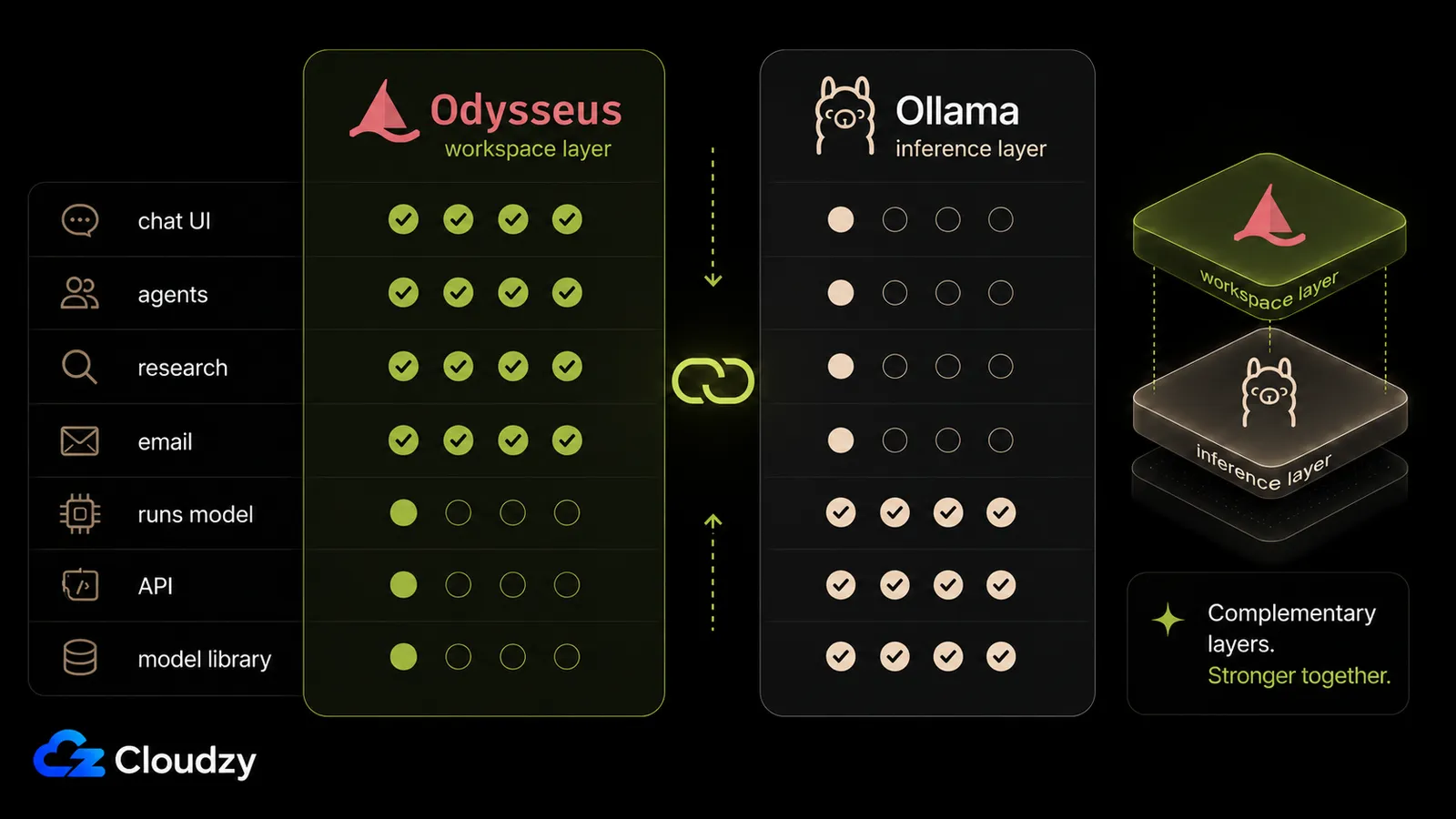
Line the two tools up feature by feature and you'll notice something: each column is mostly the other one's blank space. They barely overlap.
| Capability | Odysseus | Ollama |
|---|---|---|
| Chat UI | Yes | No |
| Agents / MCP tool execution | Yes | No |
| Deep research | Yes | No |
| Email / notes / calendar | Yes | No |
| Runs the model (inference) | No | Yes |
| Model library | No (recommends via Model Cookbook) | Yes |
| Exposes an API | Consumes one | Yes (OpenAI-compatible) |
So the plain answer: if you want a full AI workspace with local, private inference, you run both. Odysseus for the experience, Ollama for the model. That's the standard setup, and it's the setup the launch tutorials walk people through.
Ollama is optional if you point Odysseus at a different inference backend. That can mean a cloud API like OpenAI, Anthropic, or OpenRouter, or another local engine such as llama.cpp, LM Studio, or vLLM. The trade-off depends on where inference happens: local backends keep prompts on your own machine, while cloud APIs move them off-box and usually bring subscription or usage-based pricing back into the picture.
The takeaway: You need an inference backend for local inference. Ollama is the easiest default, but not the only local option.
How They Connect (the part people get stuck on)
The connection itself is trivial: you tell Odysseus where Ollama's OpenAI-compatible endpoint lives, and that's it. The catch, and it is the one thing people get stuck on, is that "where it lives" changes depending on how you're running things, because Docker networking is fiddly.
The endpoint needs the /v1 suffix (that's the OpenAI-compatible path specifically). Where you point it:
- Native install, same machine:
http://localhost:11434/v1 - Docker on macOS or Windows:
http://host.docker.internal:11434/v1 - Docker on Linux:
http://172.17.0.1:11434/v1, or addextra_hosts: ["host.docker.internal:host-gateway"]to your compose file
And when Odysseus reaches Ollama from inside a container, Ollama has to be listening on all interfaces, not just loopback. Set OLLAMA_HOST=0.0.0.0:11434 (and OLLAMA_ORIGINS=*) or the connection just won't land.
Pro Tip
On macOS, Metal GPU acceleration does not pass through Docker. If you want GPU-accelerated inference on a Mac, run Odysseus natively instead of in a container. Otherwise you're stuck on CPU no matter what hardware you've got.
That's the shape of it. This isn't the full step-by-step deployment guide; the point here is to understand why the connection is host-dependent and where to look when it doesn't work on the first try.
Is It Ready? Reading a Viral Five-Week-Old Project
Odysseus has roughly 800 open issues and 785 open PRs sitting against about 80,800 stars. Read that the right way: it's not a broken project, it's a project that went viral faster than its maintainers could absorb the flood of contributions. When something hits 30,000-plus stars in its first couple of days and 80k inside five weeks, the issue tracker is going to look like that regardless of code quality. It's a virality signal, not a rot signal.
That said, it's five weeks old and it shows in places. Users have reported a short hardcoded timeout that can cancel slow stdio MCP tool calls on startup. There are non-ASCII encoding bugs floating around. And there's been no large-scale community security audit yet, which for a tool with this much reach is worth knowing before you lean on it.
The sharper objection in that HN thread isn't the rough edges. It's "what does this do that Open WebUI, LibreChat, or AnythingLLM don't already do?" That question came up repeatedly in a Hacker News thread on the launch, alongside skepticism about the AI-assisted codebase quality and some grumbling about a celebrity project pulling stars that an unknown developer's equivalent tool never would.
The differentiation question deserves a straight answer, not cheerleading. Two things set Odysseus apart. First, licensing: Odysseus is AGPL-3.0-or-later, while Open WebUI, for all that it's open, has trademark and branding restrictions that stop you from removing or changing its branding, a point that came up in that same HN thread. If a genuinely unrestricted FOSS license matters to you, that's a real distinction. Second, scope: on top of chat, Odysseus bundles integrated email, notes, and calendar plus the hardware-aware Model Cookbook, where the alternatives mostly stop at chat plus documents. Whether that bundle is worth it depends on whether you'll use those pieces. Open WebUI, LibreChat, and AnythingLLM are all legitimate choices; this isn't a knockout.
One more thing you should weigh honestly: the attack surface is large. Odysseus can browse the web, execute shell commands through its agents, invoke MCP tools, and reach into your email over IMAP. Bolt that onto a young, partly AI-generated codebase with a community-flagged prompt-injection concern, and you've got a tool that can do a lot, including things you didn't intend if someone feeds it the wrong input. That's not a reason to avoid it. It's a reason to sandbox it, keep it off anything sensitive until it's more battle-tested, and know what you're running.
Running the Stack on a VPS
Try Odysseus and Ollama on your laptop first; that's fine for kicking the tires. But the moment you want to rely on the thing, a laptop stops being the answer. Agents that check your email, a research assistant you want reachable, a chat workspace you open from your phone: all of that needs a box that's always on and always reachable. That's a Linux VPS.
Then the model decides the size, and this is the one spec people get backwards, so I'll be blunt about it: system RAM does not run large models well. VRAM does. A CPU-only VPS with 8–16 GB of system RAM can run Ollama plus a small 7B–8B model, slow but usable for low-concurrency personal use. Once you move into 13B–34B models, a GPU starts making much more sense, and a 24 GB VRAM card is the practical comfort zone for many quantized mid-size models. A 70B model at Q4 is a different class: expect roughly 48 GB+ of VRAM, or an 80 GB card if you want cleaner headroom for context and fewer compromises. Loading a 70B into 16 GB of system RAM isn't just slow, for a useful setup, it's the wrong target.
If you're running Ollama on a VPS, the fastest way to skip the manual install is Cloudzy's one-click Ollama marketplace app: it stands the engine up for you so you go straight to pulling a model, and you size the VPS to the model class you need (a standard Linux VPS for a 7B, a GPU instance for 13B and up). Worth noting on the GPU side: availability is geography-constrained, so the full GPU range isn't in every datacenter. Check which location has the card you want before you commit. Odysseus you'll still install by hand with Docker; it's the one-time setup tax for the workspace half of the stack.
The takeaway: The workspace layer is light; the model layer decides your VPS size. CPU for a 7B, GPU for 13B and up.
Frequently Asked Questions
Does Odysseus Need Ollama?
Not strictly. Odysseus can run its inference through cloud API backends (OpenAI, Anthropic, OpenRouter) or other local engines like llama.cpp, LM Studio, or vLLM. Ollama is the standard choice when you want free, local, private inference, but it's a default, not a requirement.
Is Odysseus an Alternative to Ollama?
No, they're different layers of the stack. Odysseus is the workspace and app (chat, agents, research, email); Ollama is the model server it calls to run a language model. Odysseus talks to Ollama over an API, so they work together rather than competing.
How Do I Connect Odysseus to Ollama?
Point Odysseus at Ollama's OpenAI-compatible endpoint, which needs the /v1 suffix. The exact host depends on your setup: http://localhost:11434/v1 for a native install, http://host.docker.internal:11434/v1 for Docker on macOS/Windows, and a host-gateway address for Docker on Linux. Ollama also needs OLLAMA_HOST=0.0.0.0:11434 when it's being reached from a container.
Is Ollama Free?
Yes, the open-source local runner is free and MIT-licensed. Ollama also has hosted cloud options, including paid Pro and Max tiers, but that is separate from the local runner this article is mainly about. The runner you install on your own machine or VPS costs nothing; your only cost is the hardware it runs on.
Is Odysseus Safe to Run?
It has a large attack surface (shell and agent execution, MCP tool invocation, and email IMAP access) and it's a young, partly AI-generated codebase with no large-scale security audit yet. It's runnable, but treat it accordingly: sandbox it, keep it away from sensitive accounts until it matures, and watch for prompt-injection risk.
The Short of It
The mental model is the whole point: Odysseus and Ollama aren't a versus, they're a stack. The workspace sits on top, the inference engine runs underneath, and the workspace calls the engine over an API. The model you pick is what sizes your hardware, so decide what you want to run before you decide what to run it on.
Discussion
Comments
Sign in to join the discussion.