
Your product ships, it calls an LLM API, and the bill has been creeping up every month. So you do the thing every builder does eventually: you open a new tab and wonder whether renting a GPU and running Llama yourself would be cheaper.
The self hosting LLM cost question has an answer, but it's not the single number the top search results and AI Overviews keep repeating. It depends on three things those articles flatten: which API you're comparing against, how busy your GPU is, and the ops cost nobody puts in the spreadsheet.
Here's the short version before the details: for most solo builders, self-hosting doesn't win on cost right now. But there's a specific line where it flips, and you can calculate it on your own bill in about two minutes. Below is the 2026 math (current prices, VRAM numbers by model, and a formula you can run).
The Short Version
- The break-even isn't one number. It's three, depending on which API you're comparing against. Against a frontier API (GPT-5.x, Claude Sonnet 5 / Opus 4.8, Gemini Pro), self-hosting breaks even soonest. Against a budget open-weight API (DeepSeek, DeepInfra, Together at roughly $0.14–$0.50 per million tokens), it almost never wins on cost alone.
- Utilization is the multiplier that kills the solo case. A rented GPU costs the same idle as it does at full load, so a GPU running at 10% utilization costs roughly 10× per token what it costs at full load. Bursty solo workloads sit at low utilization by default.
- Below the break-even, the cost win is usually switching to a budget open-weight API, not self-hosting. Self-hosting earns its keep when sustained volume against frontier pricing clears the line at 60%+ utilization, or when you have a non-cost reason (privacy, latency, fine-tuning control).
- Run the formula on your own numbers before you rent anything. Break-even tokens ≈ GPU VPS monthly cost ÷ your blended API price per token.
What This Doesn't Cover
- Multi-node or datacenter-scale GPU clusters. This is a solo cost decision, not a fleet.
- Fine-tuning economics in any depth (a separate calculation with its own trade-offs).
- A step-by-step Ollama-vs-vLLM setup tutorial. The scope here is the money question, not the install.
- Owned hardware as your primary vehicle. The assumption throughout is a rented GPU, since that's the realistic path for a builder without a GPU already sitting on a desk.
What Drives the Cost (and Where the Popular Numbers Go Wrong)
Search "self host LLM vs API cost" and you'll land on a tidy break-even figure: something like 11 billion tokens a month, or around $4,200 in monthly API spend, cited by braincuber's cost analysis and echoed almost verbatim in the AI Overview at the top of the page. It's a clean number. It's also close to useless on its own, because it hides the two variables that decide your answer.
The reason this is slippery is that the two sides of the comparison have different cost shapes. An API bill is a variable cost: you pay per token, so the bill scales up and down with how much you use it. A rented GPU is a fixed cost: you pay the same monthly rate whether you push a billion tokens through it or let it sit idle. Comparing a variable cost to a fixed cost with one number requires pretending you know exactly how many tokens will flow, and at solo scale, you usually don't.
That leaves three levers that move the break-even:
- Which API you're comparing against. A frontier API and a budget open-weight API are separated by roughly two orders of magnitude in price. The break-even against each is wildly different.
- Your GPU utilization. The fixed cost only pays off if the GPU is busy. Idle time is money you spent for nothing.
- The hidden ops cost. Your hours, model-update churn, and the VRAM surprises that don't show up until you're in production.
Price each of those and the fog clears. That's the rest of this article.
Section takeaway: the break-even isn't a single number. It's three numbers, one per API tier, and picking the wrong tier to compare against is where most cost estimates go wrong.
The Three-Way Break-Even: Frontier vs. Mid-Tier vs. Budget API
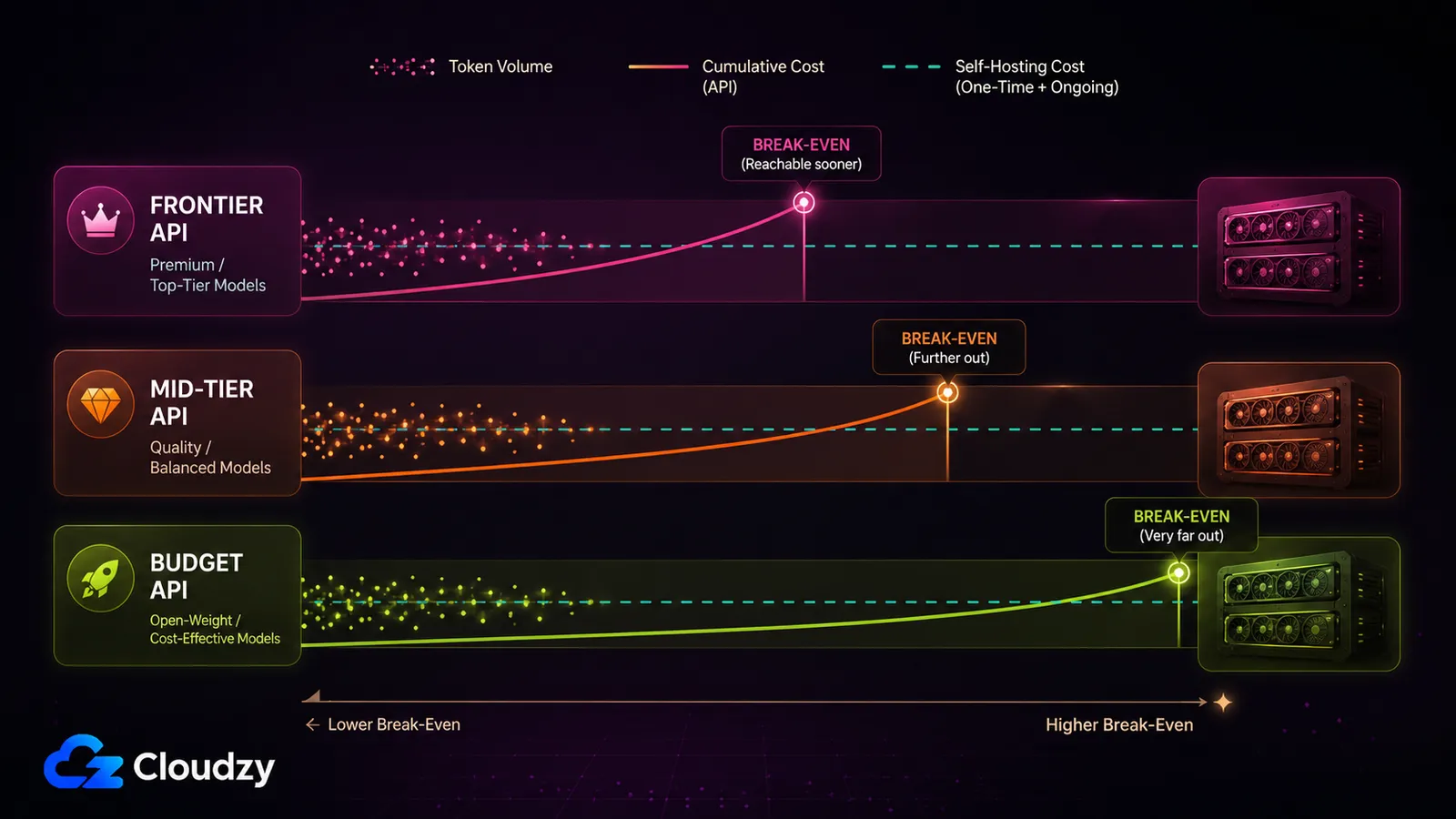
Self-hosting an open-weight LLM on a GPU VPS beats a frontier API (GPT-5-class, Claude Sonnet 5 / Opus 4.8, Gemini Pro) at roughly a few million tokens per day, provided you keep the GPU at healthy utilization (say 60% or higher). Against a budget open-weight API at around $0.14–$0.50 per million tokens, it rarely wins on cost at all. That difference is the whole story, and it's why one break-even number can't be right.
Here's the shape of it across the three tiers. Treat these thresholds as directional ranges, not hard lines. They come from community estimates and 2026 pricing, both of which move fast.
| You're comparing against | Example pricing (per 1M tokens, as of July 2026) | Approximate monthly volume where a single high-end GPU starts to win | Verdict for a solo builder |
|---|---|---|---|
| Frontier API | GPT-5.5 $5 in / $30 out; GPT-5.4 $2.50 / $15; Claude Opus 4.8 $5 / $25; Claude Sonnet 5 $2 / $10 through Aug. 31, then $3 / $15; Gemini 3.1 Pro Preview $2 / $12; Gemini 2.5 Pro $1.25 / $10 | ~160–256M tokens/month (~5–8M/day) at 60–70% utilization | Reachable if you have sustained volume |
| Mid-tier / smaller frontier | GPT-5.4-mini $0.75 / $4.50; Claude Haiku 4.5 $1 / $5; Gemini 2.5 Flash $0.30 / $2.50 | Roughly 3–5× higher than the frontier break-even, depending on output share and model choice | Rarely worth it on cost |
| Budget open-weight API | DeepInfra Llama 3.1 70B ~$0.40 flat; Together Llama 3 8B Lite $0.14; DeepSeek V4 Flash $0.14 / $0.28; DeepSeek V4 Pro $0.435 / $0.87 | ~2.5B–7B+ tokens/month, depending on model and output share | Effectively unreachable solo |
Prices from the OpenAI, Anthropic, Google, DeepInfra, Together, and DeepSeek pricing pages as of July 2026. Every one of these numbers has a shelf life measured in months, so check the current pages before you commit.
Now the contrarian point, because it's the one that changes decisions. There's a loud and correct argument going around that budget APIs killed the self-hosting break-even. Open-weight APIs like DeepInfra and Together now serve Llama and Qwen models at a fraction of frontier prices, and frontier prices themselves have dropped sharply since 2025. Against those budget rates, the per-token break-even runs into the billions of tokens per month. A solopreneur is not pushing billions of tokens a month. So if your only goal is a lower bill, the first move is usually not "rent a GPU," it's "switch to a budget open-weight API and keep zero ops."
Self-hosting's cost case survives in two places: comparing against expensive frontier pricing at genuinely high, sustained volume, and the non-cost reasons (privacy, latency, fine-tuning control) covered further down. Everywhere else, the budget API wins the money argument.
The Break-Even Formula
break-even tokens per month ≈ GPU VPS monthly cost ÷ your blended API price per token
Worked example, solopreneur scale: say a single high-end GPU VPS runs about $1,000/month (2026 catalog range for a top single-GPU tier), and you're on a frontier API with a blended rate around $6 per million tokens (roughly $0.000006 per token). That's ~$1,000 ÷ $0.000006 ≈ 167 million tokens/month before the GPU pays for itself on paper. Now redo it against a budget open-weight API at $0.40 per million ($0.0000004/token): ~$1,000 ÷ $0.0000004 = 2.5 billion tokens/month. Same GPU, same fixed cost, and the break-even moves by more than 10× depending purely on which API you put in the denominator. This is before utilization, which makes the number worse.
Section takeaway: The API you compare against can move your break-even by 10× or more, so "run the numbers" means running them against the specific API you'd actually replace.
What Utilization Does to the Cost per Token
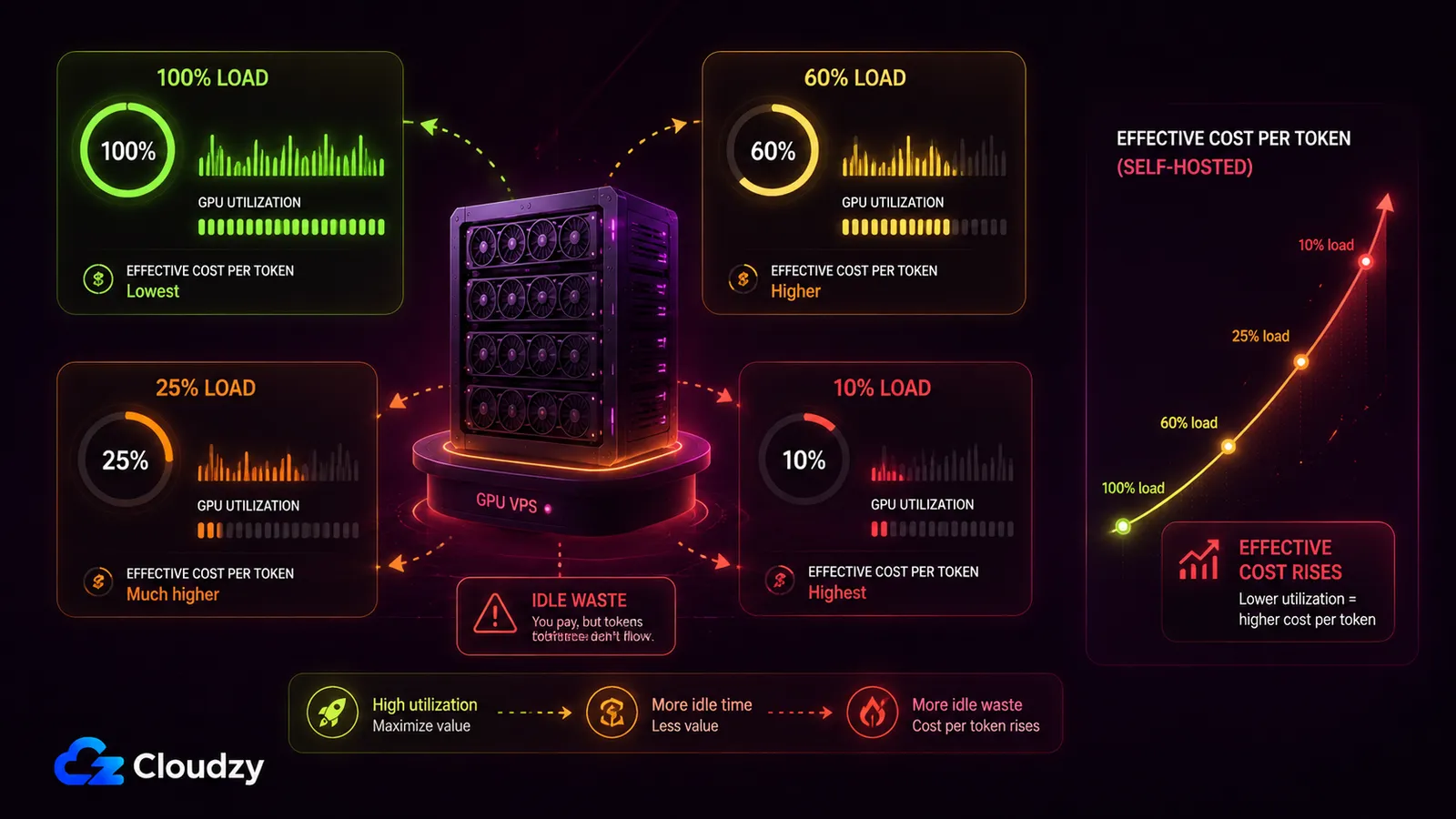
Take that ~167 million-token frontier break-even and add the variable the formula quietly assumes away: your GPU is busy the whole time. It isn't. A rented GPU bills the same whether it's saturated or idle, so your effective GPU VPS LLM cost per token scales inversely with utilization. Run at 10% load and each token you serve carries roughly 10× the cost it would at full load, because you're paying for the 90% of capacity you didn't use. Community estimates and practitioner write-ups put the practical floor at around 50–60% sustained utilization before the numbers stop embarrassing you (directional figures, not lab constants).
For a bursty solo workload (traffic that spikes during the day and flatlines overnight), sustained 60% utilization is hard to hit. That's the trap. Here's what it does to cost per million tokens across a few concrete points, using 2026 catalog GPU prices divided by rough monthly throughput at each utilization level:
| GPU tier | Model (Q4) | ~Cost per 1M tokens at 100% util | at 60% util | at 25% util |
|---|---|---|---|---|
| RTX 4090 (24 GB) | Llama 3.1 8B | low single-digit cents | ~1.7× the 100% figure | ~4× the 100% figure |
| RTX 5090 (32 GB) | Qwen 3 32B | mid cents | ~1.7× | ~4× |
| A100 (80 GB) | Llama 3.1 70B | higher (bigger model, more GPU) | ~1.7× | ~4× |
| RTX 6000 Ada (48 GB) | Llama 3.1 70B (Q4) | comparable to A100 range | ~1.7× | ~4× |
The absolute cents-per-token depend on your model, quantization, and how many concurrent requests you can pack onto the card, so treat the columns as showing the shape of the penalty rather than a quote. The point is the multiplier: drop from full load to a quarter load and your cost per token roughly quadruples. That's usually what kills the solo self-hosting case, not the GPU sticker price.
There's one structural escape hatch, and it's the reason renting can beat owning for spiky demand: you can stop a rented instance when it's idle. Own the hardware and it depreciates and draws power whether you use it or not. On hourly or on-demand rentals, you can stop or tear down the instance when the job is done and avoid paying for idle hours. On fixed monthly plans, the bill is still fixed for the billing period, so utilization remains the main cost problem. It doesn't fix a workload that's genuinely low-utilization all day, but for demand that's busy in bursts and dead in between, the ability to turn the meter off is the one lever that makes rent-vs-own tilt toward rent.
Section takeaway: utilization, not the GPU's monthly price, is usually what decides whether self-hosting pencils out, and it's the variable the popular break-even numbers leave out entirely.
Which Model Fits Which GPU: the VRAM Reality
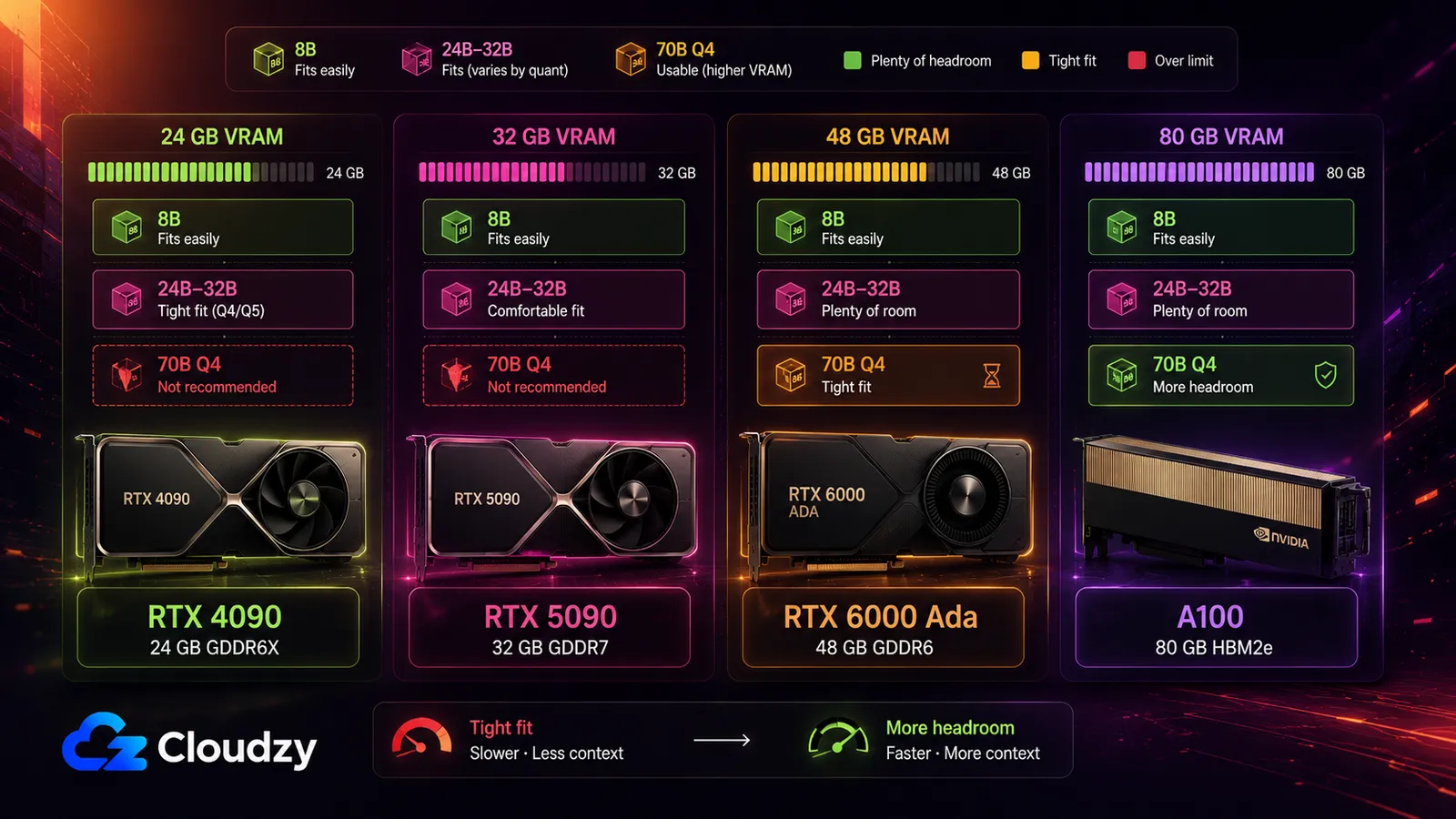
The plan that breaks first is "I'll just run a 70B on a 4090." You can't. A 70B model at Q4_K_M quantization needs roughly 40–46 GB of VRAM, and a 24 GB RTX 4090 or a 32 GB RTX 5090 simply doesn't have the room. Force it onto a 24 GB card and you're down to Q2_K quantization (around 21 GB) with visible quality loss, or the model spills to system RAM and generation speed collapses. VRAM is the hard wall that decides which models are even on the table for a given GPU.
Here's what fits where. VRAM figures are approximate: they're derived from the standard bytes-per-parameter arithmetic (FP16 ≈ params × 2 with ~15% overhead; Q4_K_M ≈ params × ~0.55 with overhead), so treat them as sizing guidance, not guarantees.
| Model | FP16 | Q8 | Q4_K_M | Smallest single Cloudzy GPU that fits (at Q4) |
|---|---|---|---|---|
| Llama 3.1 8B | ~16 GB | ~8.5 GB | ~5–6 GB | RTX 4090 (fits even at FP16) |
| Mistral Small 3.1 (24B) | ~48 GB | ~24 GB | ~14–16 GB | RTX 4090 |
| Qwen 3 32B | ~64 GB | ~32 GB | ~18–20 GB | RTX 4090 |
| Qwen 2.5 72B | ~144 GB | ~72 GB | ~41–51 GB | A100 (80 GB) or RTX 6000 Ada (48 GB) |
| Llama 3.1 70B | ~140 GB | ~70 GB | ~40–46 GB | A100 (80 GB) or RTX 6000 Ada (48 GB) |
| DeepSeek R1 70B (distill) | ~140 GB | ~70 GB | ~40 GB | A100 (80 GB) or RTX 6000 Ada (48 GB) |
VRAM figures are cross-checked against NVIDIA's official GPU spec pages for each card. The A100 gives a quantized 70B more comfortable headroom; RTX 6000 Ada can work for tighter Q4 setups, while 24 GB and 32 GB consumer cards do not have enough VRAM for a normal 70B Q4 deployment. If you want the full breakdown of how GGUF, GPTQ, AWQ, and EXL2 formats consume memory, that's a rabbit hole worth its own read: GGUF, GPTQ, AWQ, EXL2: how LLM quantization formats actually use memory.
The community sweet spot for a single 24 GB card is a 24B-to-32B model (Mistral Small 3.1 or Qwen 3 32B at Q4). That's the size that gives a solo builder a useful model on the cheapest GPU tier without fighting VRAM the whole way. If you're weighing which card to rent in the first place, our H100 vs RTX 4090 benchmark for AI workloads compares the tiers on throughput.
Pro Tip
budget for the KV cache, not just the weights. The single most common first-deployment surprise: you size the GPU for the model weights, load it, and it fits. Then requests come in, the KV cache grows with context length and concurrency, and you run out of VRAM serving your first few users. When VRAM overflows and the model spills to CPU, generation speed drops by 10–100×. Leave headroom above the weight figures in the table for the cache, especially if you're serving long contexts or multiple users at once.
The Hidden Costs That Erase the Naive Savings
The spreadsheet that says self-hosting is cheaper almost always has one line: the GPU's monthly price. The bill you pay has more lines. There's your time (every hour you spend patching, restarting a hung inference server, or chasing an out-of-memory crash is an hour you didn't spend on the product). There's model-update churn: the open-weight model you deployed gets superseded, and re-benchmarking and re-deploying is recurring work, not a one-time setup. There's the VRAM and KV-cache surprise from the last section. And there's idle waste, the hours the GPU sits billing while nothing runs.
Practitioners who've counted these put the true cost at roughly 1.3–2× the raw GPU price once ops time is folded in, and some go higher, to 3–5×, on messier setups. Those are directional multipliers from community write-ups, not audited figures, but the direction is the point. As one widely-quoted framing puts it, an idle GPU isn't an asset, it's a liability billed by the hour. For a solo builder, the right way to price this isn't an MLOps salary line, it's your own hours, which are the scarcest thing you have. If self-hosting saves you $200 a month on paper but costs you six hours of ops you'd otherwise spend shipping, that's not obviously a win.
When Self-Hosting Wins Anyway: Privacy, Latency, and Fine-Tuning
Cost isn't the only reason to run your own model, and for some builders it isn't even the main one. Below the cost break-even, where the money says "stay on the API," there are three reasons to self-host anyway. Data sovereignty: keeping your users' prompts and data out of an external AI provider's pipeline, which matters for some products regardless of what the numbers say. Predictable latency: no shared-tenant queue, no rate limits you didn't set, no surprise slowdowns during someone else's traffic spike. And full control: the freedom to fine-tune, quantize, swap models, and pin versions without waiting for a vendor.
There's a caveat on the privacy point, and skipping it would be dishonest. A rented GPU VPS still runs on someone else's hardware in someone else's datacenter. That's meaningful sovereignty from the AI provider's training and logging pipeline (your prompts aren't flowing through a model vendor's systems), but it is not the same as on-premises equipment you physically control. If your requirement is true on-prem isolation, a rented VPS doesn't get you there. If your requirement is "keep our data out of a third-party model provider's hands," it does. Know which one you need.
For workloads that run in restrictive network environments, a self-hosted model on infrastructure you control can also sidestep dependencies on external endpoints that may be unreachable, a capability that matters independently of where you deploy it.
So Should You Self-Host? A Straight Answer by Situation
Everything above sorts into a short decision. You've got a bill, a rough sense of your monthly token volume, and now the three break-even tiers, the utilization penalty, and the hidden-cost multiplier. Map your situation to one of these:
- You're below the frontier break-even and cost is your only concern. Stay on an API, and seriously price a budget open-weight API (DeepSeek, DeepInfra, Together) before anything else. That's usually the cost win, not self-hosting. Switching APIs is a config change; self-hosting is a second job.
- You have sustained, high volume against frontier pricing and can keep a GPU at 60%+ utilization. This is where self-hosting pays off. Run the formula against your frontier rate, confirm you clear the threshold with sustained utilization (not peak), and a rented GPU VPS starts to win.
- You have a non-cost driver: privacy, latency, or fine-tuning control. Self-host below the break-even deliberately, eyes open that you're paying for the control. Just don't tell yourself it's cheaper if it isn't.
- You're in between. Look at the hybrid pattern most practitioners land on in 2026: a small self-hosted model for high-volume, simple tasks, plus a frontier API for the hard reasoning your local model gets 85–90% of the way to (community benchmarks, not lab-verified, and the last stretch is often where you need the quality most).
On the "how do I get the GPU" question, the answer for a solo builder is almost always rent, not buy. Owning datacenter-grade hardware is a capex bet that only makes sense at scale you don't have yet. Serverless inference can reduce idle waste by scaling to zero and billing only for active compute, but it often trades that for a higher per-GPU-hour rate and cold-start latency. A rented GPU VPS sits in the middle: no capex, a predictable monthly bill, root access, and the ability to stop the instance when it's idle.
If you've run the formula, cleared the break-even, and want a dedicated, private, root-access inference server without buying a card, that's exactly what a rented GPU box is for. Cloudzy's GPU VPS plans cover the range from an 8B model on a single card up to a quantized 70B, and the one-click Ollama app in the marketplace deploys in about a minute with a REST API that's compatible with OpenAI clients, so the switch from a paid API to your own server can be close to a drop-in change in your code, with no per-token cost after the fixed monthly fee. Check the page for current pricing; GPU rates move.
The one action worth taking before you rent anything: run the break-even formula on your own bill. It takes two minutes and it'll tell you which of the four situations above you're in.
Frequently Asked Questions
Is It Cheaper to Self-Host an LLM or Use an API?
It depends on which API. Self-hosting an open-weight model on a GPU VPS can beat a frontier API (GPT-5-class, Claude Sonnet 5 / Opus 4.8) at high, sustained volume with good GPU utilization. It rarely beats a budget open-weight API (DeepSeek, DeepInfra, Together at roughly $0.14–$0.50 per million tokens as of July 2026) on cost alone: that break-even runs into billions of tokens per month, which most solo builders never reach.
What GPU Do I Need to Run a 70B Model?
A 70B model at Q4_K_M quantization needs roughly 40–46 GB of VRAM just for the quantized weights. An 80 GB A100 is the safer single-GPU option because it leaves room for KV cache, runtime overhead, and longer prompts. A 48 GB RTX 6000 Ada can work for tighter Q4 setups, but context length and concurrency need to be managed carefully.
How Does GPU Utilization Affect Cost per Token?
A rented GPU costs the same whether it's idle or fully loaded, so your effective cost per token scales inversely with utilization. At 10% load, each token you serve costs roughly 10× what it would at full load, because you're paying for the unused capacity. The practical floor for self-hosting to make sense is around 50–60% sustained utilization.
How Many Tokens per Month Before Self-Hosting Is Worth It?
Against a frontier API, roughly 160–256 million tokens per month at healthy utilization is the directional threshold (as of July 2026). Against a budget open-weight API it's billions per month, effectively unreachable solo. The exact number depends on your GPU cost and blended API rate, so run the formula: break-even tokens ≈ GPU VPS monthly cost ÷ your API price per token, then discount it for sustained utilization.
Can I Run an Open-Weight LLM on a VPS?
Yes, on a GPU VPS sized to the model's VRAM. A tool like Ollama runs open-weight models (Llama, Qwen, Mistral, and others) with a one-click deploy and an OpenAI-compatible REST API, so your existing API-calling code can point at your own server with minimal changes. Match the GPU tier to your model: an 8B fits a 24 GB card comfortably, a quantized 70B needs 48–80 GB.

Discussion
Comments
Sign in to join the discussion.