
A proxy listing reads "SOCKS5 residential proxy." The label bundles both sides of the SOCKS5 proxy vs residential proxy comparison, and it does not say which word you are paying for. Treat the two words as grades of one product, and you may buy a SOCKS5 server on a rented VPS only to find that the scraping script is still flagged.
A VPN is offered for the same problem, and it changes a third thing. The three terms sit at different layers: a relay protocol, the network behind an exit address, and the scope of a tunnel.
The Short Version
- SOCKS5 (RFC 1928) carries no encryption of its own, and the no-authentication and username/password methods most deployments use add none.
- An exit IP is labeled residential, datacenter, or mobile after the kind of network it comes from: a consumer ISP, a hosting provider, or a mobile carrier.
- Websites see the exit IP, not the protocol that reached it. A SOCKS5 server on a rented VPS exits from a datacenter address and is classified as datacenter traffic.
- A VPN changes the traffic path, not the underlying type of its exit network. A VPN server on a datacenter network still exits from a datacenter IP, and IP intelligence may also flag that address as a known VPN endpoint.
Three Labels That Answer Three Different Questions
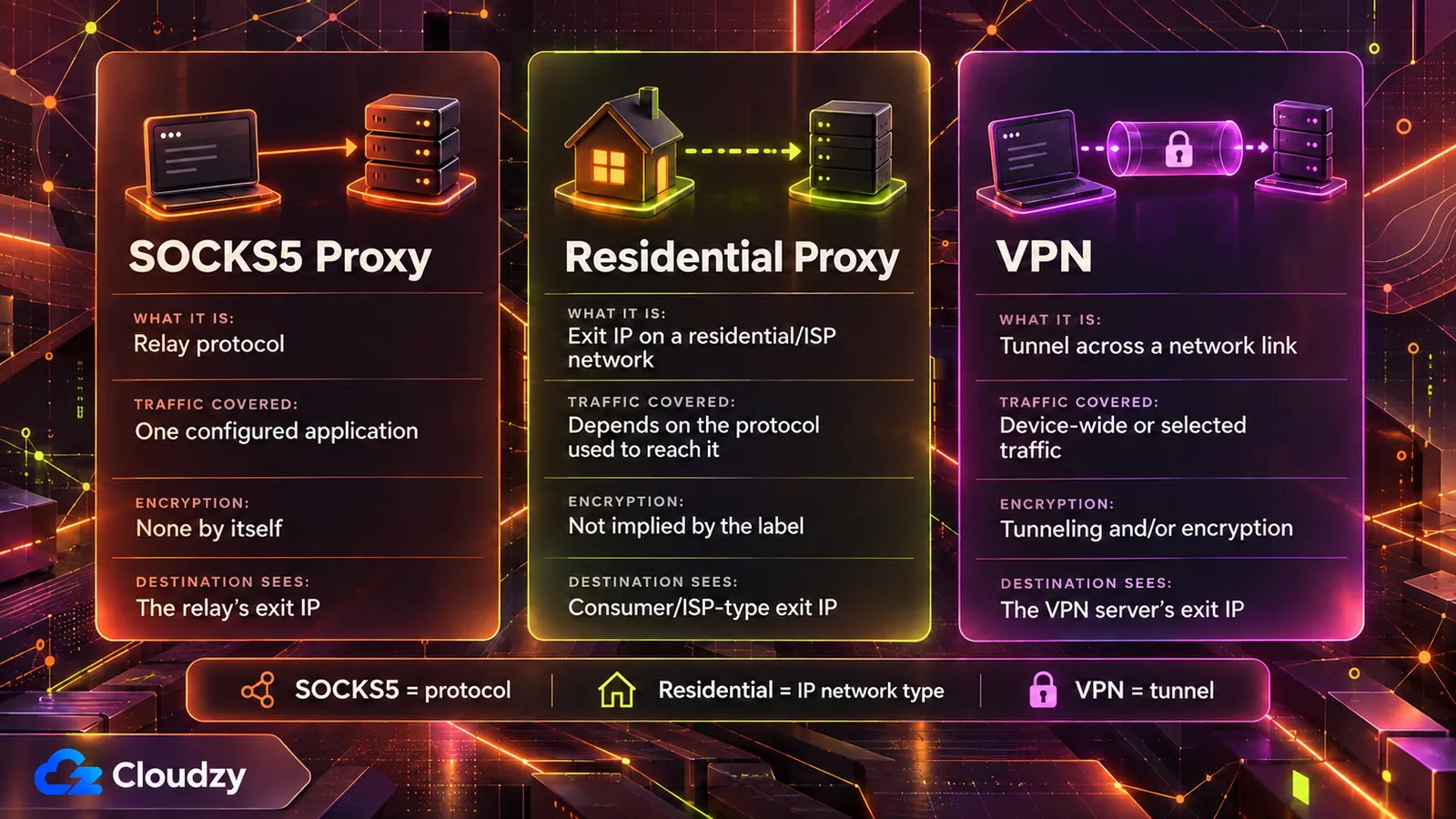
SOCKS5 is a protocol, published as RFC 1928 in March 1996, that relays one application's traffic through a server. It defines how that connection is negotiated, not who owns the exit address. Residential, datacenter, and mobile describe the network an exit address is registered to. A VPN tunnels, encrypts, or both, across a network link.
| Property | SOCKS5 proxy | Residential proxy | VPN |
|---|---|---|---|
| What the term describes | A relay protocol | The network the exit IP is registered to | A tunnel across a network link |
| Traffic covered | The application configured to use it | Depends on the protocol used to reach it | The network link it is configured on |
| Encryption | None of its own; left to the auth method | Not a property of the label | Tunneling and/or encryption (CNSSI 4009) |
| What the destination sees | The relay's exit IP | An exit IP on a consumer or ISP network | The VPN server's exit IP |
Read "SOCKS5 residential proxy" as two separate choices. "SOCKS5" is the protocol your client uses to reach the relay. "Residential" is the network the relay's exit IP belongs to. Either one can change without the other. A SOCKS5 server can just as easily sit on a datacenter address.
Buying the two together is a rational purchase once you know which half does which job.
What the SOCKS5 Protocol Defines, and What It Leaves Out
SOCKS5 negotiates an authentication method and then relays the connection. RFC 1928 defines no encryption of its own. The common no-authentication and username/password methods add none, and RFC 1929 sends the password in cleartext. RFC 1961's GSS-API method can add integrity and optional confidentiality, while a separate SSH tunnel, VPN, or TLS wrapper can protect the client-to-proxy transport. HTTPS protects the application's payload end to end, but it does not protect the SOCKS5 authentication exchange itself.
The negotiation is short. The client lists the authentication methods it supports, and the server picks one. RFC 1928 lists the method codes: no authentication, GSSAPI, username/password, and ranges reserved for assigned and private methods. Once that subnegotiation completes, the client sends its connection request and the server relays the traffic.
The specification describes itself as a "shim-layer" between the application layer and the transport layer, and it defines no cipher. If the chosen method includes encapsulation for integrity or confidentiality, RFC 1928 wraps the traffic in it: requests, replies, and relayed data.
RFC 1929, which specifies the username/password method, defines no encapsulation and states its weakness directly:
Since the request carries the password in cleartext, this subnegotiation is not recommended for environments where "sniffing" is possible and practical.
Source: RFC 1929's username/password method
The design has a history. NT Kernel's history of SOCKS5 explains that 1996-era SOCKS servers mostly ran inside networks that were "generally considered trusted," and that confidentiality was expected to be provided elsewhere. The same account notes that GSSAPI can add integrity and confidentiality, depending on the protection level negotiated, but support for it stayed far less common, and most real-world deployments still use username/password.
None of this makes HTTPS readable through the proxy. TLS 1.3 is designed to prevent eavesdropping, tampering, and message forgery between client and server, and a SOCKS5 relay only forwards those encrypted bytes.
What Makes an IP Address Residential, Datacenter, or Mobile
An exit IP is residential, datacenter, or mobile according to the network that holds it. Fraudlogix, a fraud-detection company, places datacenter IPs in data centers, hosting facilities, and cloud providers in its datacenter IP glossary. Peakhour, which sells bot management, calls residential exits consumer or ISP connectivity. It labels mobile separately: carriers use different address-sharing models, including CGNAT (carrier-grade NAT).
From the network side, the exit IP already sits inside routing and registration context before any proxy protocol touches it. One important signal is the ASN (autonomous system number) announcing the address prefix, which helps identify the network operator.
Residential proxy networks form in several ways, and not all of them involve a volunteer. Peakhour lists:
- opt-in or contracted bandwidth sharing
- free VPNs, apps, and browser extensions that route third-party traffic through users' devices
- SDKs embedded in apps
- compromised devices and routers
The SDK route has current evidence behind it. Krebs on Security's July 2026 report says security firm Spur found residential proxy SDKs in more than 42 percent of apps on LG's webOS store. More than a quarter of Samsung Tizen apps had similar components. According to Spur's report, Bright Data accounted for a majority of those SDKs across both platforms, and LG said it would suspend apps that keep the proxy option.
Bright Data told Krebs its network is built on consent and that every peer opts in through a dedicated screen. Spur's view is that "a one-time consent prompt buried in a TV app is not a substitute for meaningful transparency, ongoing control, and platform oversight." None of these sourcing models depends on SOCKS5.
Why Sites Classify the Exit Network, Not the Protocol
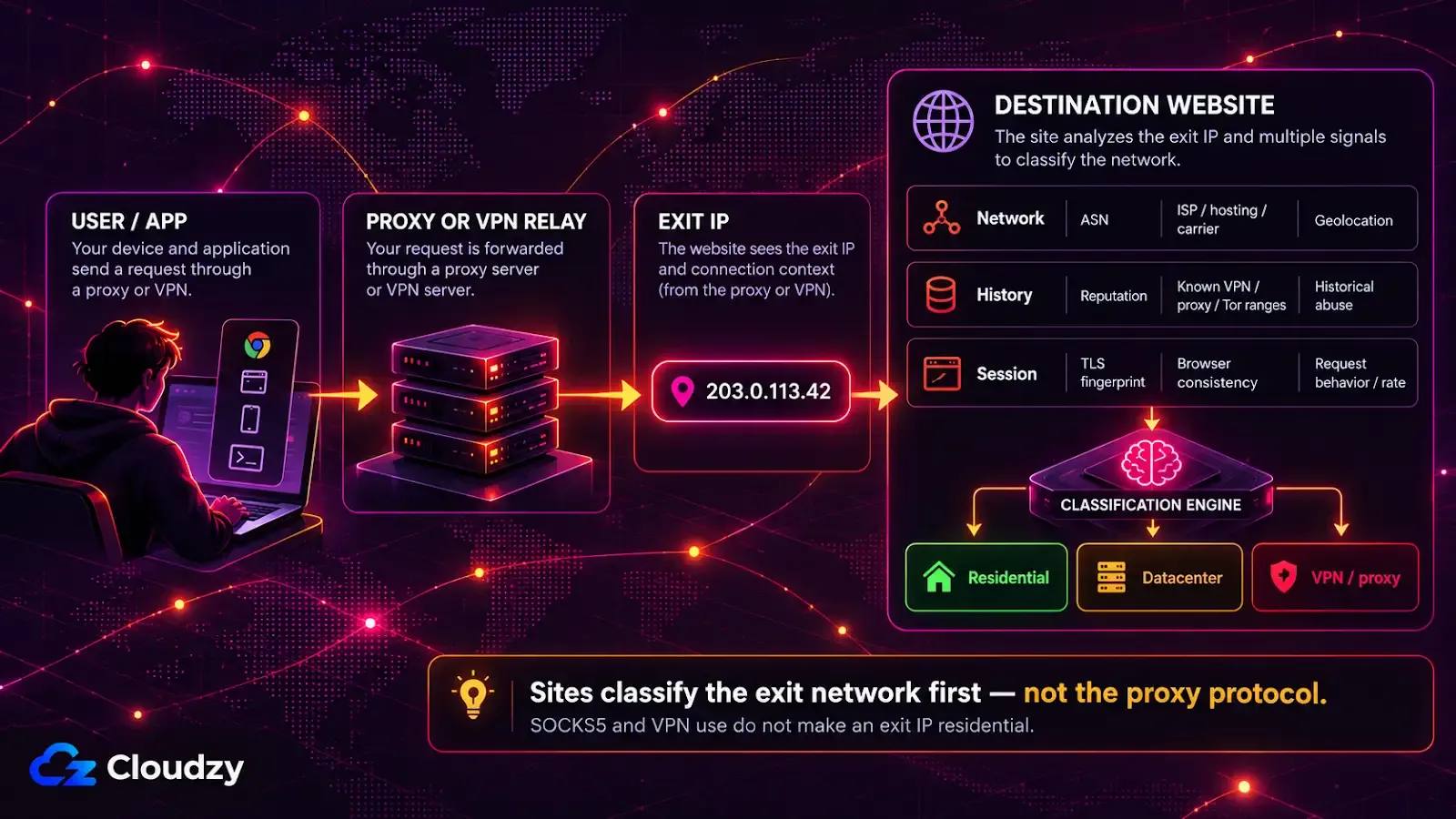
A destination site sees the proxy's exit IP, not the protocol your client used to reach the proxy. IP-based classification starts from the exit address and its context: ASN, hosting/ISP/carrier classification, reputation, and known VPN, Tor, or proxy ranges. A SOCKS5 server on a rented VPS is therefore classified as datacenter traffic.
Peakhour's residential proxy explainer says: "The destination sees the proxy exit IP, not the original source." The SOCKS5 handshake happens between your client and the relay. The site receives an ordinary connection from the relay's address.
Peakhour's page on proxy detection lists where classification usually starts: reputation, ASN, geolocation, hosting-provider classification, known VPN and Tor exits, and historical abuse. None of those signals come from the protocol. The same page says "Datacenter ranges are usually easier to identify from IP and ASN context."
Fraudlogix's IP lookup data classifies an address using signals such as whether it belongs to a datacenter, its ASN, organization, ISP, and connection type. Changing the proxy protocol, port, or authentication method does not change those properties of the exit IP.
According to Peakhour's detection page, residential and mobile addresses are harder to judge from the IP alone, because legitimate users and proxy traffic can share them at the same time. They are judged anyway: the page describes combining IP context with request-level evidence such as TLS fingerprints, browser consistency, and behavior. A residential exit that sends requests too quickly may trigger a challenge, slowdown, block, or an HTTP 429 rate-limit response.
Is a SOCKS5 Proxy the Same as a VPN?
No. A VPN carries traffic across a network link through tunneling, encryption, or both. Depending on the client and routing policy, it can cover all device traffic or only selected traffic. A SOCKS5 proxy relays the applications configured to use it and adds no encryption of its own. Both can give the destination a different exit IP, and that exit still has an underlying network type.
NIST's glossary, citing CNSSI 4009, defines a VPN as a network "constructed from the system resources of a physical network by using encryption and/or by tunneling links of the virtual network across the real network." When configured as the router's default outbound tunnel, a VPN can cover every device behind it.
Peakhour's detection page counts VPN exits among the classified categories, next to hosting providers, residential ISPs, and mobile carriers, so using a VPN does not by itself make an exit residential. The underlying exit network still determines that label. A self-hosted privacy exit node on a rented server leaves from that server's datacenter address.
Matching the Goal to the Label That Decides It
Pick the label by the goal. Redirecting one application's traffic is a proxy-protocol question. Tunneling and encrypting a device's traffic is a VPN question. Needing many addresses on consumer networks is an IP-network question, and there the protocol used to reach the address pool is a minor detail.
| Goal | Label that decides it | What that label does not decide |
|---|---|---|
| Route one application's traffic through a relay | The proxy protocol | Whether the exit looks residential |
| Tunnel and encrypt a device's traffic | The VPN | The network type of the exit |
| Many addresses on consumer networks | The IP network (residential or mobile) | Confidentiality of your traffic |
If your concern is one script's outbound address, a SOCKS5 server on your own VPS is sufficient and well understood, as long as the target accepts datacenter traffic.

Build on a Linux VPS with root access, NVMe, and AMD EPYC power.
View Linux PlansFrequently Asked Questions
Does a SOCKS5 Proxy Hide Your IP Address?
From the destination's side, yes: the site sees the proxy's exit IP instead of yours. The proxy operator sees your real IP address and any traffic your application does not encrypt itself, so hiding your address from sites means trusting whoever runs the proxy.
Can You Use a SOCKS5 Proxy and a VPN at the Same Time?
Yes, the two can be layered. When an application reaches a SOCKS5 proxy through a VPN tunnel, the VPN protects the leg from your device to the VPN server, and the proxy sets the exit IP the destination sees for that one application. The VPN does not cover the leg between the VPN server and the proxy.
Is a Residential Proxy More Secure Than a Datacenter Proxy?
Not in the sense of protecting your traffic. The residential or datacenter label changes how a site classifies the exit IP, and neither label adds encryption. A residential exit can also run through a consumer device or router whose owner's consent and security you usually cannot verify.
Discussion
Comments
Sign in to join the discussion.