You have a web app on a VPS. The access log shows login attempts on /wp-admin, requests with UNION SELECT in the query string, and steady traffic from datacenter IP ranges that have no business visiting your site. You want to filter the obvious junk before it reaches your application.
This is the moment most people meet the term WAF SaaS. For many readers, "the WAF" and "Cloudflare" are the same thing because Cloudflare is what they ran into first. They are not the same. WAF SaaS is a category: a cloud-delivered web application firewall that inspects your HTTP traffic at the provider's edge before forwarding it to your origin. Cloudflare is one product inside that category.
This article walks through how WAF SaaS works, what the major providers charge, where it fails in practice, and when running your own WAF on a Linux VPS is the better option.
TL;DR
- WAF SaaS is a cloud-delivered web application firewall. You route traffic through the provider or associate the WAF with a supported cloud resource; the service evaluates HTTP(S) requests before the protected application handles them.
- The major providers use three broad pricing shapes: subscription tiers (Cloudflare and Sucuri), usage-based billing (AWS WAF), and sales-led quotes (Imperva and Fastly). Usage-based costs rise with processed requests and optional features, while subscription plans are generally more predictable.
- A documented critique of WAF SaaS exists and is engaged below. It points at latency, false positives, opaque blocking, and third-party data routing.
- Self-hosted WAFs on a VPS are a real option. SafeLine and BunkerWeb are the two open-source projects with current momentum. They run as a reverse proxy in front of your application.
- No WAF can be a defensible choice when application security is mature, exposure is controlled, monitoring is strong, and the remaining risk is documented and accepted.
How WAF SaaS Works
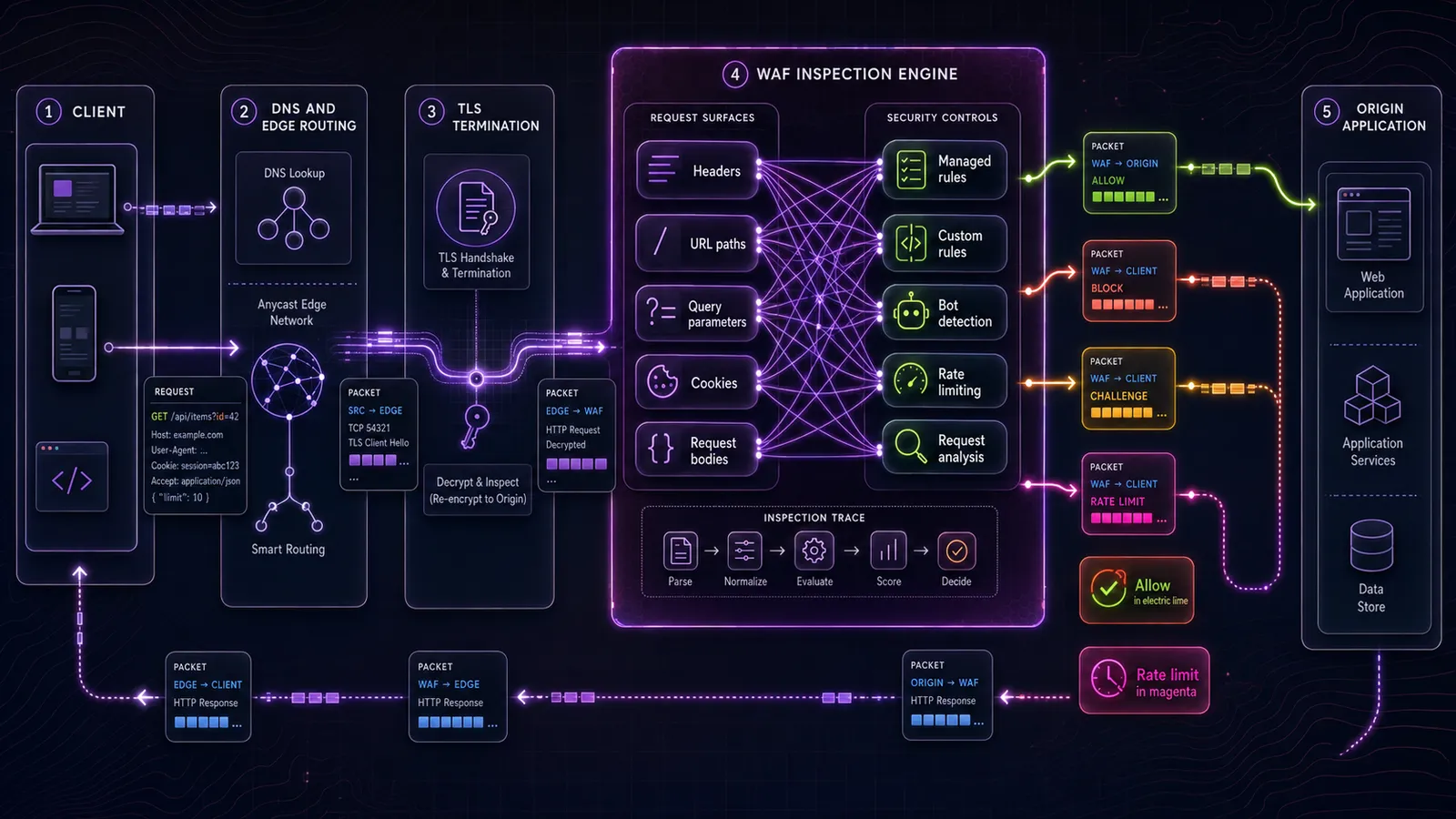
A request to example.com hits the provider's edge first because your DNS points there. The edge node terminates TLS, parses the HTTP request, runs it through a rule engine, and either forwards it to your origin, blocks it, challenges it (CAPTCHA, JavaScript test), or rate-limits the source. If it forwards, your application sees the request as if it came from the provider's IP, with the original client IP passed in a header like X-Forwarded-For or CF-Connecting-IP.
Many WAF SaaS products use a provider-managed reverse proxy or edge integration, but not every service is deployed through a DNS change. Cloudflare, Sucuri, and Fastly commonly sit in the request path at the edge. AWS WAF is associated with CloudFront or supported AWS resources such as Application Load Balancers, API Gateway APIs, and AppSync APIs. In each case, HTTP(S) requests are evaluated before the protected application handles them.
A WAF inspects Layer 7 data such as request headers, paths, query strings, methods, cookies, and the configured portion of request bodies. A traditional network firewall primarily makes decisions at Layers 3 and 4 using addresses, protocols, and ports. Our hardware vs software firewall guide covers the broader distinction.
Managed WAF protection usually draws from three rule sources:
- The OWASP Core Rule Set (CRS) is an open-source baseline for ModSecurity and compatible WAF engines. It covers common attack categories such as SQL injection, cross-site scripting, command injection, and local file inclusion. Products built around ModSecurity often ship CRS, while many cloud providers use proprietary managed rules instead.
- Vendor-managed rule sets are proprietary rules the provider keeps current. Cloudflare's "Managed Rules," AWS WAF's "AWS Managed Rules," and Imperva's threat intelligence feed all fall here.
- Custom rules are what you write yourself. "Block requests to /admin not coming from this IP range," "rate-limit /api/login to 5 per minute per IP."
A SQL-injection rule might flag a familiar pattern such as ' OR 1=1 -- in a query parameter or request body. That catches lazy probes, but a WAF can still miss obfuscated payloads, logic flaws, and malicious requests that resemble normal application traffic. It evaluates observable request signals, not business intent.
What this protects against in plain terms:
- Injection attacks where the payload matches a known signature
- Bot traffic from known scanners
- Simple brute-force patterns
- Volumetric DDoS, when the provider also runs DDoS scrubbing
- Basic API abuse
What it does not do:
- Patch your application
- Replace input validation in your code
- Stop attacks that look like normal traffic
Application security still comes from the application. A WAF raises the floor against common and automated attacks, but secure coding, patching, authorization, input handling, monitoring, and incident response set the ceiling.
WAF SaaS vs On-Prem Appliance vs Self-Hosted on a VPS
There are three common WAF deployment models in 2026: cloud WAF SaaS (Cloudflare, AWS WAF, Fastly, and others), physical or virtual appliances (including F5 and Imperva offerings), and self-hosted software on a VPS or your own server.
The three differ on four practical questions: who runs the inspection plane, who pays for capacity, who tunes the rules, and what happens when the WAF blocks something it should not have. The rest of the article uses these four as the comparison frame.
Cloud WAF SaaS
You route traffic through the provider's edge or associate the WAF with a supported cloud resource. The provider operates inspection capacity and managed updates, while you select rules, create application-specific policies, and tune exceptions. Common options include Cloudflare, AWS WAF, Imperva, Sucuri, and Fastly.
The trade-off: capacity and ops are someone else's problem. Every HTTP request also routes through someone else's infrastructure. Your HTTP traffic passes through the provider's infrastructure, and request metadata or matched payload snippets may be logged depending on the provider, product, and logging settings.
On-Prem Appliance WAF
A physical or virtual appliance sits in your network path. Buyers are typically organizations with established network-security operations, fixed-capacity requirements, strict deployment controls, or existing vendor relationships. Capacity, upgrades, high availability, and tuning remain the customer's responsibility.
For many small-to-mid teams, appliance procurement, fixed capacity, and operational overhead make this the least practical path. It can still fit organizations that need an in-network control plane and have staff to operate it.
Self-Hosted WAF on Your Own VPS
You install a WAF on a Linux VPS, point your DNS at the VPS, and the WAF sits as a reverse proxy in front of your application. You run it. You tune it. You log in at 2 a.m. when a managed rule update blocks a legitimate request and there is no one else to call.
Two open-source projects have current momentum: SafeLine, an open-source WAF using a semantic analysis engine rather than pure regex matching, and BunkerWeb, an NGINX-based WAF shipping ModSecurity. Their licenses, deployment models, and resource footprints are covered later, in the self-hosting section.
The trade-off is the inverse of the SaaS model. You control the inspection plane, capacity, logs, and tuning. This reduces dependence on a third-party WAF provider, but upstream networks and hosting providers still carry traffic. Infrastructure limits, bandwidth, patching, and incident response are now your responsibility.
SaaS WAF vs Self-Hosted WAF on Your VPS
The comparison table below focuses on the practical differences sysadmins must operate and budget for.
| Criteria | Cloud SaaS WAF | Self-Hosted WAF on a VPS |
|---|---|---|
| Who runs the inspection plane | The provider, at the network edge | You, on your VPS |
| Who pays for capacity | The provider, billed back to you on subscription or per-request | You, fixed cost of the VPS |
| Who tunes the rules | You configure; provider ships managed rule updates | You, end-to-end |
| Recourse for false positives | Tune rules and exceptions within provider controls; escalate platform issues | Edit the rule yourself; redeploy in minutes |
| Data routing | Requests pass through the provider's inspection infrastructure | Requests pass through infrastructure you control before reaching the origin |
| Cost shape during a traffic spike | Usage-based components can rise with request volume | Usually more predictable, but bandwidth and scaling can still add cost |
| Ops burden | Low, limited to configuration and tuning | You operate the VPS and the WAF |
WAF SaaS Pricing in 2026
WAF SaaS pricing usually combines subscription tiers, usage-based charges, or sales-led quotes. Public prices are not directly comparable because providers package managed rules, bot controls, logging, support, and DDoS features differently.
| Provider | Pricing model | Entry price | Entry tier includes | Notes |
|---|---|---|---|---|
| Cloudflare | Subscription tier | Free; Pro $20/mo annual or $25/mo monthly; Business $200/mo annual or $250/mo monthly | Free Managed Ruleset; broader controls vary by paid plan | Verify the current rules, limits, and included security features before purchase |
| AWS WAF | Per-request | $5 per web ACL/month plus $1 per rule or rule group/month plus $0.60 per million requests | Self-managed rules; AWS Managed Rules can be added as managed rule groups | Extra capacity, body inspection, premium managed groups, CAPTCHA, Challenge, Bot Control, and Fraud Control can add charges |
| Imperva | Enterprise quote | Contact sales | Managed rules, threat intelligence, and API-security options | No directly comparable public self-service WAF price |
| Sucuri Platform | Subscription tier | Basic Firewall $9.99/mo; Basic Platform $229/year | Firewall plan: WAF/CDN; Platform bundle adds scanning and cleanup services | The standalone firewall and annual platform bundle are different products |
| Fastly | Sales-led | Contact sales | Edge or distributed inspection, managed rules, and API protection | No directly comparable public self-service WAF price |
AWS WAF publishes component pricing, while Cloudflare and Sucuri publish self-service plan prices. Imperva and Fastly use sales-led pricing for comparable WAF offerings.
As checked on July 29, 2026, Cloudflare plan pricing lists Pro at $20 per month billed annually or $25 billed monthly, and Business at $200 per month billed annually or $250 billed monthly. Sucuri firewall pricing lists Basic Firewall at $9.99 per month and Basic Platform at $229 per year. The firewall and platform bundles are different products. The AWS WAF figures above come from AWS WAF pricing as of the same date.
Imperva and Fastly do not publish directly comparable self-service WAF prices, so treat both as contact-sales options rather than relying on third-party estimates.
The AWS WAF pricing page lists base charges of $5 per web ACL per month, $1 per rule or rule group per month, and $0.60 per million processed requests. Additional charges can apply for extra capacity, larger body inspection, CAPTCHA or Challenge actions, premium managed groups, and fraud or bot controls. Attack traffic can therefore increase the bill, but the impact depends on volume, duration, and enabled features. Rate-based rules protect the application; they do not make already processed WAF requests free.
Where WAF SaaS Falls Short
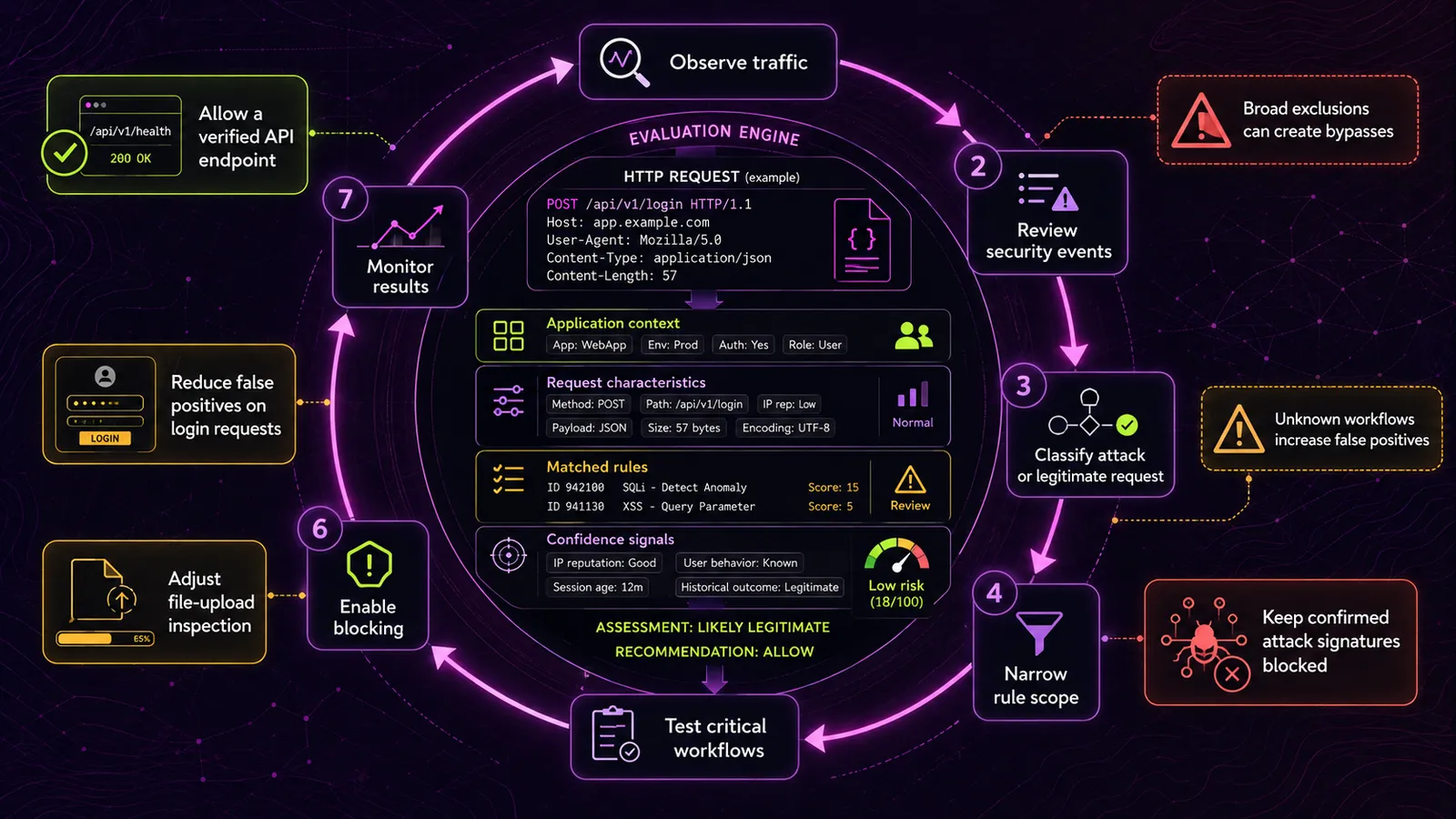
False positives are the first practical limitation. A legitimate upload, API call, or form submission can resemble an attack pattern and trigger a managed rule. The operator then has to identify the matching rule, narrow or exclude it, and confirm that the exception does not create a broader bypass.
WAFs make decisions from request signals rather than business intent. Strict rules can block legitimate traffic; broad exceptions can weaken protection. Cloud services usually provide event logs, rule overrides, and custom responses, but the available visibility and tuning controls vary by plan and provider.
Pro tip. Start new or materially changed rules in detection or count mode. Observe representative traffic, test critical and infrequent workflows, review false positives, and add narrowly scoped exclusions before enabling blocking. Current CRS tuning guidance recommends one to two weeks, or until peak traffic and critical workflows have been exercised.
The second limitation is performance overhead. A 2023 ModSecurity benchmark measured 9,462 small-file uploads at 7.36 seconds with CRS enabled versus 4.55 seconds without it. Throughput fell from 2,079 to 1,285 requests per second, while peak nginx CPU rose from 8% to 73%. This was one configuration and workload, so use it as evidence that inspection has a cost, not as a universal sizing ratio.
The third limitation is data routing. Every HTTP request, including request bodies, passes through the provider's infrastructure. For applications handling personally identifiable information, financial transactions, or medical data, this is a concrete data-sovereignty question. EU-hosted applications routing customer requests through a US-based WAF provider have a clearer audit trail to answer, and a few extra contractual terms to agree to, than the same application using a self-hosted reverse proxy on a VPS in the same jurisdiction.
The fourth limitation is tuning burden. WAF tuning challenges include false positives, limited application context, and rules that must keep pace with frequent code changes. The source is a vendor perspective, but the operational pattern is real: teams either invest in continuous tuning or leave more rules in detection-only mode.
The same 2023 critique argues that WAFs can become security theater when teams rely on them instead of fixing the application. That argument is strongest for teams with mature application security: parameterized database access, strong authorization, regular dependency scanning, immutable deployment practices, and effective monitoring. For less mature environments, a WAF can still reduce exposure to common automated probes. Both points can be true.
WAFs are one layer of defense-in-depth. They are not a substitute for application security, and they are not security theater either. The marginal value of a WAF is high for some teams and low for others. The deciding factor is what the application looks like underneath.
When Self-Hosting a WAF Makes Sense
Self-hosting wins in three situations. It loses in three others. The wins first.
Self-hosting wins when policy or data-sovereignty constraints rule out inspection by an external WAF SaaS intermediary, when traffic patterns make usage-based pricing less attractive than running dedicated infrastructure, and when a team wants direct control over blocking decisions and false-positive fixes.
Self-hosting loses when there is no operational capacity, when the application sits on a managed platform whose routing model makes an external proxy awkward, or when a provider-managed free tier already satisfies the required controls with less complexity.
Cloudflare's Free plan can be a practical starting point for small-to-mid teams that already use its DNS or CDN and accept its traffic-inspection model. Self-hosting becomes more attractive when data routing, direct rule control, or predictable infrastructure costs matter more than minimizing operations.
SafeLine and BunkerWeb
Two open-source self-hosted WAFs are worth knowing about.
SafeLine is licensed GPL-3.0, deployed with Docker Compose, and built around semantic analysis rather than a pure CRS ruleset. The SafeLine repository reports 71.65% detection, 0.07% false positives, and 99.45% overall accuracy in Balance mode across its own 33,669-sample evaluation. These are project-maintainer measurements, not an independent benchmark, and should not be generalized beyond that test set.
BunkerWeb is licensed AGPL-3.0 and uses NGINX under the hood. It integrates ModSecurity with the OWASP Core Rule Set and supports several deployment models, including Linux, Docker, Swarm, and Kubernetes.
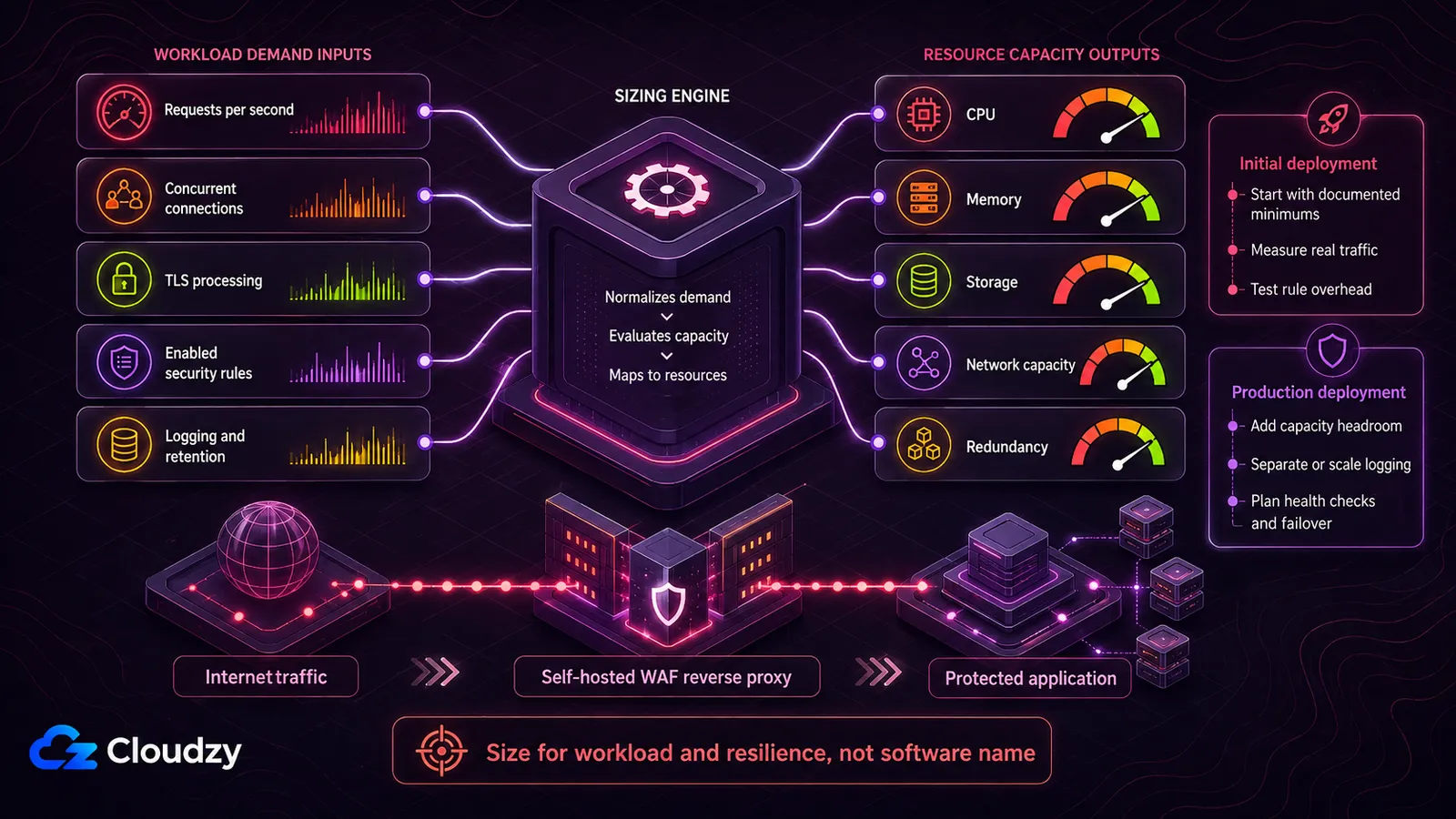
Size either project from measured request volume, enabled protections, TLS work, and log retention. For a low-traffic SafeLine deployment, 2 vCPU and 4 GB RAM is a conservative starting point with room above the install minimum. Current BunkerWeb quickstart guidance recommends at least 2 vCPU and 8 GB RAM for testing or very few services, and 4 vCPU with 16 GB RAM for production environments protecting many services. Storage depends mainly on log rate and retention, so measure it instead of promising a fixed number of months.
Pro tip. Run the self-hosted WAF in the same region as the application origin whenever possible. A distant proxy adds an inter-region network round trip to requests and can quietly degrade latency. Measure end-to-end response time from user regions before production cutover.
You operate the WAF yourself, which means the underlying infrastructure is also your responsibility: uptime, security patches, TLS certificates, backups, log rotation, monitoring, capacity, and recovery. Test failure behavior as carefully as the filtering rules so the WAF does not become a single point of failure.
A Decision Framework
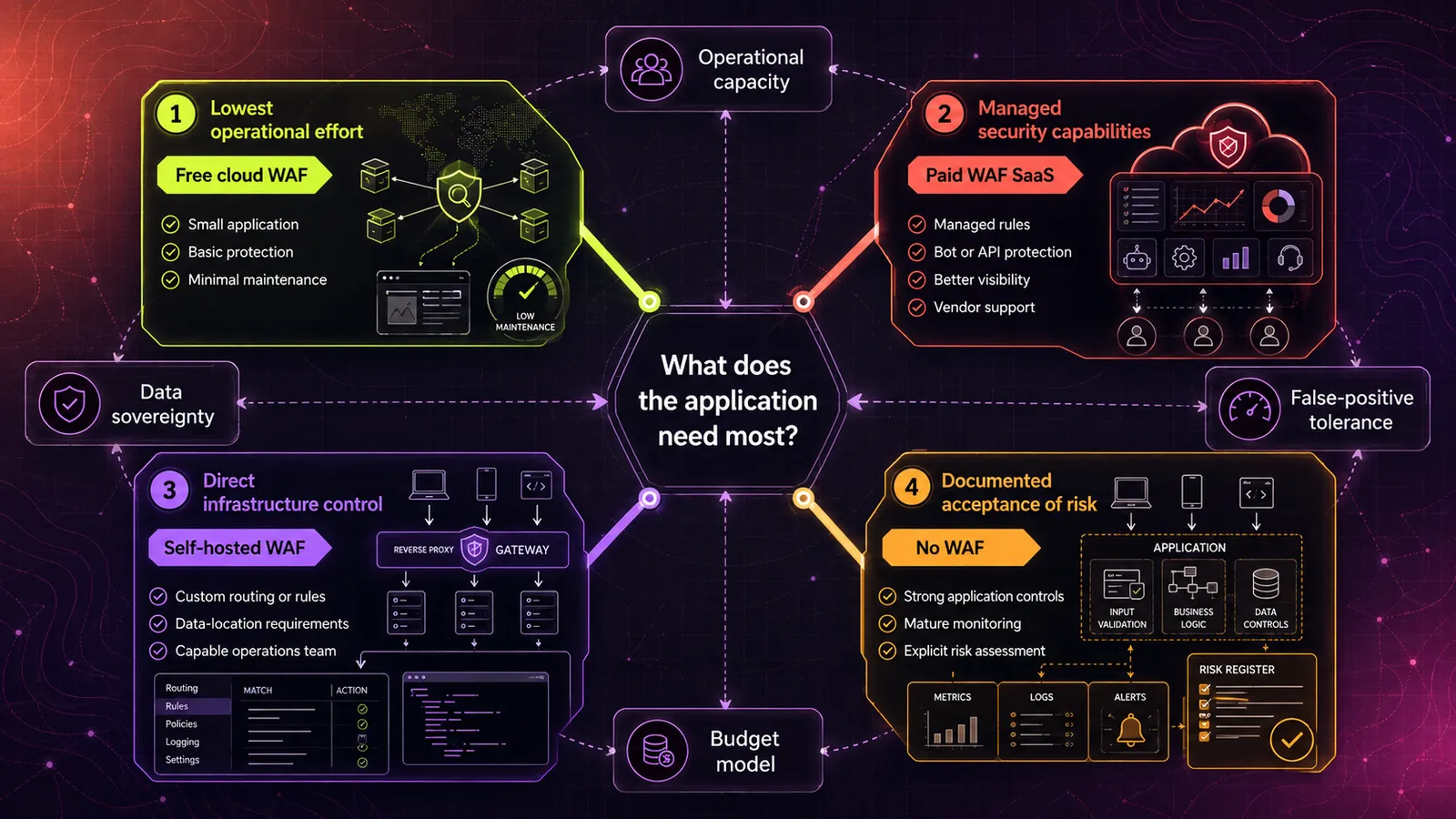
Four paths exist: Cloudflare's free tier, a paid cloud WAF SaaS, a self-hosted WAF on a VPS, and no WAF at all. The condition that picks each one is different.
Choose a free cloud WAF tier when the available managed rules and limits match the application's risk, the data-routing model is acceptable, and minimizing operational work is the priority. Test real workflows before assuming the defaults are sufficient.
Choose a paid WAF SaaS when you need more managed rules, logging, custom controls, bot or API protection, support, or capacity than the free tier provides. Compare the exact feature and limit matrix, not only the plan name. AWS WAF is strongest when the application already uses supported AWS resources and the team is comfortable forecasting component-based charges.
Choose a self-hosted WAF when the earlier self-hosting conditions apply and your team can operate the proxy reliably. SafeLine and BunkerWeb are the two projects to evaluate first.
No WAF can be a defensible choice when application security is mature, exposure is deliberately controlled, monitoring is strong, and the residual risk is documented and accepted. It should not be the default merely because a framework performs input validation.
Conclusion
Choose WAF SaaS for provider-managed capacity and lower operational overhead. Choose self-hosting for direct control when the team can run the proxy reliably. In either model, stage rules, measure latency and false positives, and keep application security primary.
If self-hosting fits your requirements, start with a Linux VPS in the same region as the origin. Cloudzy also provides one-click marketplace deployments for SafeLine and for BunkerWeb, so you can start testing without building the base stack by hand.

Build on a Linux VPS with root access, NVMe, and AMD EPYC power.
View Linux PlansFrequently Asked Questions
What Is WAF as a Service?
WAF as a service is a cloud-delivered web application firewall. Traffic reaches the service through DNS or reverse-proxy routing, edge integration, or association with a supported cloud resource. The provider operates the inspection capacity and managed updates; you select policies, tune exceptions, and add application-specific rules.
Is Cloudflare a WAF?
Yes. Cloudflare provides WAF functionality as part of a broader edge platform that also includes DNS, CDN, and DDoS services. Free plans receive the Cloudflare Free Managed Ruleset; broader rulesets, controls, analytics, and bot-management capabilities depend on the selected plan and add-ons.
Is Cloudflare's Free WAF Enough?
It depends on the application's attack surface, required rules, logging and retention needs, API or bot controls, support requirements, and tolerance for false positives. The Free Managed Ruleset may be a useful baseline, but authentication, payments, or regulated data do not automatically map to one paid plan. Compare the current feature limits and validate them against your threat model.
What Is the Difference Between a WAF and a Firewall?
A traditional network firewall primarily filters traffic using Layer 3 and 4 information such as addresses, protocols, and ports. A WAF evaluates Layer 7 HTTP(S) requests, including configured headers, paths, parameters, and body content. Modern security products can blur these boundaries, but the controls remain complementary rather than interchangeable.
What Is WAAP and How Does It Differ From WAF?
WAAP stands for Web Application and API Protection. It is broader than a traditional WAF: vendors usually combine WAF rules with API discovery or enforcement, bot management, and application-layer DDoS or abuse controls. The exact bundle varies by provider, so WAAP should not be treated as a standardized feature set.
Do I Need a WAF if My Framework Already Does Input Validation?
Not always. Framework controls reduce risk, but they do not cover every automated-abuse pattern. Add a WAF only when it addresses a defined risk that justifies its cost and tuning.