
Running yt-dlp on a VPS gives long downloads a machine that stays online after you close your laptop. It also creates a clean path from a scheduled channel pull to a media library that Jellyfin can scan.
The server changes three parts of the workflow: installation needs current YouTube dependencies, account-gated videos need a secure cookie transfer, and automation needs deliberate request pacing. The setup below handles all three without assuming that every download needs cookies, a web interface, or a PO Token provider.
TL;DR
- Install yt-dlp in a Python virtual environment with ffmpeg, ffprobe, yt-dlp-ejs, and a supported JavaScript runtime. Deno is the runtime the project currently recommends.
- Start without account cookies. Add them only for private playlists, age-restricted videos, members-only content, or another account-gated case.
- Keep yt-dlp's default single-fragment behavior until you have a measured reason to change it. Use sleep options and staggered schedules to reduce request pressure.
- Raw CLI plus systemd is the simplest dependable setup. Choose Pinchflat for hands-off channel rules, MeTube for a browser-based queue, or Tube Archivist for a searchable watch interface.
- Treat storage as the main sizing variable. Test a representative sample before buying disk capacity for a full archive.
Use yt-dlp Responsibly
Only archive media when you have permission and your use complies with the platform's terms and applicable law.
- Good candidates include your own uploads, public-domain media, and material whose rights holder has authorized the download.
- A YouTube Premium subscription does not by itself grant permission to copy videos outside YouTube's provided features.
- YouTube's permissions and restrictions limit downloading and automated access unless the service or relevant rights holders authorize it.
- This tutorial does not cover DRM circumvention, commercial redistribution, or ways to evade platform enforcement.
What You Need Before Starting
The base installation is small, but the media files are not. Prepare the server and storage path before downloading a full channel.
- An Ubuntu 22.04 or newer VPS, or a current Debian release, with SSH access
- Python 3.10 or newer
- Enough storage for a representative sample plus headroom for partial files and post-processing
- A separate local browser only if you need account cookies
- Optional: Jellyfin, Emby, or another media server that can read the archive directory
Why Put yt-dlp on a VPS?
A VPS is useful when the job must keep running independently of your daily computer. It gives the downloader a persistent process, a predictable filesystem, and a scheduler that does not stop when a laptop sleeps or changes networks.
The trade-offs matter. Your server's monthly transfer allowance can become a limit when you stream the archive back out, and a VPS IP may encounter request limits sooner than your home connection. You also own updates, credential handling, backups, storage cleanup, and media-server security. For a one-off download, a laptop is simpler. For recurring pulls or a shared media library, a VPS is easier to operate.
Size the VPS Around Storage and Playback
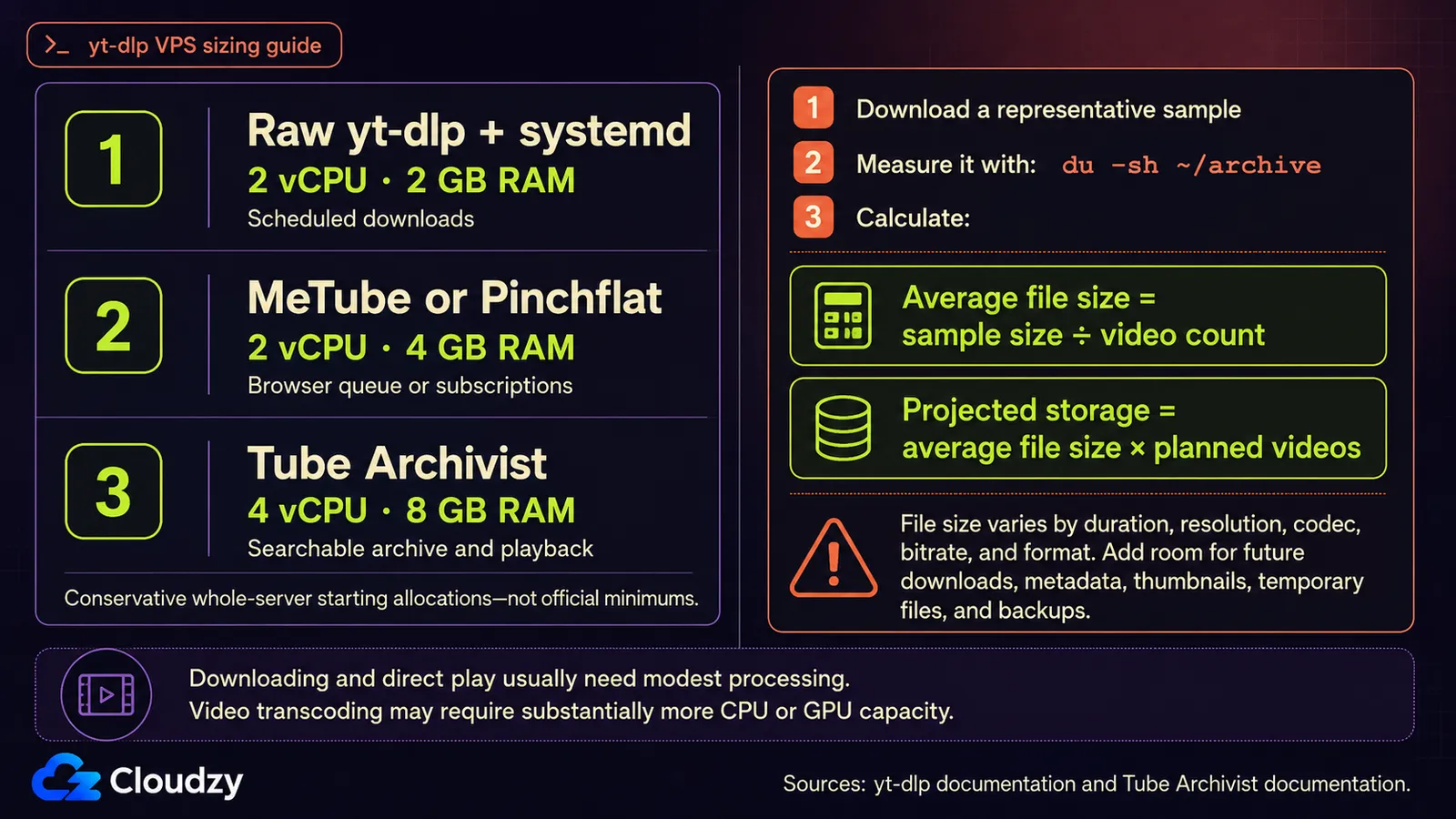
yt-dlp downloads and remuxes media; it does not normally transcode every file. That keeps the downloader's steady CPU and memory needs modest, while disk usage varies with video duration, resolution, codec, and the selected format.
Use these allocations as conservative starting points, not official minimums:
| Setup | Starting Allocation | Storage Approach | Best Fit |
|---|---|---|---|
| Raw yt-dlp with systemd | 2 vCPU, 2 GB RAM | Size from a sample | Scheduled downloads without a UI |
| MeTube or Pinchflat | 2 vCPU, 4 GB RAM | Size from a sample | Browser queue or channel subscriptions |
| Tube Archivist | 4 vCPU, 8 GB RAM | Local disk with growth headroom | Searchable archive and built-in playback |
A small test needs about 2 GB of available memory and a medium-to-large installation about 4 GB, according to the Tube Archivist deployment guide. Starting above that floor leaves room for the operating system, Docker, Elasticsearch activity, and another service such as Jellyfin.
Before sizing a full archive, simulate or download a representative group at your chosen resolution. Check the resulting directory with du, divide by the number of completed videos, and account for unusually long uploads.
du -sh ~/archive
find ~/archive -type f \( -name '*.mp4' -o -name '*.mkv' \) | wc -l
df -h ~/archive
The sample is more useful than a generic gigabytes-per-video estimate because it reflects the channel's actual duration and format mix.
Install yt-dlp and Its Current Dependencies
The yt-dlp project supports Python 3.10 and newer. The yt-dlp dependency list strongly recommends ffmpeg, ffprobe, yt-dlp-ejs, and a supported JavaScript runtime for full YouTube support.
Start with the system packages and an isolated Python environment:
sudo apt update
sudo apt install -y python3 python3-venv ffmpeg curl nano
python3 -m venv ~/yt-dlp-venv
source ~/yt-dlp-venv/bin/activate
python -m pip install -U --pre "yt-dlp[default]"
Deno is enabled by default in yt-dlp and is the runtime the project's EJS guide currently recommends. Install it, add it to your shell path, and verify every component:
curl -fsSL https://deno.land/install.sh | sh
export PATH="$HOME/.deno/bin:$PATH"
echo 'export PATH="$HOME/.deno/bin:$PATH"' >> ~/.profile
yt-dlp --version
ffmpeg -version | head -1
deno --version
yt-dlp --simulate --verbose "https://www.youtube.com/watch?v=VIDEO_ID"
The verbose output lists the dependencies yt-dlp can see. If ffmpeg is missing, yt-dlp warns and cannot merge separate best-quality video and audio streams or run several post-processing steps.
For a pip installation, update by rerunning pip inside the virtual environment. The built-in yt-dlp -U command is for release binaries, not pip packages.
source ~/yt-dlp-venv/bin/activate
python -m pip install -U --pre "yt-dlp[default]"
Update channels are covered in the yt-dlp update notes. Stable, nightly, and master are all available, and nightly is the project's recommendation for regular users because extractor fixes arrive there before the next stable release.
Add Cookies Only for Account-Gated Content
Try the target URL without cookies first. The yt-dlp YouTube guide says cookies are only necessary for content that requires an account, including private playlists, age-restricted videos, and members-only content. OAuth login no longer works with yt-dlp.
When cookies are necessary, export a dedicated YouTube session on your local computer. The project's cookie export procedure uses a private browsing window so YouTube does not rotate the exported session in an open normal tab:
- Open one private or incognito window and sign in to YouTube.
- In the same tab, open the YouTube robots.txt file.
- Export only the youtube.com cookies in Netscape format with one of the extensions listed in the yt-dlp FAQ.
- Close the private window and do not reopen that session.
- Copy the file to the VPS and restrict its permissions.
scp cookies.txt your-user@your-vps-ip:~/cookies.txt
ssh your-user@your-vps-ip 'chmod 600 ~/cookies.txt'
Test the file with an account-gated URL:
~/yt-dlp-venv/bin/yt-dlp \
  --cookies ~/cookies.txt \
  --simulate \
  "https://www.youtube.com/watch?v=VIDEO_ID"
Cookie files are session credentials, and browser extensions require careful selection, per the yt-dlp cookie FAQ. The YouTube extractor guide also warns that using an account with yt-dlp can lead to a temporary or permanent ban. Use cookies only when the target requires them, keep the file private, and use a separate account rather than your primary Google account.
Do not put --cookies in the global configuration when most targets are public. Use a second configuration file or add the flag only to the jobs that need it.
Treat PO Tokens as Conditional Troubleshooting
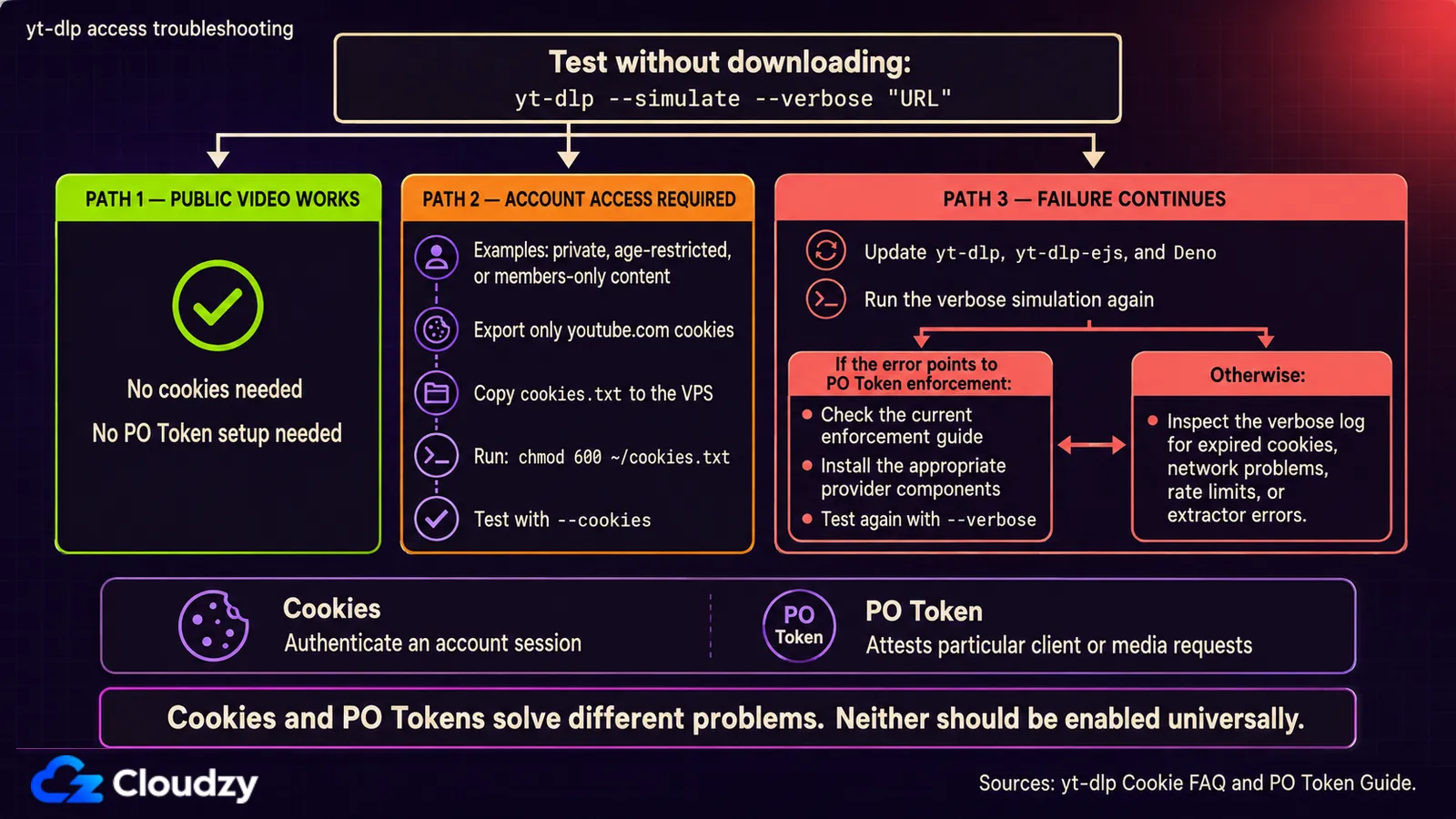
A Proof of Origin Token is not a universal installation requirement. YouTube currently enforces these tokens for some client and request combinations, and the exact matrix changes.
A provider plugin for the mweb client is recommended when the default clients fail, per the yt-dlp PO Token guide. It lists bgutil-ytdlp-pot-provider as one featured option, but the plugin requires both a token provider and a yt-dlp plugin. Installing the Python package alone is not a complete setup.
Use this order when a YouTube download fails:
- Update yt-dlp, yt-dlp-ejs, and the JavaScript runtime.
- Reproduce the failure with --verbose and no extra client override.
- Add cookies only if the video requires an account.
- If the error points to PO Token enforcement, follow the current provider instructions linked from the official guide.
This keeps a volatile workaround out of an otherwise stable base installation.
Choose a Frontend by Workflow
The main decision is not which interface has the longest feature list. Decide whether you need a browser queue, rule-based subscriptions, or a complete local YouTube-style library.
| Option | Deployment | Good At | Main Trade-Off |
|---|---|---|---|
| Raw CLI | No frontend | Scripts, config files, systemd, exact flag control | No browser UI |
| MeTube | One Docker container | Browser-based downloads plus channel and playlist subscriptions | Limited library management after download |
| Pinchflat | One Docker container | Rules for channels and playlists, RSS, retention, media-center output | Built for download management, not in-app watching |
| Tube Archivist | App, Redis, and Elasticsearch containers | Search, metadata, queues, channel pages, and playback | Highest memory and operational overhead |
For a lightweight browser workflow, MeTube supports channel and playlist subscriptions that periodically check for new items and queue them automatically. It remains the simplest choice when you mainly want a web form and download queue.
Pinchflat is the strongest fit for ongoing channel archiving that will be consumed through Jellyfin, Plex, Kodi, or an RSS client. It is self-contained, periodically checks sources, supports retention rules, and deliberately leaves playback to another application.
Tube Archivist earns its extra services when you want the archive itself to behave like a searchable video site. If Jellyfin already provides your playback interface, start with raw CLI or Pinchflat and add Tube Archivist only when its search and metadata model solve a problem you have.
Build a Repeatable Archive Configuration
Keep the durable options in one file and pass the channel URL from the command line or scheduler. This example limits output to 1080p, records completed video IDs, adds light request pacing, and writes metadata that remains useful outside yt-dlp.
Create the directories and configuration file:
mkdir -p ~/.config/yt-dlp ~/archive
nano ~/.config/yt-dlp/archive.conf
Add these options:
-P "~/archive"
-o "%(channel)s/%(upload_date>%Y-%m-%d)s - %(title)s [%(id)s].%(ext)s"
-f "bv*[height<=1080]+ba/b[height<=1080]"
--merge-output-format mp4
--download-archive ~/archive/downloaded.txt
--sleep-requests 1
--sleep-interval 5
--max-sleep-interval 10
--write-info-json
--write-thumbnail
--write-subs
--write-auto-subs
--sub-langs en.*
--embed-subs
--embed-thumbnail
--embed-metadata
--sponsorblock-mark all
Run a one-video test before giving yt-dlp a full channel:
~/yt-dlp-venv/bin/yt-dlp \
  --config-location ~/.config/yt-dlp/archive.conf \
  "https://www.youtube.com/watch?v=VIDEO_ID"
Then run a channel or playlist URL with the same configuration:
~/yt-dlp-venv/bin/yt-dlp \
  --config-location ~/.config/yt-dlp/archive.conf \
  "https://www.youtube.com/@CHANNEL/videos"
The --download-archive file records successfully downloaded IDs, so future runs skip them. Keep the default --concurrent-fragments 1 initially. yt-dlp's YouTube guide recommends delays between videos when a session reaches request limits; it does not publish a universal safe fragment-concurrency ceiling for VPS IPs.
Schedule Downloads With systemd
A user-level systemd timer gives the job persistent scheduling and logs without putting a long command in cron. The randomized delay also prevents every scheduled source from starting at the same second. To avoid relying on the user manager's PATH, the service points yt-dlp directly to Deno's default install location.
Create the service:
mkdir -p ~/.config/systemd/user
nano ~/.config/systemd/user/yt-dlp-archive.service
[Unit]
Description=Archive a YouTube channel with yt-dlp
[Service]
Type=oneshot
ExecStart=%h/yt-dlp-venv/bin/yt-dlp --js-runtimes deno:%h/.deno/bin/deno --config-location %h/.config/yt-dlp/archive.conf https://www.youtube.com/@CHANNEL/videosCreate the timer:
nano ~/.config/systemd/user/yt-dlp-archive.timer[Unit]
Description=Run the yt-dlp archive daily
[Timer]
OnCalendar=*-*-* 04:00:00
RandomizedDelaySec=30m
Persistent=true
[Install]
WantedBy=timers.targetEnable the timer and allow the user service to run when you are not logged in:
systemctl --user daemon-reload
systemctl --user enable --now yt-dlp-archive.timer
sudo loginctl enable-linger "$USER"
systemctl --user list-timers
journalctl --user -u yt-dlp-archive.service -n 100 --no-pager
For multiple channels, create one service instance per channel or use separate timers. Stagger them rather than launching several large pulls together.
Connect the Archive to Jellyfin
Mount or expose the same ~/archive directory to Jellyfin, then add it as a library. For the raw channel/date layout, Jellyfin's Music Videos library accepts nested folders and arbitrary filenames without online metadata matching. The label is imperfect for non-music archives, but the filesystem fit is better than the "Shows" type, which expects series and season folders with SxxEyy episode names. Avoid Mixed Content unless you accept Jellyfin's warning that its metadata results can be unreliable.
The metadata, thumbnail, and subtitle options in the yt-dlp configuration keep useful information beside or inside each file. Jellyfin may still need manual metadata adjustments because a YouTube channel does not map cleanly to a TV-series database.
If you want Jellyfin-specific filenames and metadata with less manual work, Pinchflat has media-center presets for that workflow. For the wider choice between media servers, our Jellyfin and Plex comparison covers playback, remote access, and transcoding trade-offs.
Put the Stack on a Persistent Server
Once the workflow succeeds on a small test set, move it to Cloudzy's Linux VPS so scheduled downloads and your media library can stay online without tying up your daily computer. You can also deploy Jellyfin as a one-click app and point its library at the yt-dlp output directory.

Build on a Linux VPS with root access, NVMe, and AMD EPYC power.
View Linux PlansFrequently Asked Questions
Does yt-dlp Need a GPU on a VPS?
No. yt-dlp can download and remux media without a GPU. A GPU becomes relevant when Jellyfin or another media server must transcode video for incompatible clients or lower-bandwidth connections; direct playback does not require that conversion.
Can yt-dlp Resume an Interrupted Download?
Yes. yt-dlp enables partial files and continuation by default, so a later run normally resumes downloaded fragments instead of starting them again. Do not add --no-continue, --no-part, or --force-overwrites if you want that behavior.

Discussion
Comments
Sign in to join the discussion.