
You stop Gitea, install Forgejo, copy app.ini and your data directory, and start the service the way every migration guide describes. The web UI comes up. Then the database migration fails, or worse, Forgejo refuses to start because your schema version is too new for it to understand. You are on Gitea 1.23 or later, and the simple in-place upgrade everyone documents does not apply to you anymore.
Forgejo became a hard fork of Gitea in early 2024, and the two projects have since diverged at the database schema level. How you migrate Gitea to Forgejo now depends entirely on your Gitea version. This guide gives you the exact path for your version, the complete commands for both native and Docker installs, the workarounds for Gitea 1.23+, and a verification checklist, so you migrate without losing repositories, issues, or users.
TL;DR
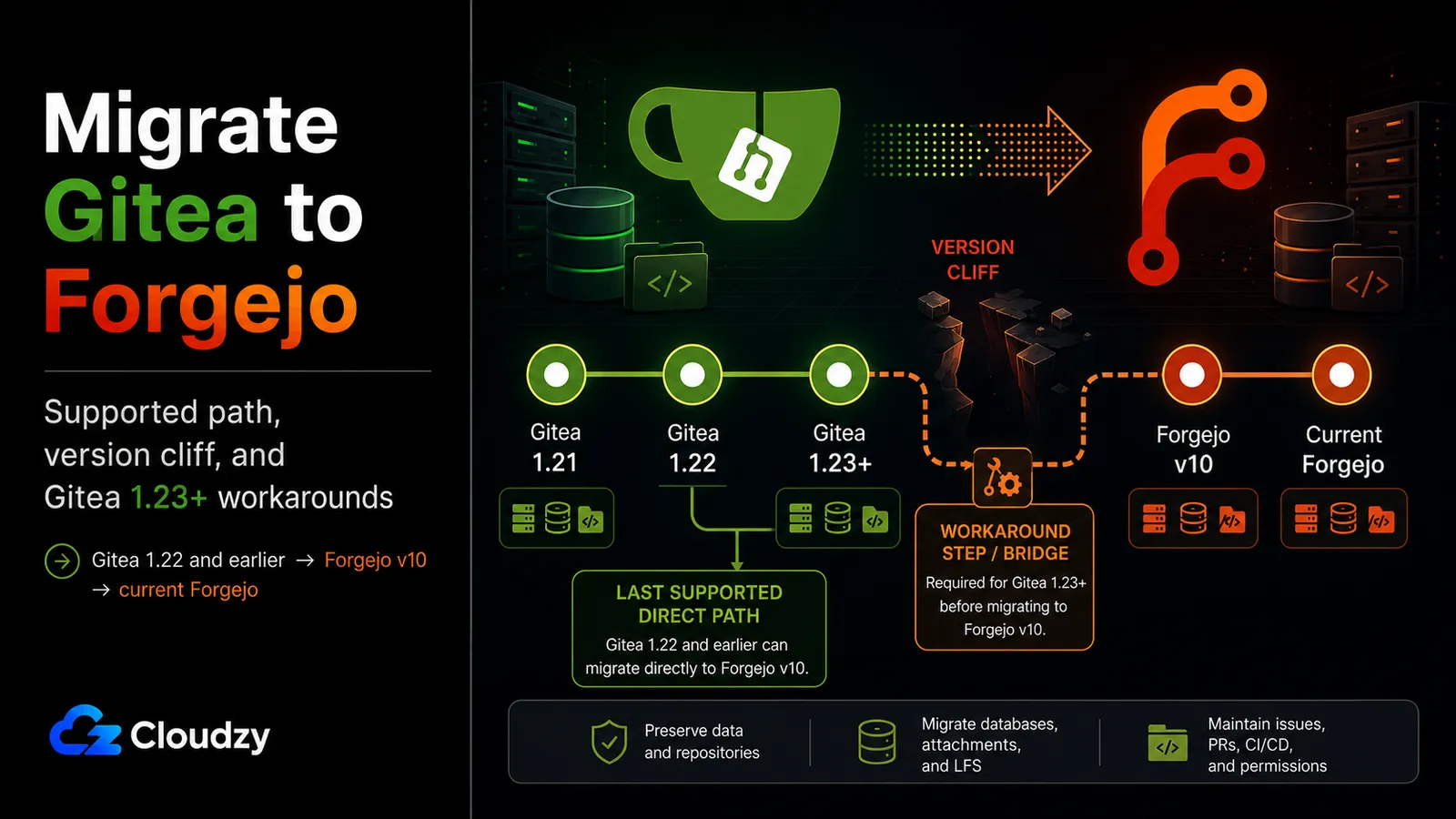
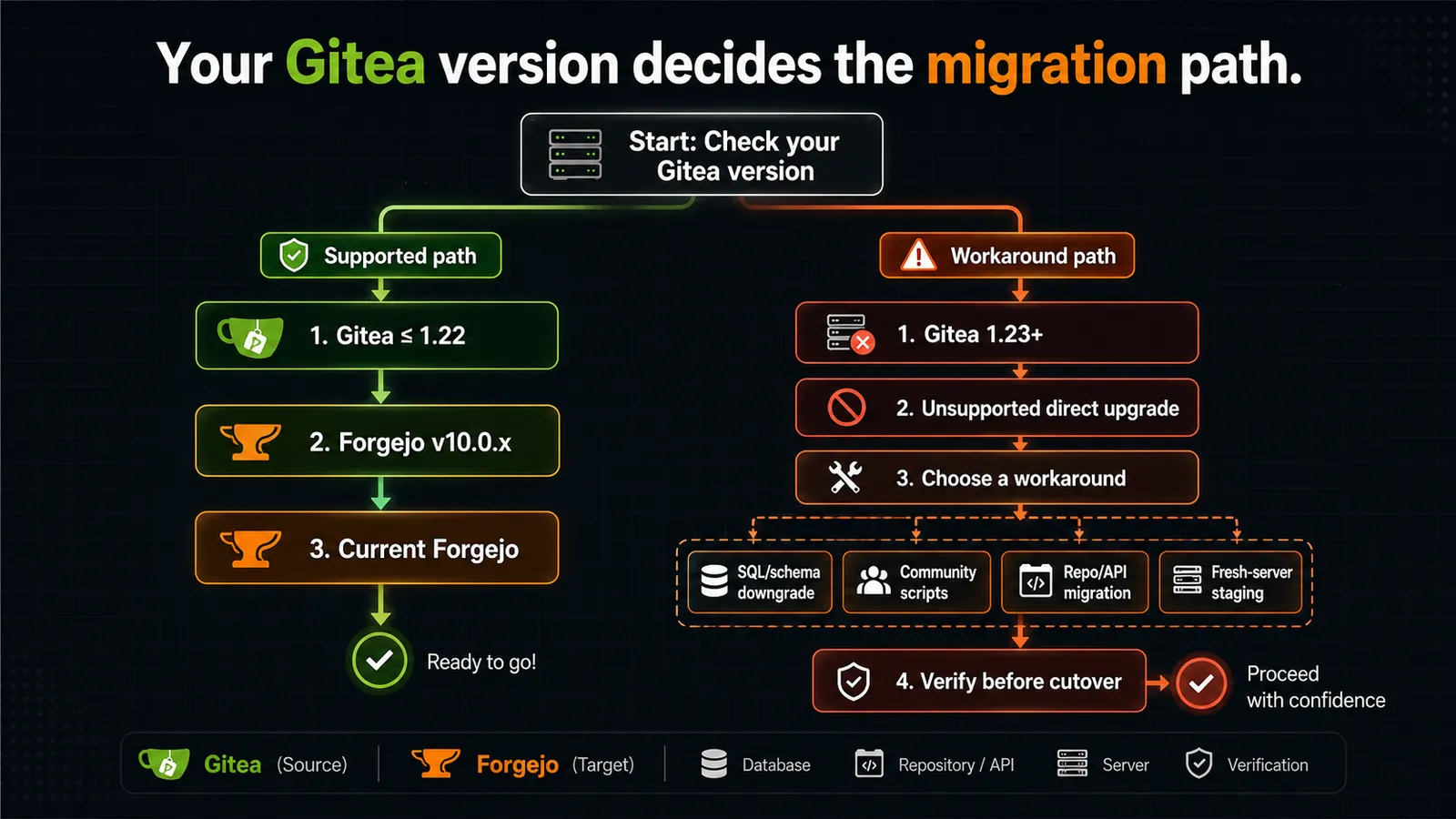
- The version cliff is real. Forgejo v10.0 was the last release to support a transparent direct upgrade from Gitea. Gitea v1.22 is the highest version that can take the supported direct path.
- On Gitea v1.22 or earlier: migrate to Forgejo v10.0.x first, then upgrade Forgejo v10 to the current release (v15). Two hops, both supported.
- On Gitea v1.23 or newer: there is no officially supported direct path. You choose between a SQL/schema downgrade, community migration scripts, repo/API migration, or a fresh-server staging migration using one of those methods. Each carries a different data-loss trade-off.
- Back up your data directory and your database before you touch anything. Every path below assumes you have a restorable backup. The unsupported paths assume it twice.
- Some things always need post-migration attention: plan to recreate or audit Personal Access Tokens, re-register Actions runners, and delete and rebuild the Bleve search index. Plan for these regardless of path.
- Migrating is not mandatory. Gitea is actively maintained. The "stay on Gitea" decision holds up if the migration risk outweighs the benefit for your situation.
Out of scope here: migrating from Gogs, GitHub, or GitLab to Forgejo, and setting up Forgejo Actions from scratch.
Prerequisites / What You'll Need
Before you run a single command, confirm you have a full, restorable backup of two things: your Gitea data directory (/var/lib/gitea on a default native install) and your database. If your database is SQLite, that file lives inside the data directory; if it is PostgreSQL or MySQL, dump it separately with pg_dump or mysqldump. A migration without a verified backup is not a migration, it is a gamble.
You will also need:
- Your current Gitea version. Run
gitea --version(ordocker exec <container> gitea --version). This number decides your entire path. - Your database type: SQLite, PostgreSQL, or MySQL. Some workarounds are database-specific.
- Root or sudo access on the server.
- An awareness that the supported path installs Forgejo v10.0 as an intermediate hop. Forgejo v10.0 has been EOL since April 16, 2025. You install it only for the duration of the migration and upgrade away from it immediately.
Why the Direct Upgrade Path Broke
In December 2024 the Forgejo project published a compatibility statement that drew a hard line: "Future Forgejo versions will not support upgrades from Gitea instances running version v1.23 or above." That sentence is the whole problem in one line.
When Forgejo forked from Gitea in early 2024, the two codebases kept diverging, and the database schemas drifted apart. Forgejo maintained a compatibility window so existing Gitea operators could move across, but that window had an end. Forgejo v10.0, released January 16, 2025, was "the last version to allow a transparent upgrade from Gitea v1.22 or lower." Anything newer than v10.0 will not read a Gitea database directly.
The timing is what catches people. Gitea v1.23 shipped in late 2024, and the current Gitea release as of June 2026 is v1.26.4. If you kept your Gitea instance reasonably current, you are already past the cliff and the standard tutorials no longer describe your situation.
Section takeaway: the supported direct path tops out at Gitea v1.22. Everything newer needs an extra step.
Find Your Migration Path by Gitea Version
Run gitea --version, find your row, and follow the path in the third column. Everything else in this guide is the detail behind these rows.
| Gitea version | Supported Forgejo target (direct) | Migration path |
|---|---|---|
| ≤ 1.21 | Forgejo v7.0 – v10.0 | Swap to Forgejo v10.0.x, then upgrade to current (v15) |
| 1.22 | Forgejo v8.0 – v10.0 | Swap to Forgejo v10.0.x, then upgrade to current (v15) |
| 1.23 | None (unsupported) | SQL version patch (Option A), then the supported path |
| 1.24 – 1.25.2 | None (unsupported) | Sequential SQL downgrade scripts (Option B), then the supported path |
| 1.26+ | None (unsupported) | Experimental script or repo-by-repo API migration (Option C) |
The version compatibility statements come straight from the official Forgejo compatibility announcement: Gitea up to v1.21 can move to Forgejo v7.0 through v10.0, and Gitea v1.22 can move to Forgejo v8.0 through v10.0. Both top out at v10.0 as the last supported direct target.
Underneath the version question sit three migration strategies, and it helps to see them before the step-by-steps:
- In-place, same server. Swap the binary or container image on the existing box. Lowest effort when your version supports it; requires the v10.0 intermediate hop.
- Fresh server staging. Provision a new server and use it as a safe target for the migration method that matches your Gitea version. This protects the original Gitea box and makes rollback easier, but it does not bypass the Gitea 1.23+ database-schema problem.
- Repo/API migration. Use Forgejo's migration tools to pull repositories from the old Gitea instance. Git history is the reliable part; metadata such as issues, PRs, labels, releases, wiki data, and comments should be treated as best-effort and verified repo by repo.
The Supported Path: Gitea v1.22 or Earlier
If you are on Gitea v1.22 or earlier, the official migration docs describe a two-step path: migrate to Forgejo v10.0.x, then upgrade Forgejo v10 to the current release. The first step is a drop-in swap because Forgejo v10.x reads a Gitea v1.22 database; the second step is a normal Forgejo upgrade.
There are two ways to do this depending on how Gitea runs on your server. Pick the one that matches your existing setup. If Gitea runs as a system service, use the native path. If Gitea runs in a container, use the Docker path. Forgejo v10.x acts as a drop-in replacement for Gitea v1.22.x.
Native (systemd) Path
Back up first. Then install Forgejo v10.0.x using your distribution's package or the release binary pinned to v10.0. Stop Gitea before you copy anything. A running service writing to its data directory mid-copy will corrupt the copy.
# Stop the running Gitea service before touching its data
systemctl stop gitea
Copy the configuration and the data directory into Forgejo's locations, then fix ownership. The config file must be group-readable by the forgejo group; the data must be owned by the forgejo user.
# Copy the existing Gitea config to Forgejo's config path
cp /etc/gitea/app.ini /etc/forgejo/app.ini

# Back up the copied config before rewriting paths
cp /etc/forgejo/app.ini /etc/forgejo/app.ini.bak

# Update old Gitea data paths to Forgejo data paths
sed -i 's#/var/lib/gitea#/var/lib/forgejo#g' /etc/forgejo/app.ini

# Forgejo reads its config as the forgejo group; grant group write
chown root:forgejo /etc/forgejo/app.ini && chmod g+w /etc/forgejo/app.ini

# Copy the data directory and hand ownership to the forgejo user
rsync -aHAX --numeric-ids /var/lib/gitea/ /var/lib/forgejo/
chown -R forgejo:forgejo /var/lib/forgejo
Start Forgejo and enable it on boot.
# Start Forgejo and enable it at boot
systemctl start forgejo && systemctl enable forgejo
Before you upgrade off v10.0, flush the queues so no in-flight work is lost during the version jump.
# Flush pending queue items before the version upgrade
forgejo manager flush-queues
Now upgrade Forgejo v10.0.x to the current release by replacing the binary with v15 and restarting the service, following the standard Forgejo upgrade guide. After both hops, run the doctor to check the database and fix what it can.
# Check everything; write a log you can read if something is wrong
forgejo doctor check --all --log-file /tmp/doctor.log
Read /tmp/doctor.log before applying any automatic fix. Use --fix only when the doctor output identifies a specific repair you understand or when you are following an official troubleshooting path.
If doctor reports no critical errors and the web UI lists your repositories, the first migration is complete.
Docker / Container Path
If Gitea ran as a container, run Forgejo the same way. Use the Forgejo v10.x image as a drop-in replacement for your Gitea v1.22.x image, pointing it at the same data volume and database. Confirm your Docker version is at least 20.10.6 first. Older versions produce undefined behavior with Forgejo containers.
The one container-specific detail that trips people: environment variables. Forgejo retains the GITEA_ prefix for compatibility, but the docs recommend passing both prefixes so your configuration survives a future Forgejo version that drops the old names.
# docker-compose.yml (excerpt): pass both prefixes for forward compatibility
environment:
  - GITEA__database__DB_TYPE=postgres
  - FORGEJO__database__DB_TYPE=postgres
  # ...repeat the dual-prefix pattern for every config override you pass
For rootless containers, the data must be owned by user 1000 and group 1000, matching the rootless image's runtime user. After the container starts on v10.x, run the same forgejo doctor check --all from inside the container, then upgrade the image tag to the current v15 release and restart.
If You're on Gitea v1.23 or Newer
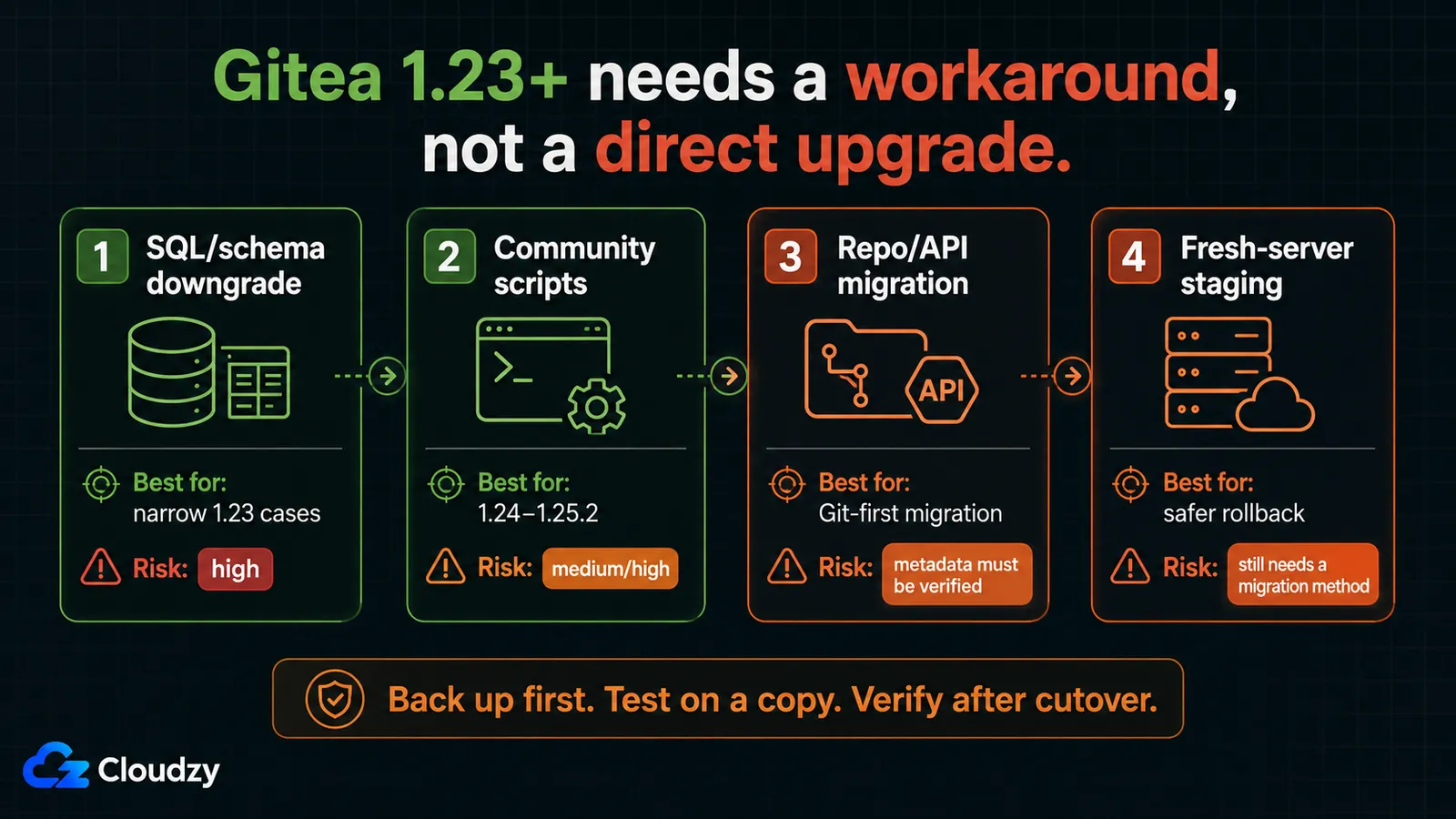
This is where the standard guides stop and where most current installs actually are. There is no officially supported direct path off Gitea v1.23+, so every option below is either community-sourced or lossy. Before you run any of them, take a full backup of your data directory and your database, and confirm you can restore it. These approaches modify production data; the backup is your only undo.
The three options differ in risk and in how much they preserve. Pick the one whose trade-off you can accept.
Option A: SQL Schema Downgrade / Version Patch
The narrowest workaround downgrades the database schema version so Forgejo v10 treats it as a v1.22 database.
Note: Do not treat the version update as a complete downgrade by itself. The recorded migration version and the actual schema must match. On Gitea 1.23.x, test the full downgrade on a copy first and compare the schema before pointing Forgejo at it.
A Forgejo maintainer described the SQL in Codeberg issue #7638:
-- Downgrade the recorded schema version to the v1.22 baseline (PostgreSQL/MySQL)
UPDATE version SET version=305 WHERE id=1;
After this, you follow the supported path as if you were on v1.22. The critical caveat: the maintainer confirmed this only for Gitea v1.23.1 specifically, not all of v1.23.x. The schema version number is exact; applying the wrong target value to the wrong Gitea release can leave the database in a state no migration can recover. This is PostgreSQL/MySQL, it is not officially supported, and it is not tested as a general procedure.
Pro Tip
Setting version=305 directly skips the 304→305 migration, which changed how TOTP secrets are encoded. Codeberg issue #8210 documents that this corrupts two-factor authentication for affected users. The fix is to set the version to 304, let the migration run, or to clear the two_factor table rows so users re-enroll. Do not skip this if any account uses TOTP.
Option B: Sequential SQL Downgrade Scripts (Gitea 1.24–1.25.2)
For versions between 1.24 and 1.25.2, a single version patch is not enough: the schema moved through several intermediate states. The community scripts at xlrl/prepare-gitea-migration-to-forgejo walk the schema back through the intermediate versions to v1.22, after which you take the supported path. These scripts are community work, not an authoritative procedure, and they target SQLite as the primary case. Run them only against a database you have already backed up.
Option C: Repo-by-Repo API Migration (Gitea 1.26+ or Any Version)
The repo/API path preserves Git data most reliably. Depending on the source, permissions, and migration method, optional metadata such as issues, pull requests, labels, milestones, releases, wiki data, and comments may also be available, but treat those as best-effort and verify them repo by repo. For a code-only archive this is usually fine; for a server where the issue tracker is the team's memory, test the metadata transfer before committing to this path.
Two experimental tools attempt fuller migrations for 1.23+ but carry their own gaps. pacnpal/gitea2forgejo (GitHub) does a full dump plus API sync and requires a matching SECRET_KEY for encrypted fields to transfer, but it does not move Personal Access Tokens, Actions runners, webhook callback URLs, or 2FA. nicoverbruggen/gitea-to-forgejo (GitHub) is a Podman-based experimental tool that transfers users, keys, orgs, repos, issues, PRs, releases, and mirrors, but not 2FA tokens, Actions runtime data, or dangling OCI package manifests. Treat both as experimental and verify the result against the transfer matrix below.
Section takeaway: there is no officially supported direct path off Gitea 1.23+. Pick the option whose data-loss trade-off you can live with, and back up before you start.
Migrating on a Fresh Server Is Safer, but It Does Not Bypass the Version Cliff
A fresh server is the safest place to stage and verify the migration, but it is not a separate schema-compatibility path. If your source is Gitea v1.22 or earlier, install Forgejo v10.0.x on the target first, restore or copy the Gitea data there, let Forgejo run the supported database migrations, and then upgrade that Forgejo v10 instance to the current Forgejo release.
If your source is Gitea v1.23 or newer, do not restore the Gitea database straight into current Forgejo and expect it to start. You still need one of the unsupported 1.23+ approaches above: a staged SQL downgrade or revert, a community migration tool, or a repo/API migration. The fresh server reduces rollback risk because the original Gitea box stays untouched; it does not remove the need to handle the database version mismatch.
This is where Cloudzy's one-click Forgejo app can help: use it as the clean target instance, then run the migration method that matches your Gitea version. Cloudzy's marketplace image gives you a ready Forgejo target on our high-performance VPS, so you can focus on the restore, verification, and cutover steps instead of the initial installation. The migration plan still depends on whether you are before or after the Gitea 1.22 cliff.
What Transfers and What You Must Redo
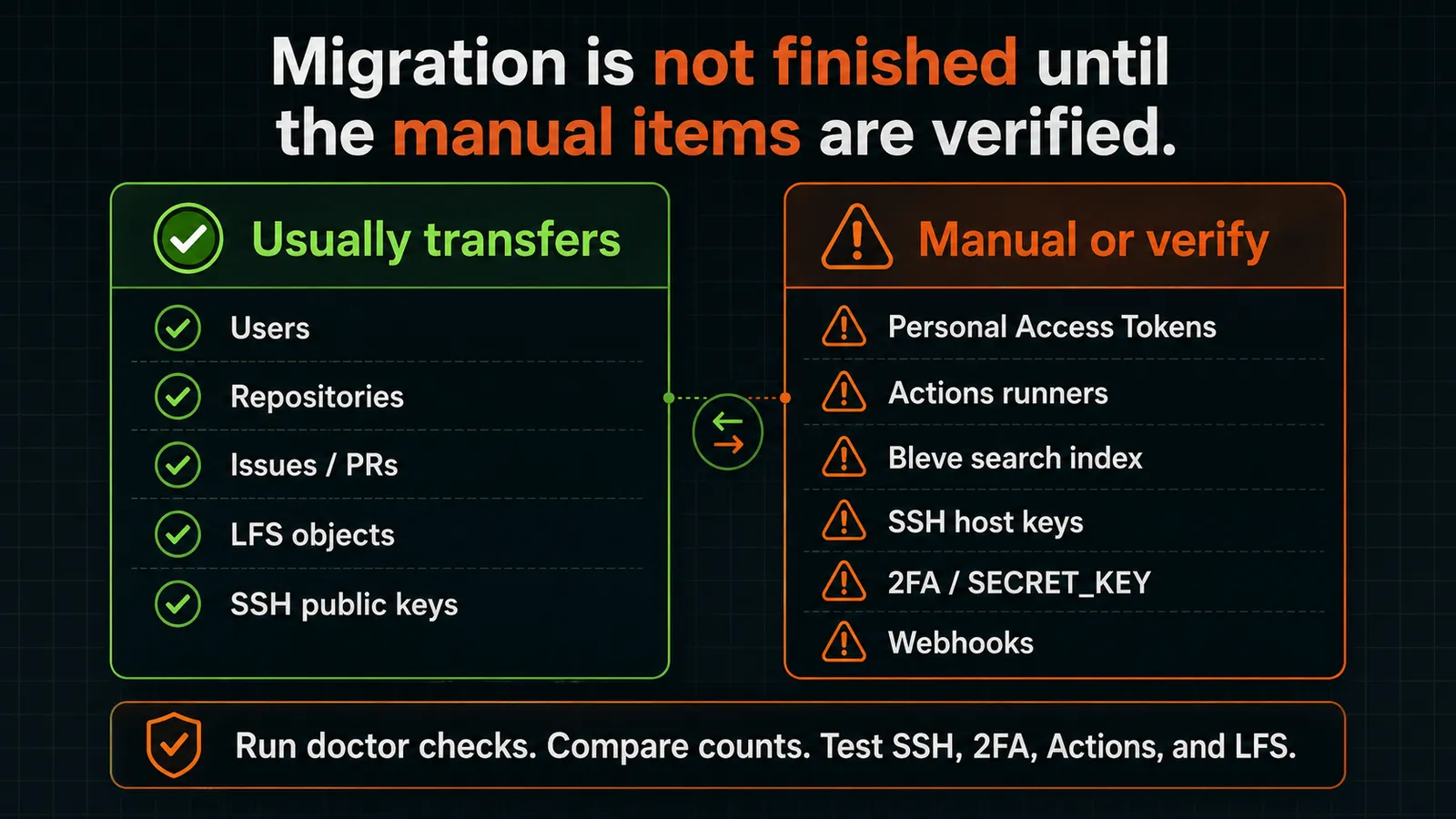
Some of your data moves automatically, some moves only if a condition holds, and some never moves and must be recreated by hand. Knowing which is which before you start is the difference between a clean cutover and a week of confused users.
| Item | Transfers? | Condition |
|---|---|---|
| User accounts + passwords | Yes | Automatic |
| User SSH public keys | Yes | Automatic |
| SSH host keys (server identity) | No (manual) | Copy /etc/ssh/ssh_host_* or every client hits a host-key mismatch |
| Repositories + git history | Yes | Via data directory copy |
| Issues, PRs, labels, milestones, comments | Yes | Via the database |
| LFS objects | Yes | Verify object count and total size match |
| Webhooks (config) | Yes | Delivery history is not migrated |
| CI/CD secrets | Conditional | Only if SECRET_KEY matches; silently unreadable otherwise |
| OAuth apps | Conditional | Only if SECRET_KEY matches; callback URLs may need updating |
| 2FA (TOTP seeds) | Conditional | Only if SECRET_KEY matches |
| Personal Access Tokens | Plan to recreate / audit | Safest post-migration practice; verify before relying on old tokens |
| Actions runner registrations | No (must re-register) | Registration tokens are hostname-scoped |
| Actions run history / logs | No | Not migrated by any path |
| Bleve search index | No (delete + rebuild) | Delete /var/lib/gitea/data/indexers/ and let it regenerate |
| Custom branding / templates | Yes (files) | public/assets/img/ must now live in custom/ |
| Per-repo deploy keys | No (re-add manually) | Not migrated by any path |
Four items hit hardest because they break silently or affect every user, so handle them deliberately: users should recreate or audit their Personal Access Tokens, you must re-register your Actions runners against the new hostname, you must delete the Bleve search index so Forgejo rebuilds it cleanly, and you must rewrite any uses: short references in your Actions workflows to full GitHub URLs, because Forgejo and Gitea pull actions from separate mirrors and a relative reference resolves to the wrong place.
Pro Tip
If you run Gitea and Forgejo in parallel during the migration and both point at the same Redis instance, change Forgejo to Redis db=1 before you start. Both default to db=0, and if they share it, Gitea consumes Forgejo's migration events and destroys the migration queue. (blog.mei-home.net documents this exact failure.)
Section takeaway: Personal Access Tokens, Actions runners, per-repo deploy keys, and the Bleve search index are always manual. Schedule them as migration tasks, not afterthoughts.
Verify the Migration Succeeded
Start with the doctor, then check the numbers, then test the things users actually do. The doctor catches database-level problems; the manual checks catch the data-loss and access problems the doctor cannot see.
- Run
forgejo doctor check --all --log-file /tmp/doctor.log, then read the log before making changes. Use--fixonly for a specific repair you understand. - Confirm the repository count, the issue and PR counts, and the LFS object count and total size all match your pre-migration numbers. A mismatch here means something did not come across.
- Test an SSH push and pull. If clients get a host-key mismatch, you did not copy /etc/ssh/ssh_host_* to the new server.
- Log in and confirm 2FA works for an account that uses it. If TOTP is broken, see the Option A caveat above.
- Regenerate Personal Access Tokens, re-register Actions runners, and run a test workflow.
A few post-migration symptoms have known causes. A missing favicon or logo means your branding assets are still in public/assets/img/ instead of custom/, where Forgejo now expects them. 404 errors on package routes point to misconfigured storage paths. Actions failing with "repository not found" is the uses: mirror problem. Switch to full URLs. A blank or 500 page after login on a SQLite database means you are below the minimum, which the upgrade docs put at Forgejo v1.19.3-0.
When It Makes Sense to Stay on Gitea
Migrating is a choice, not an obligation. If you are already past the cliff and the migration complexity outweighs the governance or feature benefit for your situation, staying on Gitea is a legitimate choice. Gitea is actively maintained (multiple releases per month, currently at v1.26.4), and CommitGo offers commercial options including Gitea Enterprise, Gitea Cloud, and SOC 2 Type 2 certification for teams that need them.
There is also the EOL-intermediate concern to weigh honestly. The supported direct path requires briefly installing Forgejo v10.0, which has been EOL since April 2025. That is acceptable as a transient migration step you upgrade away from immediately, but some operators will object on policy grounds. For them, repo/API migration into a fresh Forgejo instance can avoid the EOL hop entirely, while fresh-server staging still depends on the migration method you choose.
If your reason to move is development activity, the data supports Forgejo as the more active project: an analysis by honeypot.net counted 3,039 Forgejo commits against 1,228 Gitea commits over July 2024 to May 2025, and 232 Forgejo contributors against 153 for Gitea over the year ending May 2025. That is one signal among several; weigh it against your migration risk rather than treating it as decisive.
Section takeaway: migrating is not mandatory. The decision is a governance-and-activity preference weighed against migration risk, and both choices are defensible.
Pick Your Path and Back Up First
Your migration path comes down to one number: your Gitea version. On v1.22 or earlier you take the supported two-step path through Forgejo v10. On v1.23 or newer you choose a workaround by the data loss you can accept: SQL/schema downgrade, community scripts, repo/API migration, or a fresh-server staging migration. Whichever path you take, back up your data directory and database first, run forgejo doctor after, and confirm your repository, issue, and LFS counts match what you started with.
Identify your version, take the backup, and follow the matching row. The path is more involved than the old tutorials promised, but it is well-defined once you know where you stand on the version cliff.
Frequently Asked Questions
Can I Upgrade Directly from Gitea to Forgejo?
Yes, if you run Gitea v1.22 or earlier: upgrade directly to Forgejo v10.0, then upgrade Forgejo v10 to the current release. No, if you run Gitea v1.23 or newer. Forgejo v10.0 was the last release supporting a transparent direct upgrade, so newer Gitea versions need a workaround instead.
What Version of Gitea Is Compatible with Forgejo?
Gitea v1.22 and earlier have a supported direct upgrade path to Forgejo (up to Forgejo v10.0, then onward to current). Gitea v1.23 and newer have no officially supported direct path, because Forgejo stopped supporting transparent upgrades from Gitea v1.23+ as of releases after v10.0.
Can I Migrate from Gitea 1.26 to Forgejo?
Yes, but not through a supported direct upgrade. Your options are a repo/API migration, where Git history is the reliable part and metadata must be tested repo by repo, an experimental migration script, or a fresh-server staging migration using one of the unsupported 1.23+ methods above. There is no officially supported in-place path from Gitea 1.26.
Do My Personal Access Tokens Transfer?
Plan to recreate or rotate Personal Access Tokens after migration. Some migration paths do not preserve them, and even when tokens remain present, users should audit scopes before relying on them again. Any scripts or integrations using old tokens should be tested and updated after cutover.
Do My Gitea Actions Workflows Work in Forgejo?
Mostly, with two required fixes. Workflow uses: short references break because Forgejo and Gitea pull actions from separate mirrors. Switch them to full GitHub URLs (for example, uses: https://github.com/sammcj/dotenv-output-action@main). You must also re-register your Actions runners, because their registration tokens are tied to the old hostname.
What About Migrating from Gogs to Forgejo?
That is a different migration with a different path and is out of scope here. This guide covers Gitea to Forgejo specifically; for a Gogs source, consult Forgejo's official migration documentation for the Gogs-specific procedure.


Discussion
Comments
Sign in to join the discussion.