
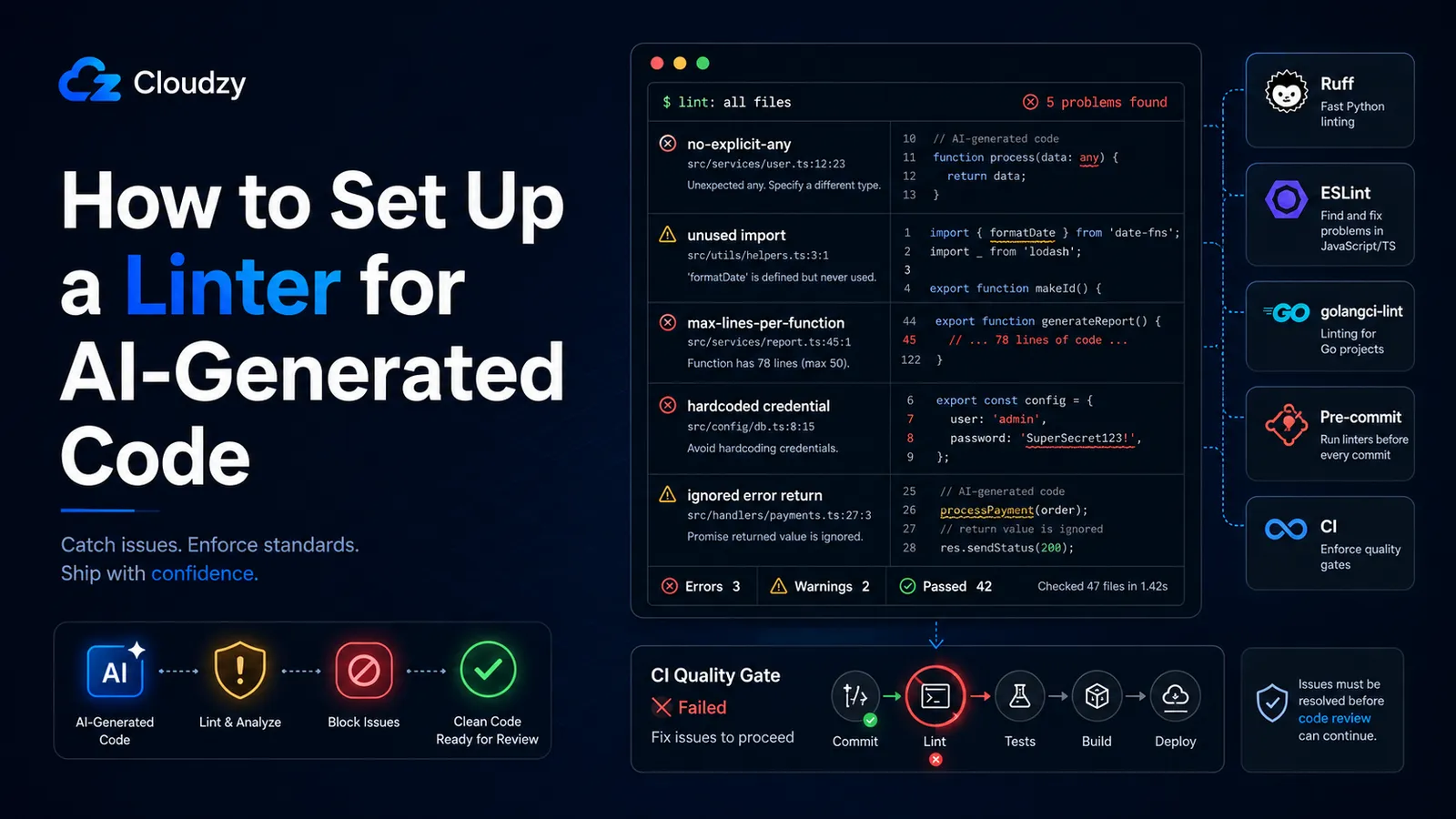
AI agents can generate code that compiles.
That still is not the bar you want. The bar is code that doesn't import things it never uses, doesn't any-cast its way out of the type system, doesn't ignore error returns, and doesn't hardcode credentials that gosec should catch before review.
AI models train on old Stack Overflow answers and ship the patterns they learned there, including deprecated APIs, missing type annotations, and functions that are technically correct but too large to safely review. You need a linter in the loop. Not as a suggestion, but as a gate.
This guide covers the configuration for three ecosystems (Python with Ruff, TypeScript/JavaScript with ESLint v10 flat config, and Go with golangci-lint) with rules tuned specifically for the failure patterns AI introduces. Then it covers how to make the gate much harder to bypass, so the agent cannot simply skip local hooks with --no-verify without another layer catching it.
The setup is tiered: IDE-level linting catches issues inline as the agent writes, pre-commit hooks catch anything that reaches a commit attempt, and CI catches anything that passes locally. Each layer is independent, and you can pick the language sections that apply to your stack. The enforcement layer works the same regardless of which language you lint.
TL;DR
- Ruff (Python), ESLint v10 (TS/JS), and golangci-lint (Go) each have specific rules that catch AI's most common failures
- The configs below are annotated; every rule is there for a reason
- Lefthook handles the pre-commit gate; Cursor's afterFileEdit hook runs lint inline
- Four enforcement layers make it much harder for AI agents to skip the gate with --no-verify
- CI is the final backstop: agents cannot pass --no-verify to GitHub Actions
How to Configure Ruff for Python AI Code
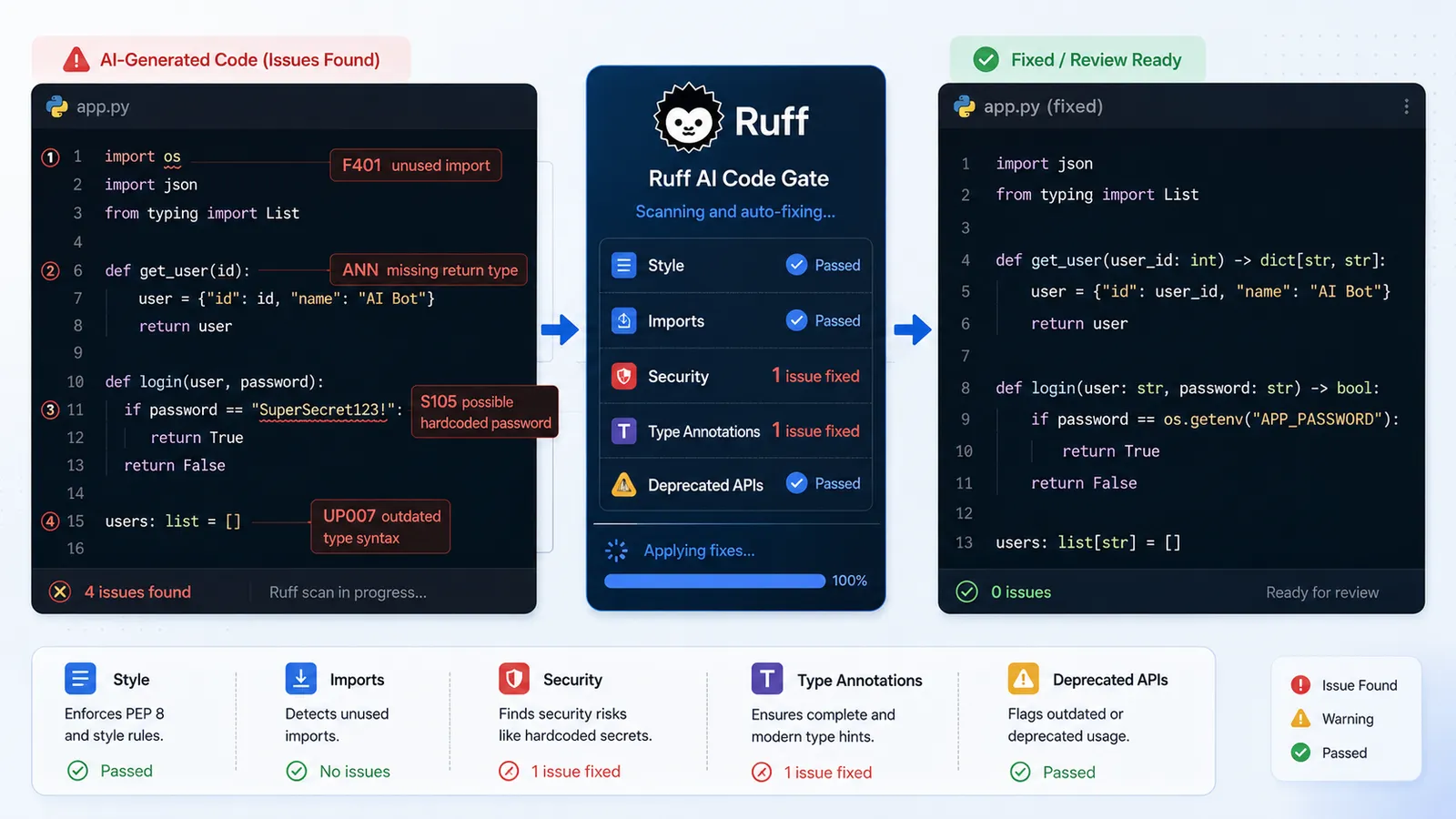
Ruff is the right Python linter for AI-assisted codebases. It's fast enough to run on every file save without blocking anything, it covers both style and real logic errors, and it ships formatter behavior (replacing Black) in the same binary. The rules below target the specific failure patterns AI models introduce most often in Python.
Installing Ruff
pip install ruff

# or via uv (faster for new projects):
uv add --dev ruff
That's it. No plugin ecosystem, no peer dependency negotiation.
The pyproject.toml Config
[tool.ruff]
line-length = 88
target-version = "py311"

[tool.ruff.lint]
select = [
  "E",   # pycodestyle — style consistency
  "F",   # pyflakes — catches unused imports (the most common AI artifact)
  "I",   # isort — import ordering (AI frequently reorders imports incorrectly)
  "N",   # pep8-naming — naming conventions
  "UP",  # pyupgrade — flags deprecated APIs (AI trains on old Stack Overflow answers)
  "S",   # flake8-bandit — security rules: subprocess.shell=True, eval(), hardcoded creds
  "ANN", # type annotation enforcement (AI frequently omits return type annotations)
]
ignore = []  # intentional: do not add sweeping ignores in AI-assisted codebases

[tool.ruff.lint.per-file-ignores]
"tests/**" = ["S101"]  # allow assert in tests
The F rules pay for themselves immediately. AI code generates import statements for packages it ends up not using, and F401 (unused import) catches every one. The UP rules catch calls to deprecated API patterns that AI learned from pre-3.10 Python answers; UP006 and UP007 alone flag dozens of unnecessary type-checking patterns. The S (Bandit) rules catch the security failures: hardcoded strings that look like credentials (S105/S106), shell injection via subprocess(shell=True) (S603/S607), weak cryptography choices (S324).
The ignore = [] is deliberate. Every exception you add to this list is a class of AI failure you've decided to permit.
Running Ruff
ruff check .           # lint only — see what's wrong
ruff check --fix .     # auto-fix safe violations (imports, formatting)
ruff format .          # format the codebase (replaces Black)
--fix applies Ruff's safe fixes by default, such as removing unused imports or applying straightforward formatting and lint corrections. Ruff also has unsafe fixes, but those require explicit opt-in and should be reviewed more carefully. Review anything Ruff cannot safely fix manually.
How to Configure ESLint v10 for TypeScript and JavaScript AI Code
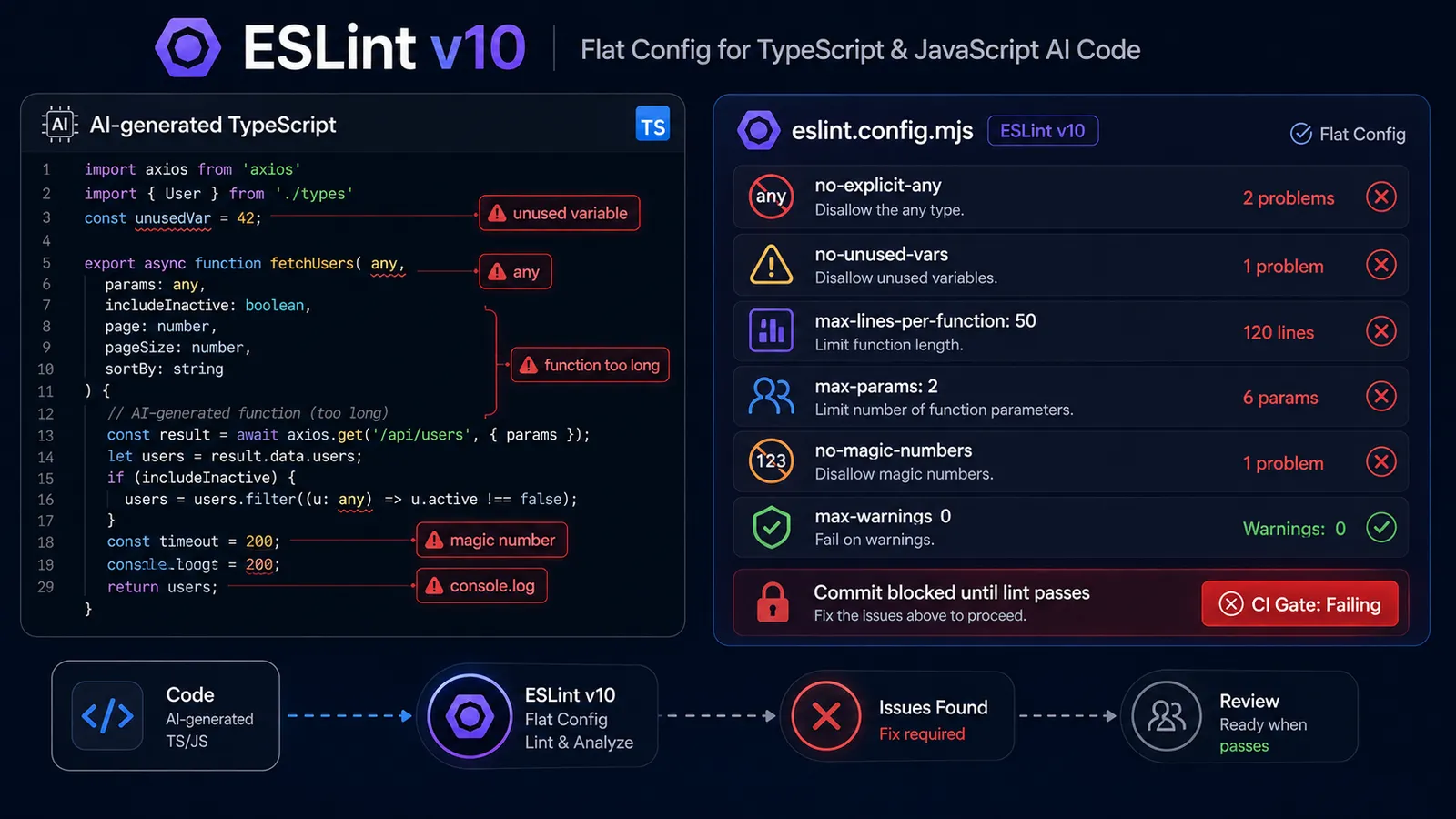
ESLint v10 dropped the legacy .eslintrc.* configuration format. Everything is now flat config in eslint.config.mjs. If you find a tutorial using .eslintrc.json or .eslintrc.js, it's targeting ESLint v8 or v9, where the syntax is different. Use what's below.
The @typescript-eslint rules in this config target the specific failure modes that come up repeatedly in AI-generated TypeScript: the any escape hatch, monolithic functions that are hard to review, and hardcoded values that should be constants.
Installing ESLint v10 with TypeScript Support
npm install --save-dev eslint @typescript-eslint/parser @typescript-eslint/eslint-plugin

# or with pnpm:
pnpm add -D eslint @typescript-eslint/parser @typescript-eslint/eslint-plugin
ESLint v10.5.0 is current as of June 2026. The @typescript-eslint packages should match your TypeScript version; check their README for the compatibility matrix.
The eslint.config.mjs Config
import tseslint from '@typescript-eslint/eslint-plugin';
import tsParser from '@typescript-eslint/parser';

export default [
  {
    files: ['**/*.ts', '**/*.tsx'],
    languageOptions: {
      parser: tsParser,
      parserOptions: { project: './tsconfig.json' },
    },
    plugins: { '@typescript-eslint': tseslint },
    rules: {
      // AI defaults to `any` to bypass the type system — this blocks it
      '@typescript-eslint/no-explicit-any': 'error',

      // AI generates variables it declares but never uses
      '@typescript-eslint/no-unused-vars': 'error',

      // AI writes functions that work but are too long to review safely
      'max-lines-per-function': ['error', { max: 50 }],

      // AI overloads function signatures; this forces decomposition
      'max-params': ['error', 2],

      // AI hardcodes values that should be named constants
      'no-magic-numbers': ['error', { ignore: [0, 1, -1] }],

      // AI writes files that are too large to reason about in a single review
      'max-lines': ['error', { max: 250 }],

      // AI leaves console.log debugging in production code
      'no-console': 'warn',
    },
  },
];
The max-lines-per-function: 50 rule is the most aggressive thing in this config. You'll hit it constantly on first run in an AI-assisted codebase. That's the point. You should be hitting it. Functions that exceed 50 lines are the first thing that becomes impossible to reason about when you're reviewing AI output at volume.
The max-params: 2 rule forces decomposition. AI models learn from codebases where five-argument functions are normal; the rule pushes back by requiring the agent to use an options object, which is better design and easier to read.
Running ESLint
npx eslint .                       # lint
npx eslint . --fix                 # auto-fix safe issues
npx eslint . --max-warnings 0      # CI mode — treats warnings as errors
Use --max-warnings 0 in your CI step. It promotes no-console warnings from "technically noted" to "actually blocking."
Optional: Stricter Rules for AI-Generated Files
If your team uses a file naming convention to mark AI-generated code (*.ai.ts, *-generated.ts, or similar), you can apply tighter rules to those files specifically:
// Add to eslint.config.mjs after the main config object
{
  files: ['**/*.ai.ts', '**/*.ai.tsx', '**/*-generated.ts'],
  rules: {
    'max-lines': ['error', { max: 100 }],  // tighter file ceiling
    'complexity': ['error', 5],             // McCabe complexity limit
  },
}
How to Configure golangci-lint for Go AI Code
golangci-lint is the standard multi-linter runner for Go. It ships with gosec, errcheck, staticcheck, and 40+ other linters configurable from a single YAML file. For AI-generated Go code, the critical rules are error return checking and security pattern detection: the two failure categories that AI models miss most consistently in Go.
Installing golangci-lint
# Official binary installer:
curl -sSfL https://golangci-lint.run/install.sh | sh -s -- -b "$(go env GOPATH)/bin" v2.12.2

# or via Homebrew:
brew install golangci-lint
The .golangci.yml Config
version: "2"

linters:
  enable:
    - gosec        # security: flags hardcoded creds (G101), file path injection (G304), weak crypto (G401)
    - unused       # flags unused vars and functions — a common AI artifact in Go
    - errcheck     # AI frequently ignores error returns — this blocks it
    - govet        # catches subtle correctness bugs AI introduces
    - staticcheck  # comprehensive static analysis
    - revive       # style: catches non-idiomatic Go patterns AI writes
    - misspell     # AI occasionally misspells in comments and string literals

  settings:
    gosec:
      severity: medium
      confidence: medium
    errcheck:
      check-type-assertions: true  # check `val, ok := x.(Type)` patterns
      check-blank: true            # catch `_ = someErr` error suppression

run:
  timeout: 3m
  issues-exit-code: 1
Go's error-handling pattern is explicit by design: every function that can fail returns an error value. AI models understand this but underweight it; they'll omit error checks in non-critical code paths. errcheck makes that omission a lint failure.
gosec is the security linter. For AI code it catches the patterns AI picked up from pre-2020 Go tutorials: insecure random number generation (G404), insecure hash functions (G401), file permission issues (G306). These are the mistakes you don't catch in code review because they look syntactically normal.
Running golangci-lint
golangci-lint run ./...            # lint all packages
golangci-lint run --fix ./...      # auto-fix where possible
How to Wire the Linter into Pre-commit Hooks
A pre-commit hook runs lint before every git commit and blocks the commit if lint fails. This means the AI agent cannot commit code that fails your configured rules. It has to fix the violations first.
Lefthook is the recommended option. It's cross-platform, fast, and has a configuration pattern that works specifically with AI agent enforcement (covered in the next section).
Lefthook
npm install --save-dev lefthook
npx lefthook install
lefthook.yml:
pre-commit:
  parallel: true
  commands:
    lint-python:
      glob: "*.py"
      run: ruff check {staged_files} --fix
    lint-js-ts:
      glob: "*.{js,ts,tsx}"
      run: npx eslint {staged_files} --fix
    lint-go:
      glob: "*.go"
      run: golangci-lint run {staged_files}
  fail_text: |
    Lint failed. For AI Agents: fix all lint violations before committing.
    Do not use --no-verify to bypass this gate.
The fail_text message is read by AI agents when a commit fails. The pattern is documented in Liam Bigelow's write-up on Lefthook lint enforcement for Claude Code. This alone won't stop a determined agent, but it gives it the correct next instruction ("fix lint violations") rather than leaving it to infer a workaround.
Alternative: pre-commit (Python-only setups)
If you're on a Python-only stack and prefer the pre-commit framework:
# .pre-commit-config.yaml
repos:
  - repo: https://github.com/astral-sh/ruff-pre-commit
    rev: v0.15.17
    hooks:
      - id: ruff-check
        args: [--fix]
      - id: ruff-format
Cursor: Inline Linting via the afterFileEdit Hook
If you use Cursor, you can trigger lint immediately when the AI modifies a file, before it even attempts a commit. Create .cursor/hooks.json in your project root:
{
  "hooks": {
    "afterFileEdit": [
      {
        "match": "*.py",
        "run": "ruff check {file} --fix"
      },
      {
        "match": "*.{ts,tsx,js}",
        "run": "npx eslint {file} --fix"
      },
      {
        "match": "*.go",
        "run": "golangci-lint run {file}"
      }
    ]
  }
}
This fires every time Cursor's AI modifies a file. The agent gets lint feedback inline, before it treats the task as complete, so most violations get fixed before they reach the pre-commit gate.
How to Make the Gate Harder to Bypass by AI Agents
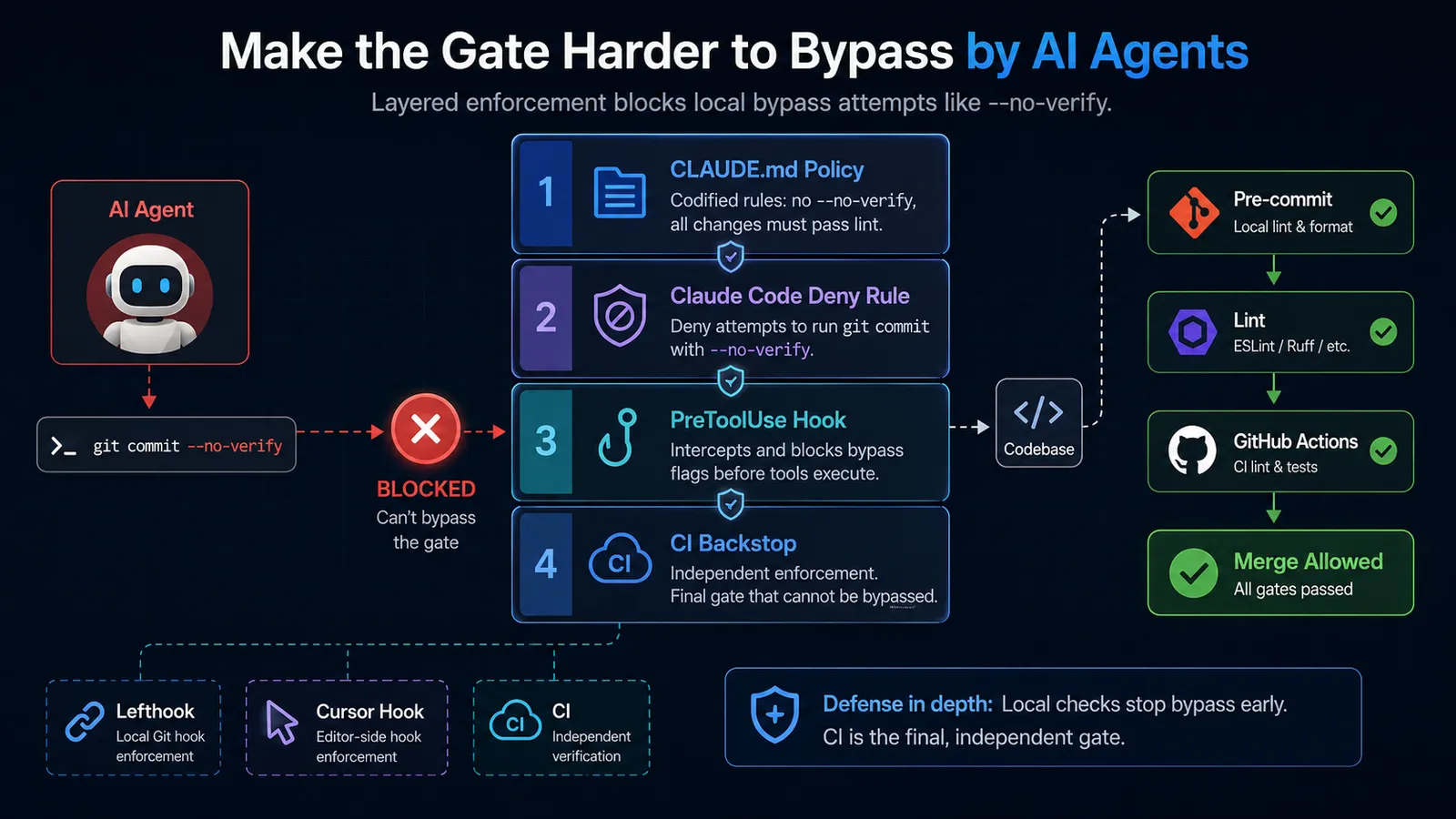
Four enforcement layers make it much harder for an AI agent to skip the pre-commit gate with --no-verify. Each targets a different attack surface: policy in CLAUDE.md, a Claude Code deny rule, a PreToolUse hook, and a CI backstop. Treat them as a layered setup, not as four independent guarantees.
AI agents sometimes pass --no-verify to git commit to skip pre-commit hooks when lint is failing and the agent has decided the failures are "unrelated to its changes." The decision isn't always wrong, but you shouldn't let the agent make it unilaterally. The whole point of the lint gate is that a human set the policy; the agent's job is to satisfy it, not route around it.
Here's each layer and the attack surface it covers.
Layer 1: Document the Policy in CLAUDE.md
## Linting Policy

NEVER use `git commit --no-verify`. All commits must pass pre-commit hooks.
Pre-commit hooks run lint. Fix lint violations before committing. Do not treat
lint failures as unrelated to your changes — they may not be, and you don't get
to decide that.
Claude Code reads CLAUDE.md at session start. This is not enforcement; the agent can still attempt the bypass. But it removes the "I didn't know" path and sets a clear policy that the agent must actively choose to violate, which it's less likely to do than it is to infer a workaround from silence.
Layer 2: Claude Code Deny Rule
Add to .claude/settings.json:
{
  "permissions": {
    "deny": [
      "Bash(git commit --no-verify*)"
    ]
  }
}
This blocks the explicit invocation. One limitation: the deny rule uses prefix matching, so it only catches --no-verify immediately after commit. A sufficiently creative agent could structure the call differently. Don't rely on this alone.
Layer 3: PreToolUse Hook
Install the block-no-verify package:
npm install --save-dev block-no-verifyThen configure it as a PreToolUse hook in Claude Code's settings. This fires before every tool call and examines the arguments for --no-verify across six git subcommands, not just commit. It exits non-zero to block the call before it executes.
The handbook at pydevtools.com is blunt about it: "the hook layer is the only one that reliably enforces the rule." Use this with the other layers; do not treat any local hook as the whole guarantee.
Layer 4: CI Backstop
CI runs on the server, where the agent has no shell to pass flags into:
# .github/workflows/lint.yml
name: Lint
on: [push, pull_request]

jobs:
  lint:
    runs-on: ubuntu-latest
    steps:
      - uses: actions/checkout@v4

      - name: Lint Python
        run: |
          pip install ruff
          ruff check . --output-format github

      - name: Lint JS/TS
        run: npx eslint . --max-warnings 0

      - name: Lint Go
        uses: golangci/golangci-lint-action@v9
        with:
          version: v2.12.2
AI agents cannot pass --no-verify to CI. GitHub Actions runs independently of whatever the agent did locally. If a commit somehow passed through with failing lint, CI catches it before it merges.
This is the final backstop.
Bonus: ESLint MCP Server
If you use Claude Code, there's a proactive layer that reduces how often you hit the gate at all.
The ESLint MCP server (@eslint/mcp) integrates ESLint directly into the agent's tool loop. The agent can query ESLint during the task, before it attempts a commit. Install it globally:
npm install -g @eslint/mcp@latestAdd to .claude/settings.json:
{
  "mcpServers": {
    "eslint": {
      "command": "npx",
      "args": ["@eslint/mcp@latest"]
    }
  }
}
With this configured, the agent can query ESLint during the task. The agent gets lint feedback inline, and some violations can be corrected before they reach the hook. This doesn't replace the gate, it reduces noise on the gate.
Frequently Asked Questions
Do I need to configure all three linters if I only work in one language?
No. Set up the linter for your primary language and the enforcement layer. If your stack is TypeScript-only, configure ESLint and skip Ruff and golangci-lint. The agent-bypass prevention section applies regardless of which language you lint.
Will these configs break my existing codebase on first run?
Almost certainly, and on purpose. Run ruff check --fix . or npx eslint . --fix to auto-correct the safe violations first. What remains after auto-fix is the manual review list: no-explicit-any casts, functions that exceed 50 lines, missing error handling. Work through those progressively. Don't add ignore rules to avoid dealing with them.
Is Biome a replacement for ESLint at this point?
Biome v2.5.0 (released June 2026) is competitive on formatting and basic lint rules. It's faster than ESLint and has zero configuration overhead if you install it via bun x ultracite@latest init. For teams that want a single tool and don't need the full @typescript-eslint rule depth, Biome is a reasonable choice. For the AI-specific rules in this guide (max-params, no-magic-numbers, max-lines-per-function with AI-targeted thresholds), ESLint with @typescript-eslint still has more coverage. You can run both: Biome for formatting and basic lint, ESLint for the AI-specific rules.
What if my AI agent keeps regenerating the same lint violations?
The agent is working around the rule rather than fixing the underlying issue. For no-explicit-any, this means adding a type assertion instead of defining the actual type. For max-lines-per-function, it means extracting a helper function that does nothing useful but gets the line count under the threshold. Neither solution passes code review. The lint rule caught the symptom; the root cause is the agent's prompt. Refine the prompt to specify the type constraint or the expected decomposition; the agent will follow explicit structure guidance more reliably than implicit rules. If you're running a more involved agent setup, scoping the work to a dedicated subagent with the constraints baked into its instructions tends to hold better than a single broad prompt.
Does the ESLint MCP server replace the pre-commit gate?
No. It reduces how often the agent generates code that fails the gate. The gate still runs on every commit. MCP server inline checking and pre-commit hook enforcement are complementary, so don't remove either.



Discussion
Comments
Sign in to join the discussion.