
On April 24, 2026, GitHub’s model-training policy changed for individual Copilot plans. GitHub may now use interactions from Copilot Free, Pro, Pro+, and Max, including inputs, outputs, code snippets, and associated context, to train and improve AI models unless the user opts out. Copilot Business and Enterprise data remains protected under GitHub’s Data Protection Agreement. Crucially, this concerns Copilot interaction data, not private repositories that merely sit unused on GitHub.
At the same time, migration arguments resurfaced for a different reason: public self-hosted Git instances were absorbing heavy automated traffic. A Hacker News discussion collected a useful set of operator reports on that problem: End of an era for me: no more self-hosted git.
That leaves a more useful question than “GitHub or self-hosting?”: which concern are you actually trying to solve?
The Short Version
Three answers. Pick the one that fits your situation.
- A: Opt out and stay. Use this when the Copilot training change is your only concern and GitHub still fits your team’s operational needs. Disable the account-level setting and move on.
- B: Run a hybrid. Keep public OSS on GitHub for the network effect. Move private code to a self-hosted Forgejo, Gitea, or GitLab CE instance behind a VPN or IP allowlist. Use this when public reach and private control matter at the same time.
- C: Fully migrate. Move everything off GitHub. Use this when regulation, data residency, governance, or FOSS-only policy rules out GitHub and the team can accept the operating cost.
Most readers are in Position A or B. Position C is justified by stricter governance, sovereignty, or values requirements, not by the Copilot setting alone.
What Actually Changed in April 2026
The mechanical change is small. In Copilot settings, individual subscribers can set “Allow GitHub to use my data for AI model training” to Disabled. GitHub describes the covered material as interactions with GitHub features and services, including inputs, outputs, code snippets, and associated context, not private repository contents that were never sent through Copilot.
Copilot Business and Enterprise do not show this toggle because their data is protected under GitHub’s Data Protection Agreement. For individual plans, disabling the setting addresses the training-policy concern; it does not resolve a broader objection to depending on a vendor-controlled policy.
The Copilot change can be the trigger without being the whole case. A team may also care about platform dependence, identity tied to GitHub, workflows built around Actions, data residency, or how easily it could move again later. Those are migration questions; the training toggle is only one setting.
That distinction matters: opting out changes one data-use setting, while migrating changes who controls hosting, identity, integrations, and policy. The second decision carries far more operational cost.
The Three Positions Explained
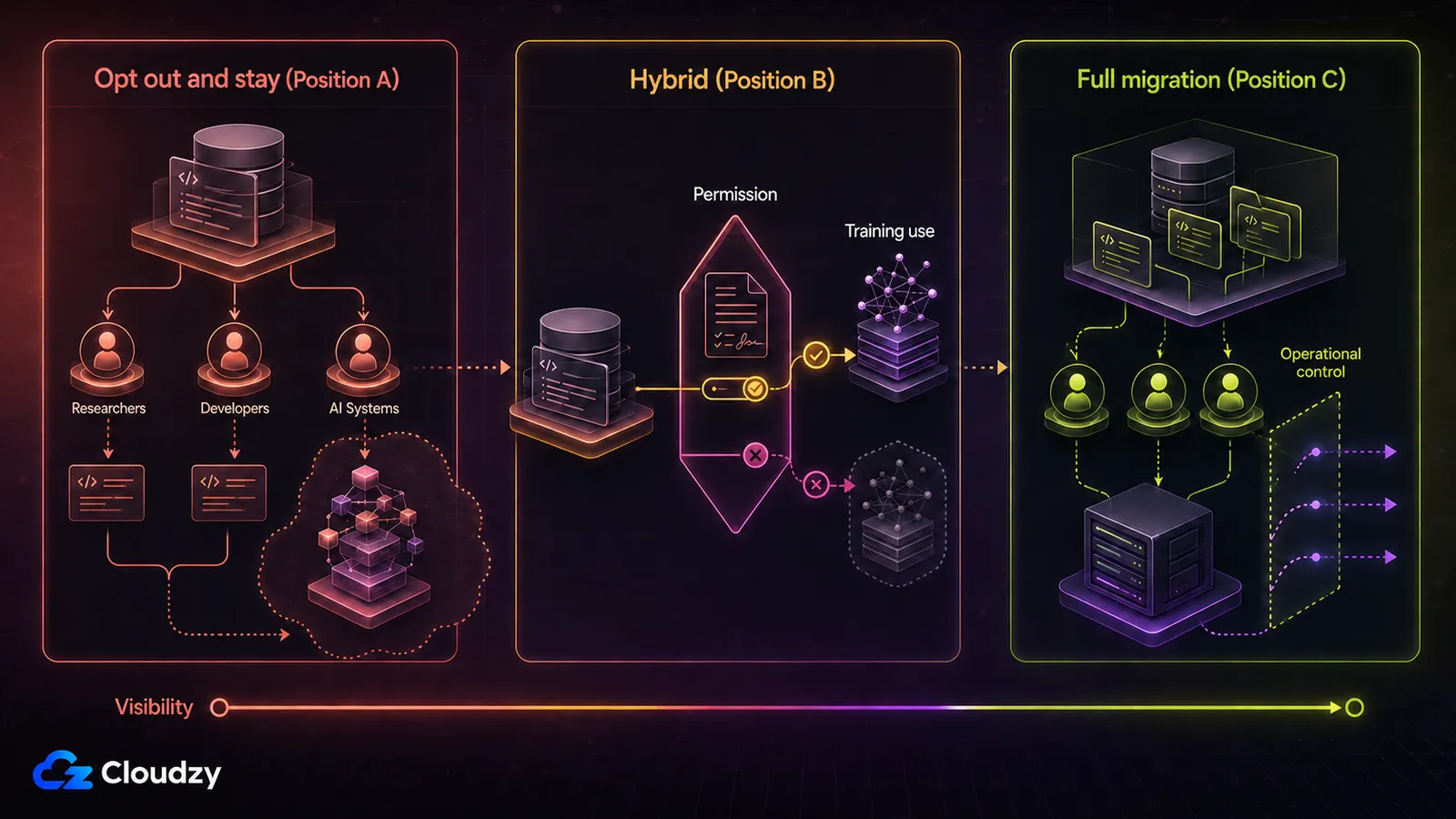
The decision compressed into three rows. Detail below.
| Your Concern | Answer | What to Do |
|---|---|---|
| My Copilot interaction data used for training | Opt out and stay (Position A) | Toggle the setting, get back to work |
| Private code I don’t want on a US vendor + active OSS I don’t want to hide | Hybrid (Position B) | Self-host private repos behind a VPN; keep public OSS on GitHub |
| Sovereignty, regulated industry, principled FOSS-only, full vendor independence | Full migration (Position C) | Move everything; budget the operational cost |
Position A: Opt Out and Stay
If you’re a solo developer or small team with private repos and your only complaint is the training default, this is your answer. Toggling a setting: one minute, once. Self-hosting: a small VPS bill, a backup strategy you actually test, integrations to rebuild because they assumed GitHub auth, and the occasional upgrade or recovery job that lands at the worst possible time.
Self-hosting can still be worth it, but only if that recurring work buys something you actually need.
The strongest counter: the toggle is also a vendor decision. GitHub changed from not using this interaction data for training by default to using it by default in 2026, and they could change policy again.
If your underlying concern is “I never want a US vendor making unilateral decisions about my code,” no checkbox solves that, and Position A is the wrong answer for you. Skip to Position C.
But if your concern is specifically “I don’t want my current Copilot interaction data in training” and you’ll trust GitHub’s setting until the next thing changes, Position A is the cheapest correct answer. There’s no shame in cheap and correct.
Position B: Run a Hybrid Model
Hybrid hosting separates public reach from private control.
The split is simple. Public OSS stays on GitHub: network effect, contributor pipeline, Dependabot, the Actions ecosystem are real value. Private code moves to a self-hosted instance behind a VPN or IP allowlist, never reachable from the public internet.
Why this works is a property of the threat model. The Copilot training concern only applies to Copilot interaction data you send through GitHub. The AI-scraper traffic problem (next section) only applies to publicly reachable instances. A private hybrid setup sidesteps both.
For a 2-to-10-person private team, 2 vCPU and 4 GB RAM is a safer starting point for Forgejo or Gitea, with more room if search indexing, packages, or CI share the host. Treat that as Forgejo/Gitea sizing, not GitLab CE sizing: GitLab’s single-node tutorial starts at 8 vCPU and 7.2 GB of memory before CI workload.
Don’t expose the web UI openly on 80 or 443. Restrict it at the firewall, proxy, VPN, or mesh-network layer. CI runners can serve both sides.
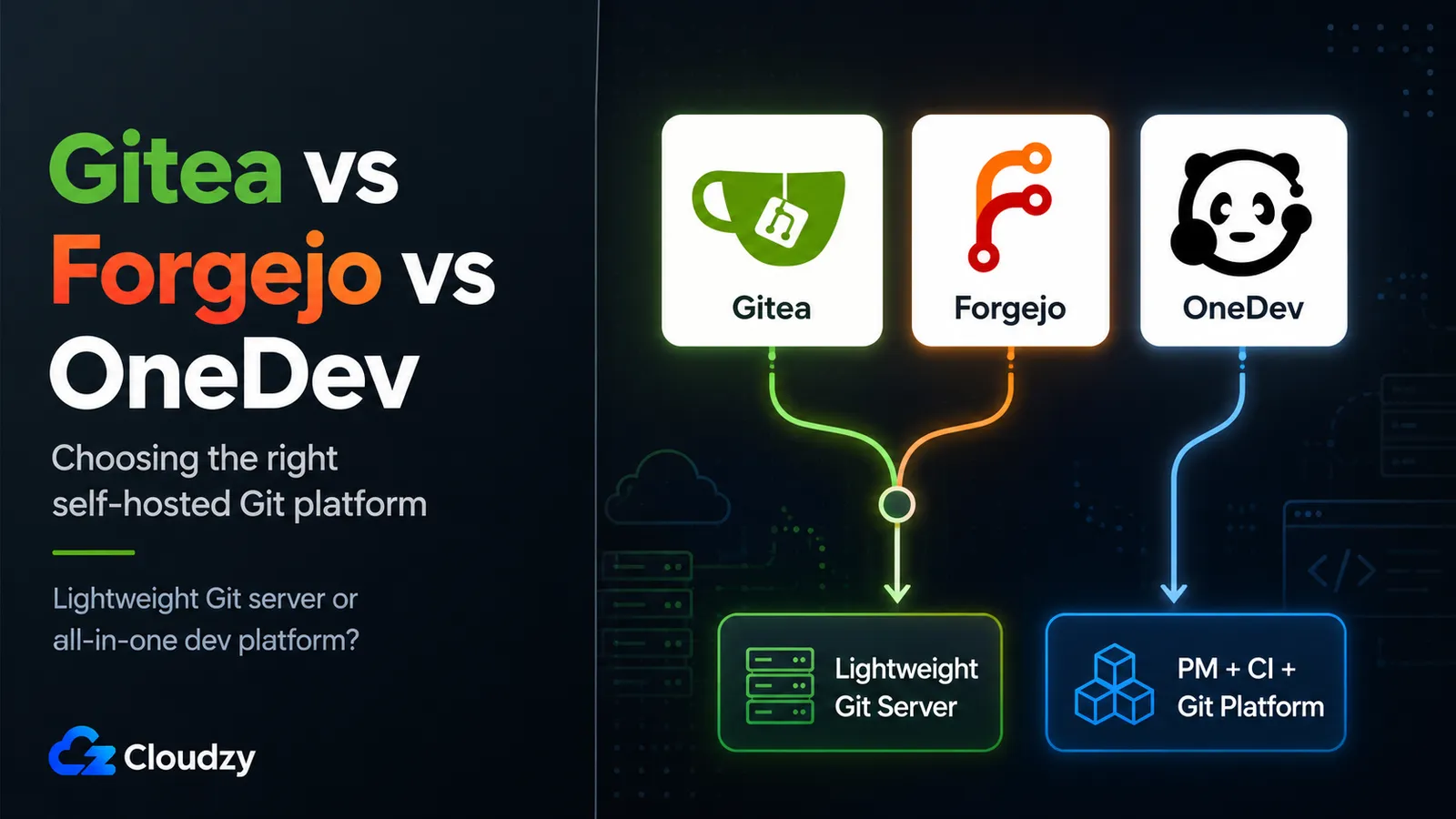
Platform choice changes the feature set more than the hybrid model itself. Forgejo and Gitea suit a lighter private forge; GitLab CE makes more sense when you also need an integrated CI/CD and registry stack.
Backups are manageable, but don’t reduce them to a git bundle. Forgejo’s official upgrade guidance treats a synchronized point-in-time snapshot of all the storage Forgejo uses as the reliable backup, and where that is not practical, a Forgejo dump paired with a separate PostgreSQL or MySQL dump. For either Forgejo or Gitea, keep repositories, database, config, attachments, and LFS data together, store a copy off-server, and test a restore.
A developer’s local clone can recover code, but not issues, users, PR metadata, attachments, or all LFS objects. If a private fork later goes public, push it to a GitHub mirror at that point.
Position C: Full Migration When Control Is a Requirement
Full migration is the clearest fit when vendor independence is a requirement rather than a preference.
Three groups stand out: regulated teams with audit, residency, or vendor-control rules that rule out GitHub; public-sector or EU teams whose sovereignty requirements are policy, not preference; and FOSS-only organizations that want off Microsoft-owned infrastructure and already have staff who can operate Linux services.
The cost is a small VPS, ongoing maintenance, and integration loss. Integration loss is the part people forget. Anything authed with “Sign in with GitHub” stays on GitHub or needs a separate identity provider.
Plan migration around dependencies, not just repositories. PR previews, third-party Actions, bots, webhooks, package registries, and “Sign in with GitHub” integrations may need new credentials, new workflows, or replacement services. Stars and watchers do not become native records on the new forge, so public projects also give up part of their existing discovery signal.
Use a dry run before changing the canonical remote: migrate one representative repository, rebuild its integrations, test issue and pull-request history, and document the rollback path. The platform comparison comes after that dependency audit.
For teams that want non-profit governance without operating a server, Codeberg is worth considering.
Pro tip on sovereignty. If you’re choosing self-hosted for EU data-residency reasons, datacenter location matters. Locations like Frankfurt or Amsterdam are the boring-but-correct choice. The cheapest VPS in Virginia doesn’t help your DPA.
The Operational Cost of Public Git Hosting
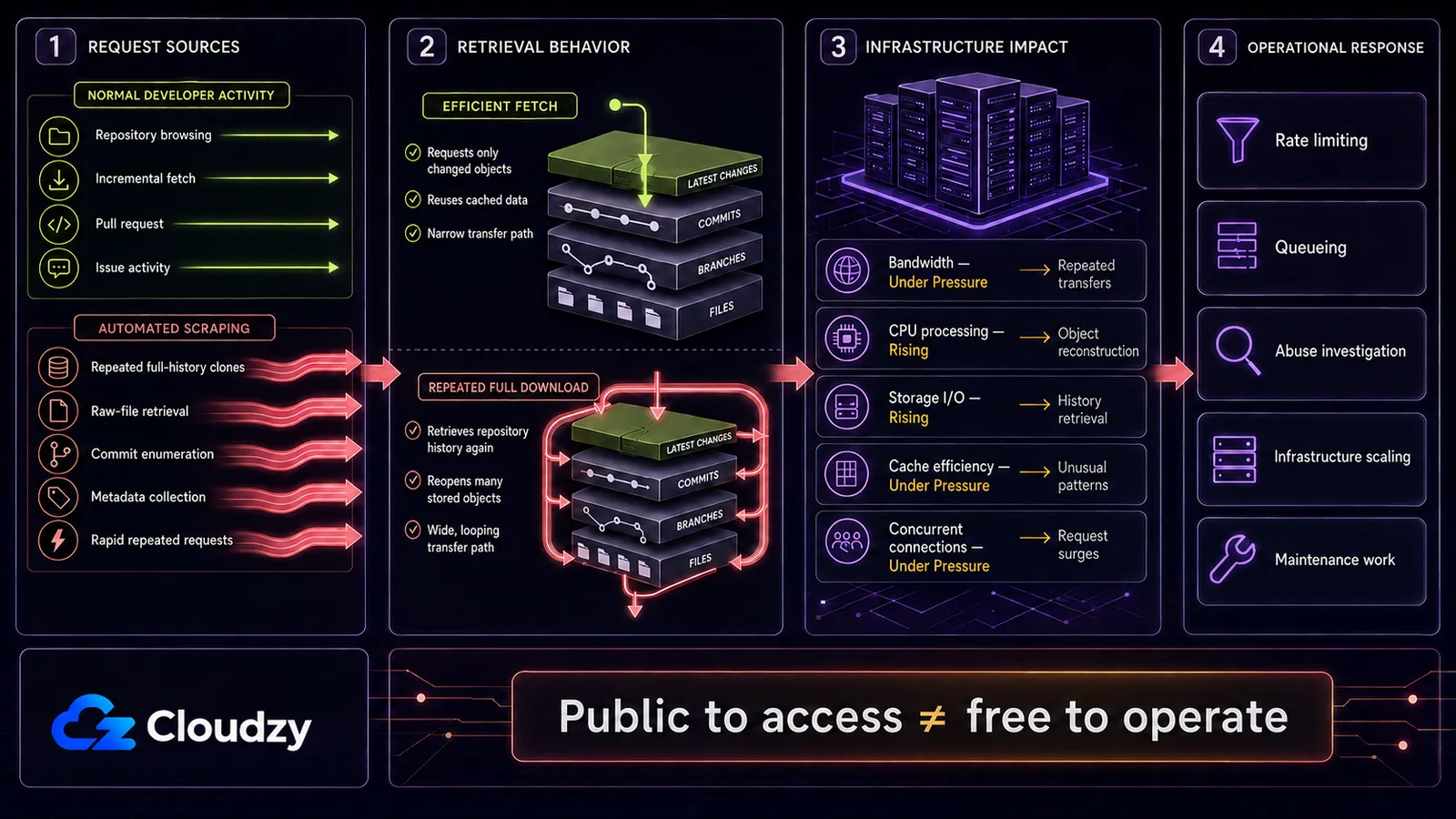
Public self-hosting exposes a forge to the same automated traffic that hits any internet-facing application, but repository pages include expensive paths such as blame views, archives, and commit history. The following reports are individual operator experiences, not benchmarks.
In the self-hosted Git discussion mentioned earlier, one operator reported 37,212,377 requests against a cgit instance over 60 days, with more than 99% classified as bots.
In the same discussion, kstrauser reported pulling a Forgejo instance from around 600,000 requests per day down to roughly 1,000, only after layering a JavaScript-and-cookie challenge on top of standard mitigations.
Other operators mentioned fail2ban, GeoIP blocks, autonomous-system-level blackholes, and moving repositories back to hosted platforms. These reports show possible failure modes; they are not universal traffic benchmarks.
The mechanical reason this is hard: simple per-IP rate-limiting can fail against rotating residential-proxy traffic. A scraper fleet can spread requests across enough IPs that no single address looks abusive, while the server still gets overwhelmed in aggregate.
JavaScript or cookie challenges can reduce unsophisticated scraping, but they can also block no-JavaScript users and interfere with Git-over-HTTPS if applied to every path. CDN caching helps repeated reads; it does less for unique or expensive endpoints such as archives, blame views, and per-commit pages.
What a challenge changes is the economics. Anubis sits in front of a forge and makes a client complete a challenge, such as a small proof-of-work computation, before the server returns the protected page, which makes high-volume crawling more expensive. It is mitigation, not a guarantee.
Apply browser challenges selectively. Keep SSH available for Git operations, and test Git-over-HTTPS before protecting that path; a challenge page returned to a Git client becomes a failed clone, not a useful verification step.
GitHub absorbs this traffic class as part of its hosted service. A public Forgejo or cgit instance leaves capacity planning, abuse controls, caching, and mitigation with you. That operational transfer, not raw software cost, is the important part of the migration decision.
This is why the hybrid model is a first-class option, not a fallback. Private code behind a VPN: scrapers can’t reach it. Public OSS on GitHub: GitHub’s abuse infrastructure handles the bot traffic.
If you still want a public self-hosted forge, budget for logs, rate controls, caching, bot mitigation, monitoring, and a tested path for Git traffic that does not depend on browser challenges. Treat scraper defense as part of normal operations, not an edge case.
The Network-Effect Question for OSS Maintainers
I’m talking about a specific reader, here: You maintain an OSS project. Twenty contributors, two hundred stars, and an active issue tracker. You’re considering moving it off GitHub.
Be honest about what you’re trading: contributor discoverability, the implicit trust mark of github.com, Dependabot, CodeQL, and the third-party ecosystem that keys off GitHub auth. None are impossibilities elsewhere; all are friction.
The rule of thumb I’d offer: if your project’s value is mostly in the code, self-hosting is easier to justify.
The code travels. If its value depends heavily on contributors, issues, search visibility, and trust around github.com, moving away trades off part of what makes the project work for the thing that makes the maintainer feel better. Legitimate trade if your reasons are big enough. Bad trade if you’re doing it to make a point.
Codeberg’s platform overview describes a Forgejo-based service operated by the non-profit Codeberg e.V. For OSS maintainers, that means community governance without the maintenance burden of running the forge yourself.
For OSS-aligned teams that want community governance without upgrade duty, it offers a smaller operational jump than running a public forge. SourceHut is a more deliberate workflow change and needs a separate evaluation.
Make the Smallest Change That Solves the Problem
Before changing remotes, write down the requirement in one sentence: stop Copilot interaction-data training, separate public and private hosting, or remove GitHub from the architecture. If you cannot name the requirement, do not migrate yet.
For a migration, pilot one representative repository first. Inventory authentication, Actions, webhooks, package publishing, preview environments, issue history, LFS data, and rollback steps before changing the canonical remote.
Cloudzy’s one-click Forgejo deployment is a fast way to set up the private side of a hybrid model; a manual install on any Linux VPS works too. Whichever route you choose, keep the web UI private, back up the complete application state, and test restoration before moving a critical repository.

Build on a Linux VPS with root access, NVMe, and AMD EPYC power.
View Linux PlansControl is useful only when it solves the requirement at an operating cost your team can sustain.
Frequently Asked Questions
Should I migrate off GitHub because of the Copilot training change?
Not automatically. If your only concern is Copilot interaction data being used for model training, disabling the account-level setting is the smallest correct fix. Migration makes sense when you also need stronger data-residency, governance, vendor-independence, or FOSS-only controls.
Does GitHub train on all of my private repositories?
No. The policy change discussed here covers eligible Copilot interaction data, including inputs, outputs, code snippets, and associated context sent through Copilot. It does not mean every private repository stored on GitHub is automatically used for model training.
Is self-hosting Git always more private?
Only if you operate it that way. A private forge behind a VPN or IP allowlist can reduce exposure, but a publicly reachable instance adds patching, monitoring, bot mitigation, access control, and backup responsibilities that GitHub normally absorbs.
Which self-hosted Git platform should I choose?
Choose Forgejo or Gitea when you want a lighter private forge. Choose GitLab CE when integrated CI/CD and a package or container registry matter enough to justify its higher resource and maintenance requirements.
What VPS size do Forgejo or Gitea need for a small team?
For a private team of two to ten people, 2 vCPU and 4 GB RAM is a safer starting point. Add capacity when search indexing, packages, large repositories, or CI runners share the host. Size GitLab CE separately because it needs more resources.
What should I test before changing the canonical remote?
Pilot one representative repository. Verify issue and pull-request history, authentication, Actions or replacement CI workflows, webhooks, package publishing, LFS data, preview environments, backups, restoration, and the rollback path before moving everything.
Discussion
Comments
Sign in to join the discussion.