
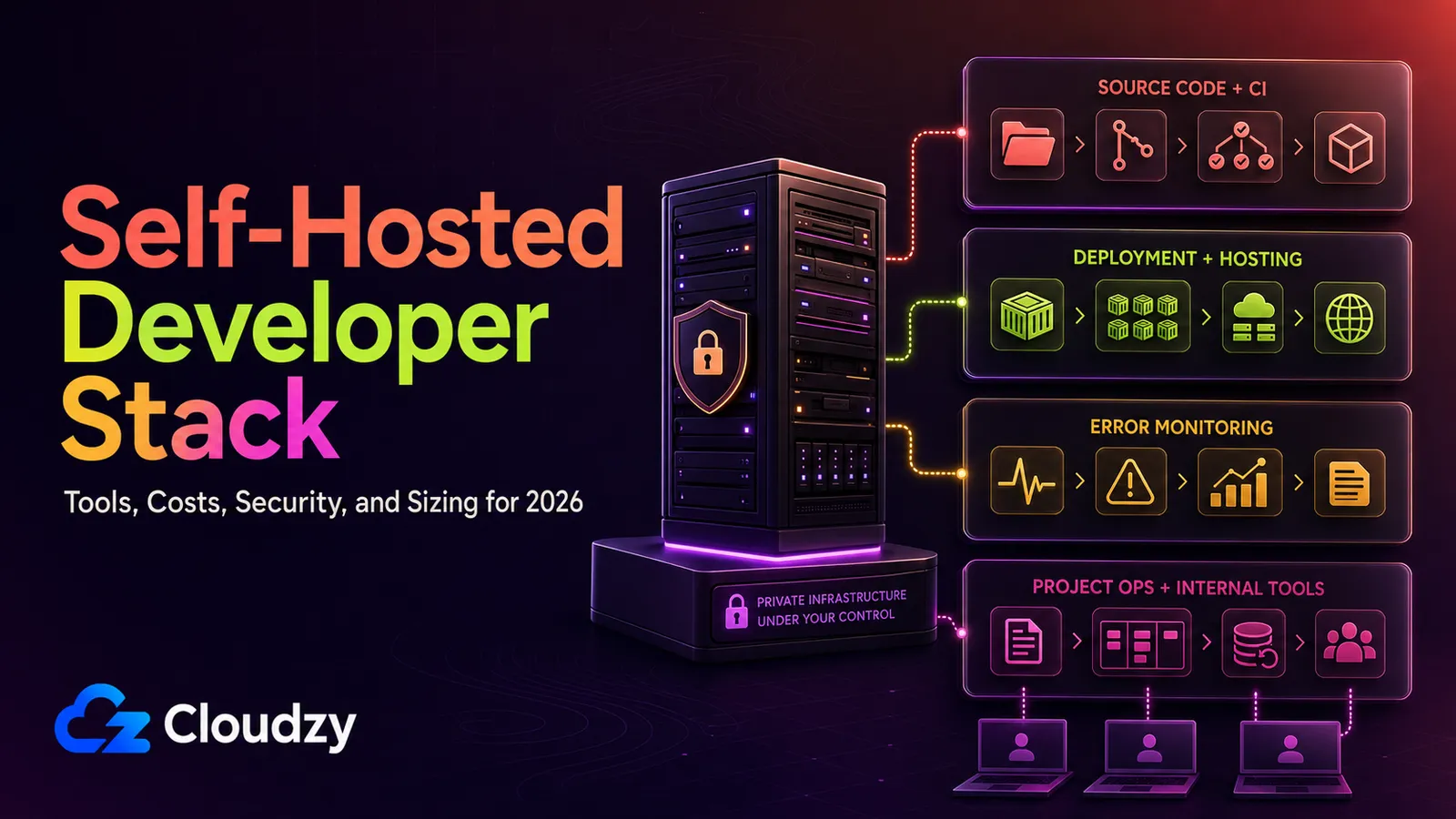
At current list prices, a 3-person team using GitHub Team, Vercel Pro, Sentry Team, Linear Basic, and Notion Plus starts at roughly $158 a month before 1Password, usage charges, and add-ons. A carefully scoped self-hosted stack can cut that bill substantially, but the fair comparison includes a larger VPS than the 4 GB lab floor and the maintenance time everyone forgets.
This guide is for the developer or small team that has already decided “the SaaS bill is annoying” and “keeping private code and developer workflows on third-party infrastructure is uncomfortable,” and now wants to know what specifically to run. The stack has four layers: code, build and deploy, run, and document. Each layer gets one recommended tool, one alternative, the resource cost, and the failure mode. The scope is private and team use on a single VPS. Email hosting, DNS, customer-facing authentication, and Kubernetes are out of scope, for reasons we will state where they belong.
The Short Version
If you only read the bullets:
- Code: Forgejo by default. Use GitLab CE only if you want git, CI/CD, registry, and issues in one product; GitLab's current single-node baseline is 16 GB RAM, with 8 GB reserved for memory-constrained environments.
- Build and deploy: Coolify on the current stable release (v4.3.0 at QC time), with the dashboard kept off the public internet. Dokku suits solo developers; pure Docker Compose suits teams that prefer visible moving parts.
- Run: Vaultwarden for shared credentials, Uptime Kuma for monitoring, GlitchTip for error tracking, and Portainer or Dockge for container management. GlitchTip is a much smaller deployment than self-hosted Sentry, whose official minimum is 16 GB RAM plus 16 GB swap.
- Document: Docmost for docs and OpenProject (or Plane) for issue tracking. AFFiNE fits teams that prefer a canvas-style Notion model.
- Sizing: Treat 4 GB as a lab size for a few lightweight services, 8 GB as a reduced pilot without OpenProject, Plane, or local builds, and 16 GB as the practical starting point for the complete Forgejo-based stack in this guide. GitLab's 8-vCPU/16-GB baseline applies to GitLab itself, so a GitLab-based one-box stack requires additional capacity or separate workload testing.
- Where it loses: Public open-source projects with external contributors. The GitHub network effect is real, and self-hosting costs you discoverability.
Prerequisites
Before you read further, this guide assumes:
- A Linux VPS with Docker and Docker Compose installed. Plan about 16 GB RAM for the complete Forgejo-based stack; 8 GB is suitable for a reduced pilot that omits the heavier project-management tools and local builds.
- 30 to 60 minutes of attention per layer for the initial deploy.
- Comfort reading a Compose file and adjusting environment variables.
- Willingness to maintain a regular update window, apply security fixes promptly, and verify backups rather than merely configuring them.
If any of those are deal-breakers, the SaaS bundle is genuinely the right answer for your team. That is a defensible position, not a failure.

Build on a Linux VPS with root access, NVMe, and AMD EPYC power.
View Linux PlansLayer 1: Code: Forgejo, Gitea, or GitLab CE
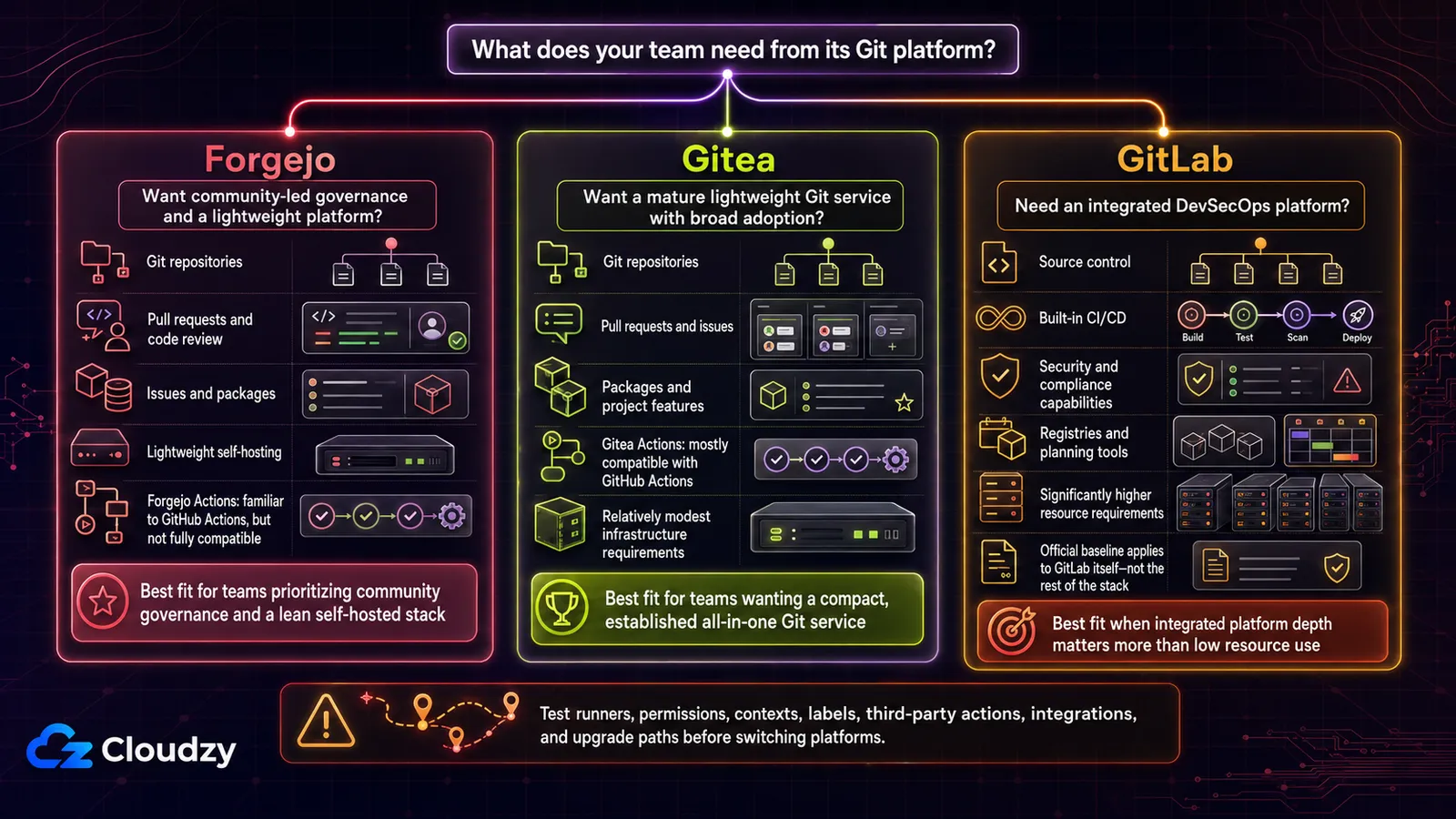
Three viable options, three different points on the resource and governance curve. For new self-hosters in 2026, the recommendation is Forgejo first.
Forgejo is designed for modest infrastructure and offers pull requests, issue tracking, project boards, wikis, package registries, and Forgejo Actions. Its workflows use a GitHub Actions-style format, but compatibility is not absolute; test any third-party actions your pipeline depends on.
Choose Gitea only if you already depend on a specific Gitea-only feature or have tooling pinned to a Gitea version. There is nothing wrong with the codebase. Forgejo's official comparison says the fork followed Gitea's October 2022 transfer of its domains and trademark to a for-profit company without community approval; Forgejo's licensing announcement records GPL v3+ for versions starting with v9.0.
Choose GitLab CE if you want one product for git, CI/CD, container registry, and issue tracking, and you can afford its resource floor. GitLab's current requirements set 16 GB RAM and 8 vCPU as the single-node baseline; 8 GB is for memory-constrained environments. Gitea is light enough to run a small private instance in roughly 1 to 2 GB RAM, and Forgejo is comparable, but production sizing for either still depends on repositories, runners, and concurrent users.
| Tool | Starting resources | Governance | License | Built-in CI/CD | When to Pick |
|---|---|---|---|---|---|
| Forgejo | 1-2 vCPU / 1-2 GB RAM (light-use estimate) | Community-driven (Codeberg e.V.) | GPL v3+ (v9.0+) | Forgejo Actions; test compatibility | Default for new self-hosters in 2026 |
| Gitea | 1-2 vCPU / 1-2 GB RAM (light-use estimate) | For-profit (Gitea Ltd, since Oct 2022) | MIT | Gitea Actions; test compatibility | Existing Gitea dependency or tooling pinned to a specific version |
| GitLab CE | 8 vCPU / 16 GB RAM baseline; 8 GB constrained | GitLab Inc | MIT (Community Edition) | Native, full-featured | Want one platform for git, CI/CD, registry, and issues, and have the RAM |
The CI question is worth flagging. Gitea Actions is designed to be mostly compatible with GitHub Actions, while Forgejo Actions deliberately aims for familiarity rather than full compatibility. Many workflows require only small changes, but runner images, permissions, contexts, labels, and third-party actions can behave differently. Test every workflow and action your pipeline depends on before migration.
One caveat applies to all three options. This guide assumes private and team use, with the admin surface behind a VPN or IP allowlist. Public git services face bot traffic, abuse, and discoverability trade-offs that a small private deployment does not. For public open source, mirror to GitHub for visibility while keeping Forgejo as the source of truth if that governance model matters to you.
Size the server from the workload, not a provider's plan names. A standalone Forgejo or Gitea service for light private use can start around 1 to 2 vCPU and 1 to 2 GB RAM. A reduced stack without OpenProject, Plane, or local builds can start around 4 vCPU and 8 GB RAM. For the complete Forgejo-based stack described here, start around 8 vCPU and 16 GB RAM, then validate it under real CI and application load. GitLab's official 8-vCPU/16-GB baseline applies to GitLab itself, so do not treat it as sufficient for GitLab plus the rest of this stack. Use SSD or NVMe storage, budget separately for repositories, container images, logs, databases, and backups, and keep 20 to 30% capacity free for updates and workload spikes.
Section key takeaway: Forgejo is the default code-layer recommendation in 2026; Gitea remains solid, and GitLab CE is the integrated choice only when you can afford its 16 GB baseline or knowingly operate in an 8 GB constrained configuration.
Layer 2: Build and Deploy: Coolify (with Caveats), Dokku, or Pure Docker Compose
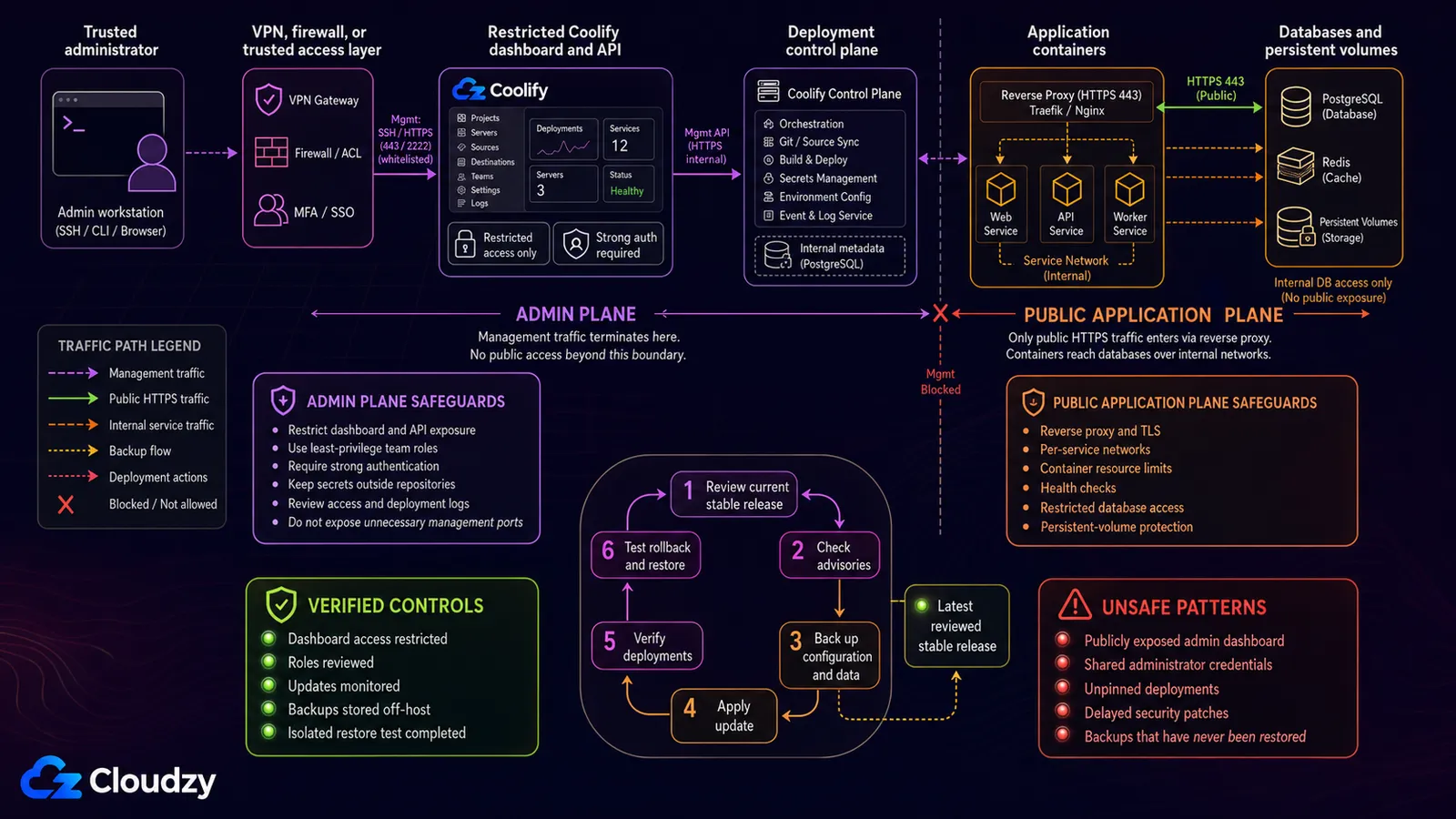
The honest framing: Coolify is the recommended PaaS option for this stack if you run the latest production release, keep the admin dashboard off the public internet, and follow security advisories. At QC time, GitHub marks Coolify v4.3.0 as Latest. Treat patching and admin-plane isolation as operating requirements, not optional hardening.
Pro tip: Restrict Coolify's dashboard and API with a firewall, VPN, or trusted access proxy. Deployed applications can still receive public traffic; the goal is to reduce exposure of the administrative control plane.
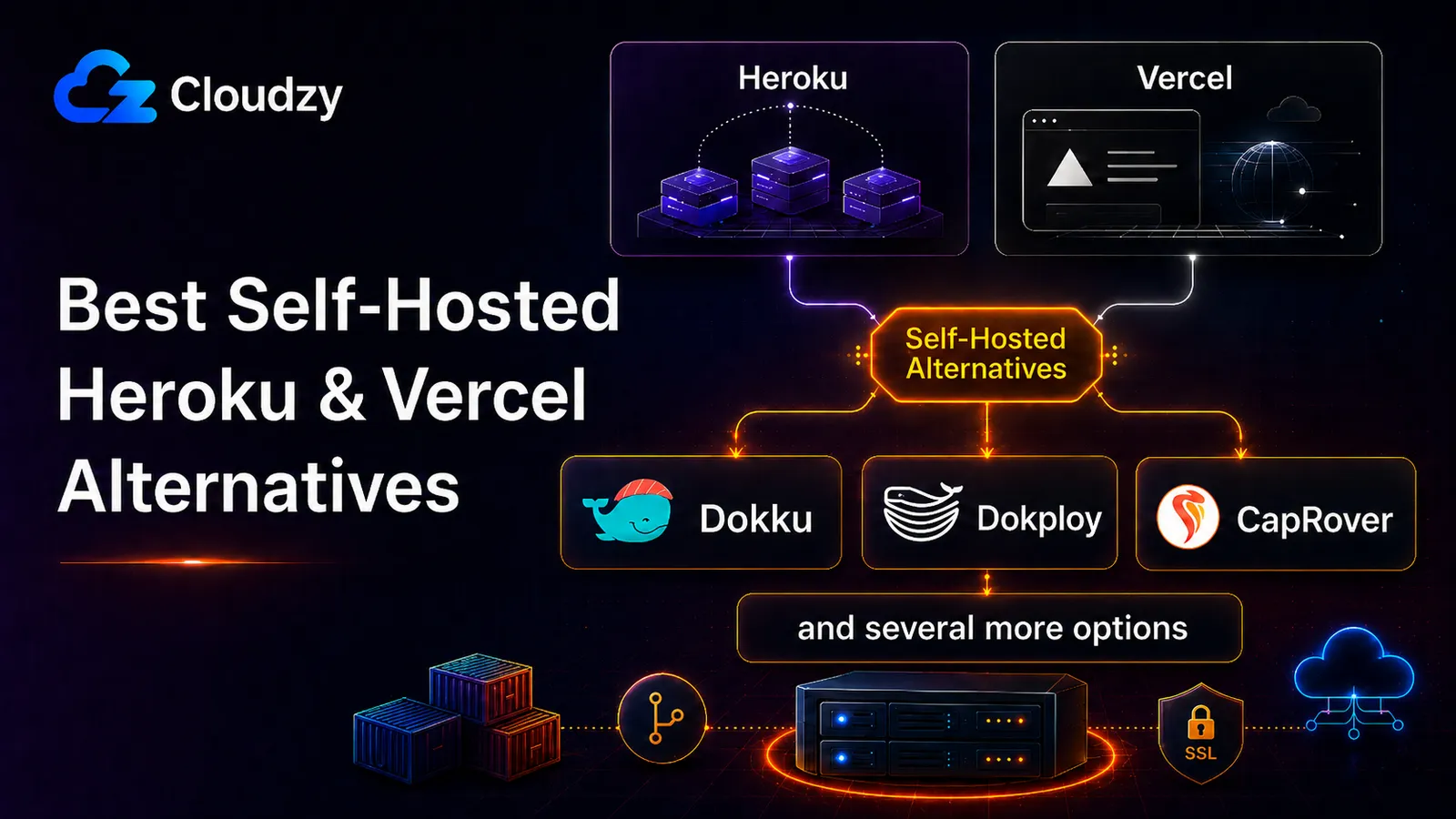
The alternative for solo developers is Dokku, a compact PaaS with Heroku-style git-push deployments and buildpack support. It has a smaller surface area than Coolify and a correspondingly smaller feature set. That makes it a defensible “boring choice” for one or two developers who do not need a dashboard.
The third option that experienced operators reach for is no PaaS at all, just Docker Compose. If your team already writes Compose files and you prefer the moving parts to be visible, this is a perfectly reasonable answer. Add Dockge or Portainer as a UI layer for stack management when you want a click-to-restart instead of docker compose restart. The trade-off is operational: no preview environments, no built-in TLS automation, no zero-downtime deploys without effort. You earn those features by writing scripts; with Coolify they are pre-baked, with the security history that comes attached.
Cloudzy's guide to the best CI/CD tools covers the build pipeline more deeply for teams that need a separate runner, which many small teams do not once Forgejo Actions or GitLab CI/CD is in place.
Section key takeaway: Coolify is the recommended PaaS only on the current stable release with its admin plane restricted; Dokku is the conservative solo choice; pure Docker Compose remains a defensible third option.
Layer 3: Run: Vaultwarden, Uptime Kuma, GlitchTip, and Container Management
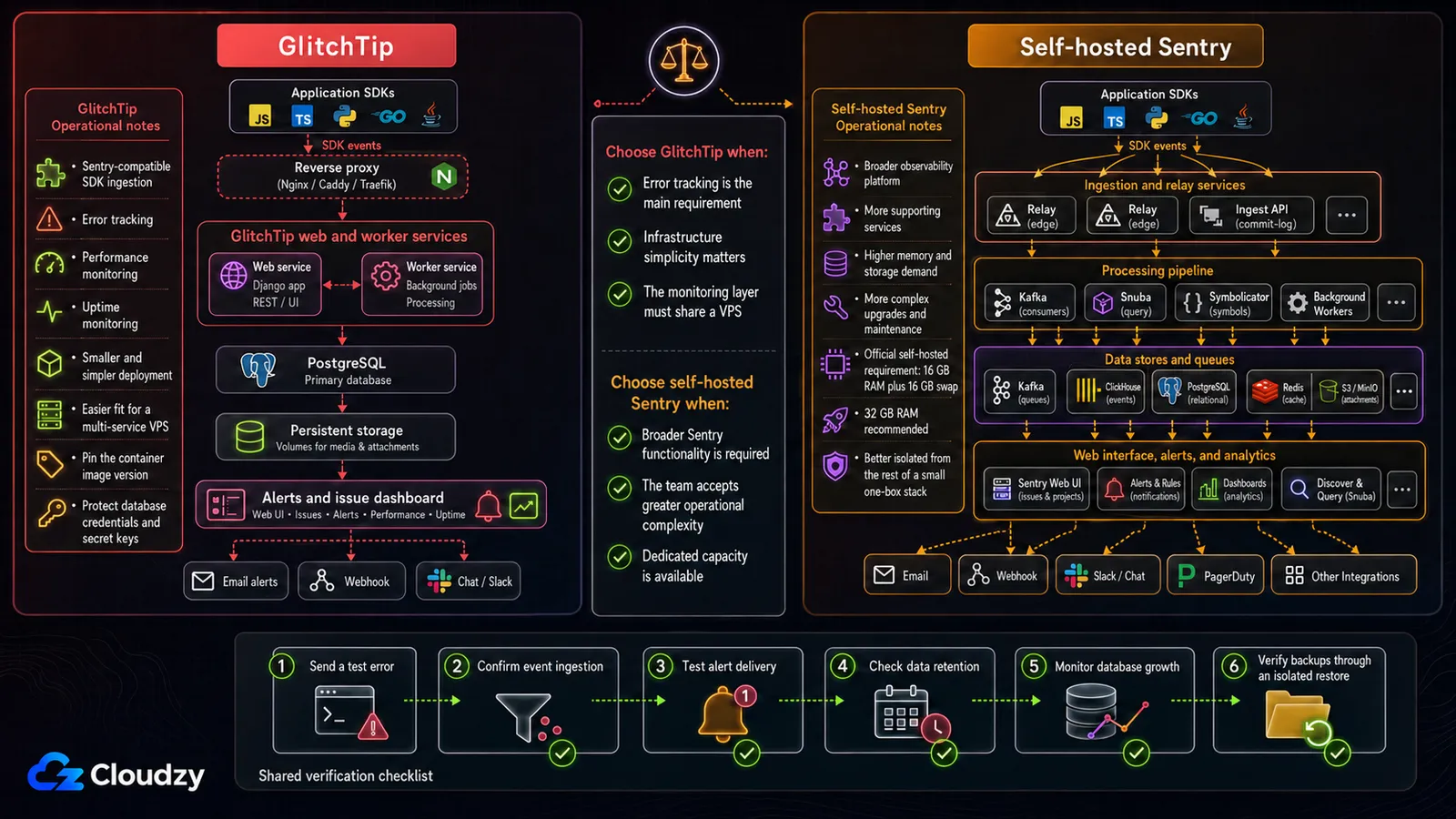
The starkest resource gap in this stack lives here. Sentry's official self-hosted requirements list 4 CPU cores, 16 GB RAM, 16 GB swap, and 20 GB free disk as the minimum, with 32 GB RAM recommended. GlitchTip's installation guide recommends 512 MB RAM, requires PostgreSQL, and makes Valkey optional. For a small team on one VPS, GlitchTip is the practical default.
| Tool | RAM (typical) | Container Count | API Compatibility |
|---|---|---|---|
| Self-hosted Sentry | 16 GB RAM plus 16 GB swap minimum; 32 GB recommended | Large multi-service deployment | Native |
| GlitchTip | 512 MB recommended; 256 MB minimum for the all-in-one setup | 2 core services; Valkey optional | Sentry SDK traffic; test feature parity |
The remaining four tools at this layer are short stories.
Vaultwarden is a Bitwarden-compatible password manager that supports Bitwarden mobile apps and browser extensions plus team sharing. Its actual footprint depends on users, attachments, and database choice. Cloudzy's self-hosted password-manager comparison covers the deeper trade-off when you need more structured permissions, audit controls, or a different security model.
Uptime Kuma is the small monitoring and alerting tool: HTTP, TCP, ping, push, certificate-expiry checks, and optional status pages. Notifications can route through chat, email, or webhooks. Resource use varies with monitor count and retention; alerting on a second consecutive failure is a practical way to suppress brief flaps.
GlitchTip is the error tracker. Most Sentry SDK integrations can report to a GlitchTip DSN, but feature parity is not complete; test performance monitoring, source maps, alerts, and any integration your team treats as critical.
Choose Portainer or Dockge for a container UI. Portainer spans broader container-management use cases; Dockge stays focused on Docker Compose. For a small Compose-only stack, Dockge is the cleaner fit. Move to Portainer only when you need the broader scope.
A useful Compose ergonomic for this layer: keep each tool in its own subdirectory with its own compose.yml, share a Docker network only where cross-tool traffic is required, and put one reverse proxy in front for TLS termination.
# /opt/stack/glitchtip/compose.yml (excerpt)
services:
  web:
    image: "glitchtip/glitchtip:${GLITCHTIP_VERSION:?Set GLITCHTIP_VERSION in .env}"
    environment:
      DATABASE_URL: "${DATABASE_URL:?Set DATABASE_URL in .env}"
      SECRET_KEY: "${GLITCHTIP_SECRET_KEY:?Set GLITCHTIP_SECRET_KEY in .env}"
      GLITCHTIP_DOMAIN: "https://errors.example.com"
      DEFAULT_FROM_EMAIL: "[email protected]"
    ports:
      - "127.0.0.1:8000:8000"
Pro tip: A backup is only proven when the service can be restored and its data validated. Once a month, restore one representative service into an isolated test environment, start it, authenticate, inspect records and attachments, and confirm that the application behaves normally. Listing restored files proves only that the archive is readable, not that the database, volumes, permissions, and application state can be recovered successfully.
Section key takeaway: GlitchTip delivers the core error-tracking job with a dramatically smaller deployment than self-hosted Sentry, but validate the Sentry features and integrations your team actually uses.
Layer 4: Document: Docmost, AFFiNE, and Issue Tracking with OpenProject or Plane
Notion's interface is fine until a growing wiki makes navigation and search feel slow. The recommended split for a small team is Docmost for documentation and wiki, with OpenProject for issue tracking. Replace OpenProject with Plane if your team specifically wants a Linear-shaped visual model and is comfortable managing its supported self-hosted deployment.
Docmost is the closest self-hosted Notion replacement here without pretending to be Notion. Its block editor, page hierarchy, and team permissions fit a conventional internal wiki. Size this layer for concurrent editors, attachments, and whether PostgreSQL and Redis share the same host. AFFiNE is the alternative for teams that prefer a canvas-and-whiteboard model over nested pages. Both are reasonable; pick one.
OpenProject covers the issue-tracking job for teams comfortable with a Jira-flavored workflow: epics, work packages, sprints, and time tracking. Plane is the Linear-shaped alternative, with a faster issue-centric interface and a different operational footprint.
Honest acknowledgment: Linear's keyboard-first speed is genuinely good, and Plane does not reproduce every interaction. If your team's workflow is built on Linear's command-menu muscle memory, the migration friction is real. It is not necessarily a deal-breaker, but it is a real cost.
Section key takeaway: Docmost covers the internal-documentation role, while OpenProject or Plane covers issue tracking; the keyboard-UX gap with Linear is the one place this layer asks you to compromise.
What This Stack Costs and What It Runs On
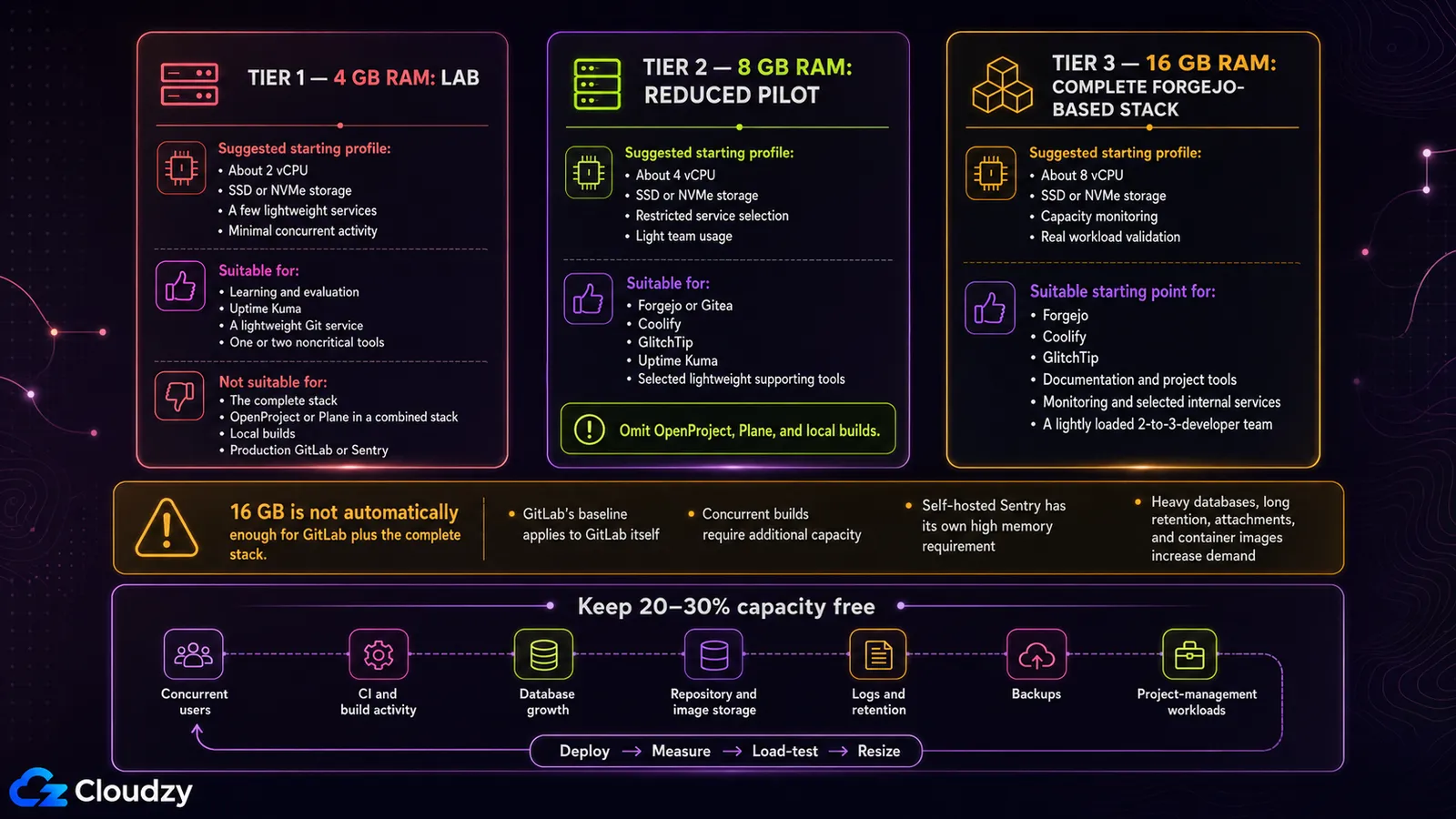
The practical starting point for the complete Forgejo-based one-box stack is about 8 vCPU and 16 GB RAM. Treat 2 vCPU and 4 GB RAM as a lab size for a few lightweight services, and 4 vCPU and 8 GB RAM as a reduced pilot that omits OpenProject, Plane, and local builds. Actual requirements depend on concurrent users, CI activity, database growth, attachments, image storage, logs, and retention, so validate the stack under real load and keep 20 to 30% capacity free. The 16 GB starting tier can accommodate the following services for a lightly loaded 2-to-3-developer team, subject to workload testing:
- Forgejo
- Coolify
- Vaultwarden
- Uptime Kuma
- GlitchTip
- Docmost
- OpenProject
- Dockge
A 4 GB server is suitable only for a few lightweight services. An 8 GB server is better treated as a reduced pilot without OpenProject, Plane, or local builds. Start the complete Forgejo-based stack at 16 GB, and add capacity when running GitLab, concurrent builds, Plane, long retention periods, or heavier database workloads. The same team's SaaS bundle includes:
- GitHub Team
- Vercel Pro
- Sentry
- Linear
- Notion
- 1Password
Using the published base rates shown on each pricing page (including annual-billing rates where applicable). The five priced products total about $158 a month for three people: GitHub Team at $4 per user for the first 12 months, three Vercel Pro developer seats at $20 each, Sentry Team starting at $26, Linear Basic at $10 per user, and Notion Plus at $10 per user. Usage charges, taxes, add-ons, and 1Password are additional. Infrastructure can still be materially cheaper, but the comparison is not meaningful without the operator's time.
When to size up: GitLab's single-node baseline is 8 vCPU and 16 GB RAM. Multiple concurrent builds can require additional capacity even without GitLab. Self-hosted Sentry also starts at 16 GB RAM plus 16 GB swap and recommends 32 GB, which is why this guide recommends GlitchTip for the one-box stack.
The unpriced cost is operational time. As a planning estimate, budget 1 to 2 hours a month for updates and backup verification, plus a short weekly scan of security advisories for the projects you run. The real number depends on change volume, incident response, and how much you automate. It is not zero, and it belongs in the cost model.
Deployment method changes convenience, not the operating requirements. Whether you use an official Compose file or a marketplace template, pin image versions, set CPU and memory limits, keep service data in named volumes, and test both backups and restores. Combining the full stack on one host also creates a shared failure domain, so isolate critical services when downtime or credential exposure would have a high impact.
If you want to deploy this stack, compare our cloud VPS plans by CPU, RAM, SSD or NVMe storage, transfer allowance, and region, then apply the sizing framework above. For faster setup, browse our one-click app catalog, but still pin versions, set resource limits, and verify backups before production.
Section key takeaway: Use 4 GB for a small lab, 8 GB for a reduced pilot, and about 8 vCPU with 16 GB RAM as the practical starting point for the complete Forgejo-based stack. Add capacity for GitLab, concurrent builds, heavier project-management tools, and growing databases.
Where Self-Hosting This Stack Genuinely Fails
Four failure modes, named plainly, because the rest of this guide has been an argument for the approach.
Failure mode 1: GitHub network effect for public open-source projects. Self-hosted git is correct for private code. It is incorrect for projects whose entire value depends on external contributors finding you. GitHub is where developers look first. Pull requests, forks, stars, the implicit trust signal of being on github.com, the third-party tool integrations, all of it. If your project is public open-source, the honest pattern is to mirror to GitHub for visibility while keeping the source of truth on Forgejo. Do not expect a self-hosted instance to replace GitHub's discoverability for public work. It will not.
Failure mode 2: Bot and scraper traffic on public Git instances. Public-facing Forgejo and Gitea services need abuse controls, rate limits, monitoring, and enough capacity for unpredictable traffic. This guide assumes private and team use, with the admin surface behind a VPN or IP allowlist. A genuinely public forge has a different threat and capacity model.
Failure mode 3: Maintenance burden. “You are the IT department” is the cliché, and it is mostly true. Updates break things. Compose files drift. Certificates expire. Backups fail silently in the most undignified ways. Coolify's 2026 advisories are a useful reminder that patch cadence matters. If you cannot commit to a maintenance window before signing on, the SaaS bundle is honestly the right answer.
Failure mode 4: Loss of integrations. Third-party GitHub Actions, Vercel preview deployments tied to GitHub PRs, Sentry's hosted alerting integrations with PagerDuty and Linear, Notion's wide integration catalog. Most have self-hosted equivalents (Forgejo Actions, Coolify webhook deploys, GlitchTip notifications, n8n for workflow glue) but the substitutions are not always 1:1. Prototype the workflow that matters most before committing the team to migration. The integration you take for granted is the one most likely to surprise you.
Section key takeaway: This stack works for private code, small teams, and willing operators; it does not work for public open-source visibility, hands-off teams, or zero-maintenance expectations.
The Operator's Stack
Four layers, four recommendations, named honestly. Code: Forgejo. Build and deploy: Coolify with the admin plane restricted, or Dokku, or Compose. Run: Vaultwarden, Uptime Kuma, GlitchTip, Portainer or Dockge. Document: Docmost and OpenProject (or Plane). Start a reduced pilot at 8 GB and the complete Forgejo-based stack at 16 GB. Add capacity for GitLab, concurrent builds, heavier databases, or sustained application load.
If you are migrating, start with Uptime Kuma and a noncritical internal service. They provide a lower-risk way to learn the operational cadence (updates, monitoring, backup verification, and certificate renewal) before moving a team workflow or credential store. Do not make Vaultwarden the first test deployment: move it only after encrypted off-host backups, a successful restore test, restricted administration, and MFA are in place. Once that cadence is reliable, move to Forgejo, then Coolify, then the rest.
For teams choosing GitLab CE specifically, decide whether its native CI/CD replaces a separate runner or whether your workload still needs dedicated build capacity.
Frequently Asked Questions
What Is the Best Self-Hosted Alternative to Gitea in 2026?
Forgejo is the recommended choice for new self-hosters in 2026. The October 2022 transfer of the Gitea trademark and domain to a for-profit company without prior community approval prompted the Forgejo fork in late 2022. Starting with v9.0, Forgejo releases use GPL v3+; earlier v8.0 and v7.0 patch releases remained under MIT. Day-to-day feature parity is close.
Can Coolify Be Run Safely in Production in 2026?
Yes, but only with active maintenance and defense in depth. Run the latest reviewed stable release, monitor new advisories, restrict team permissions, and keep the dashboard and API behind a firewall, VPN, or trusted access layer. Do not treat beta.451, beta.474, or any other historical patch level as a permanent safe threshold.
How Much RAM Does a Complete Self-Hosted Developer Stack Actually Need?
For a 2-to-3-developer team, treat 4 GB as a lab size for a few lightweight services and 8 GB as a reduced pilot without OpenProject, Plane, or local builds. About 8 vCPU and 16 GB RAM is the practical starting point for the complete Forgejo-based stack. GitLab's 8-vCPU/16-GB baseline applies to GitLab itself, while self-hosted Sentry requires 16 GB RAM plus 16 GB swap and recommends 32 GB. Validate the final configuration under real workload conditions.
Why GlitchTip Instead of Self-Hosted Sentry?
The resource and operational gap. Self-hosted Sentry requires at least 16 GB RAM plus 16 GB swap and is a large multi-service deployment. GlitchTip recommends 512 MB for its all-in-one service, requires PostgreSQL, and makes Valkey optional. It accepts Sentry SDK traffic, but feature parity is not complete, so test the features and integrations you depend on.
What Does This Stack Actually Cost Compared to the SaaS Equivalents?
Treat 4 GB as a lab size for a few lightweight services and 8 GB as a reduced pilot without OpenProject, Plane, or local builds. About 8 vCPU and 16 GB RAM is the practical starting point for the complete Forgejo-based stack. At published base prices, GitHub Team, Vercel Pro, Sentry Team, Linear Basic, and Notion Plus total about $158 a month for three people before 1Password, usage charges, taxes, and add-ons. Self-hosting can be materially cheaper, but operator time and backup infrastructure are real costs.



Discussion
Comments
Sign in to join the discussion.