
If you've already left the managed PaaS, your VPS is provisioned, the SSH key is added, and your terminal cursor is blinking on the install line. The only question left: do you run curl ... | bash for Coolify, or for Dokploy?
Both tools install in one command. Both give you Git-push deployments, automatic SSL, a web UI, and a reverse proxy on top of Docker. The interesting differences are the ones that show up in production: how each handles a standard docker-compose.yml, what happens during a deploy, and how each project responded to the news that reshaped this comparison in 2026. Two pieces of news carry most of the weight here: the Coolify CVE disclosures of January 2026 and the Dokploy license restructure of the same month.
This post matches each tool to a specific use case rather than crowning a winner. By the end you will hopefully know which one fits your workflow.
TL;DR
- Coolify is older with the larger ecosystem (~55k GitHub stars, 300+ one-click service templates), heavier at idle, Apache 2.0 throughout, with no paid tier on the self-hosted side.
- Dokploy is younger (~34k stars), lighter at idle, Apache 2.0 core plus a separate Source Available License gating future paid features (SSO, RBAC, audit logs, white-labeling).
- Coolify cannot do zero-downtime deployments via Docker Compose today; only via Dockerfile, Nixpacks, or single-image deploys. Dokploy ships Docker Swarm as a first-class mode; Coolify's Swarm is labeled experimental.
- The January 2026 Coolify CVEs are patched in v4.0.0 (April 27, 2026). Update Coolify and don't expose the dashboard publicly.
When Neither Tool Is the Right Answer
Both Coolify and Dokploy are the wrong shape for some setups. Three alternatives worth knowing about, briefly:
- Kamal (from 37signals): for teams with one or two apps who want zero UI; just
kamal deployfrom your laptop. Simpler than Coolify or Dokploy by a wide margin and the right call when you don't want a dashboard. - Dokku: the classic, Git-push, single-server model. Older, smaller scope, very stable. The "Heroku on one VPS" original.
- GitHub Actions + Docker Compose on a bare VPS: the smallest possible stack. No orchestration UI, but no orchestration overhead either. Good for a single app where the deploy flow is
docker compose pull && docker compose up -dtriggered from CI.
If your shape is one app on one server, both Coolify and Dokploy are probably overkill; try one of the above first. If you have multiple apps, multiple databases, or a team with non-technical members who need a UI to operate things, the Coolify-vs-Dokploy choice is the right one to make. For a wider survey of options in this category, see our roundup of self-hosted cloud platforms with a web UI.
Coolify and Dokploy at a Glance
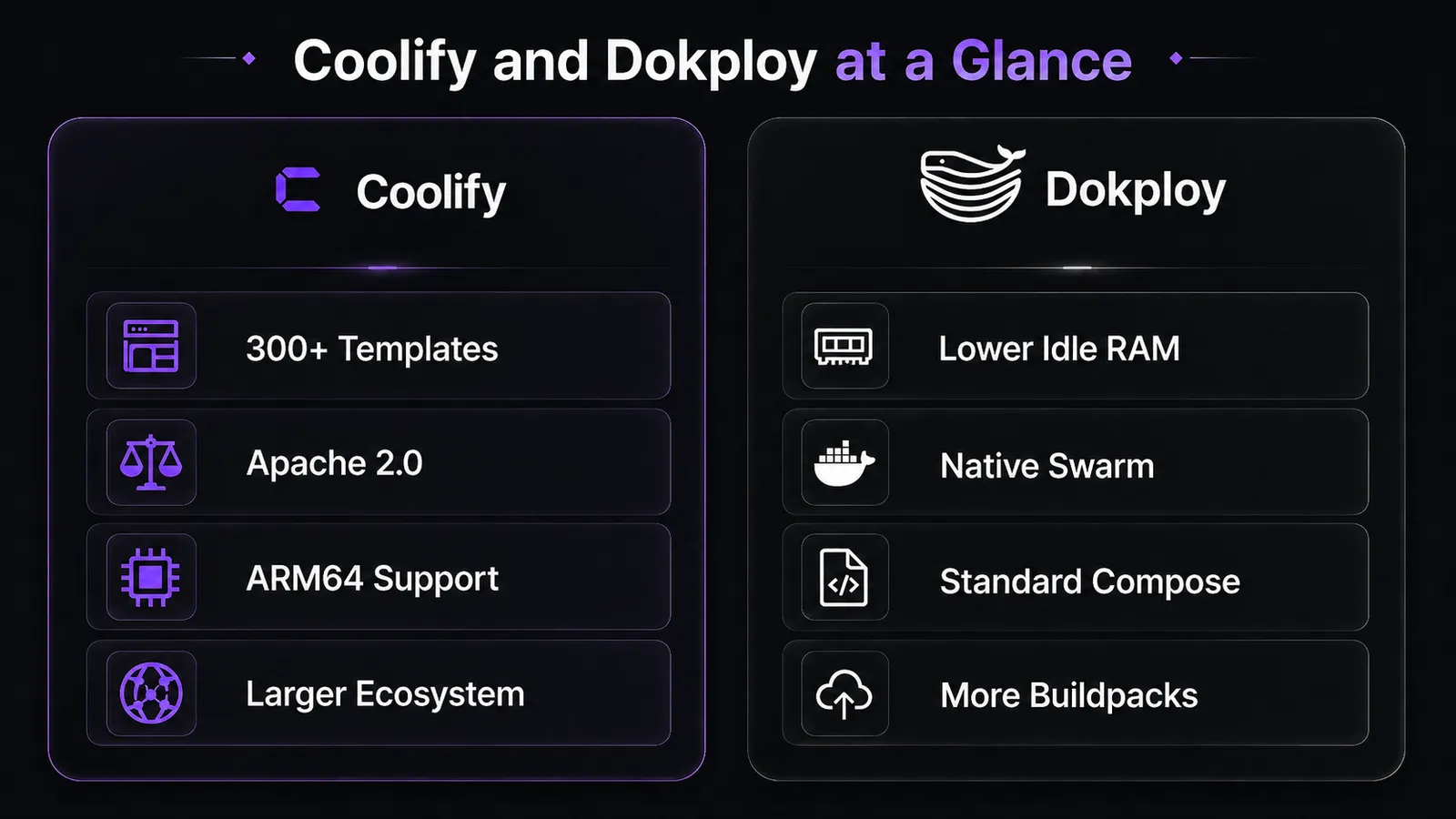
Coolify v4.0.0 stable shipped on April 27, 2026, after a long beta cycle. Dokploy is on v0.29.4 as of May 11, 2026. Both are open-source self-hosted PaaS projects in the Heroku/Render/Vercel-alternative space, both wrap Docker with a UI, an HTTPS-by-default reverse proxy (Traefik), and Git-based deploys.
| Feature | Coolify | Dokploy |
|---|---|---|
| Latest stable release | v4.0.0 (April 27, 2026) | v0.29.4 (May 11, 2026) |
| License | Apache 2.0 | Apache 2.0 core + Source Available for paid features |
| Tech stack | PHP / Laravel | TypeScript / Node.js |
| GitHub stars | ~55,000 | ~34,000 |
| Minimum RAM (official) | 2 GB | 2 GB |
| Minimum CPU (official) | 2 cores | not specified |
| Idle RAM (community-reported) | 500 MB – 1.2 GB | 300 – 400 MB |
| Docker Compose zero-downtime | Not supported (Dockerfile/Nixpacks only) | Standard Compose handling |
| Multi-server clustering | Docker Swarm (experimental) | Docker Swarm (native) |
| ARM64 support | Yes (incl. Raspberry Pi OS) | Not advertised in docs |
| Build systems | Nixpacks, Dockerfile, Docker image | Nixpacks, Dockerfile, Docker image, Heroku Buildpacks, Paketo, Railpack |
| Reverse proxy | Traefik | Traefik |
| Self-hosted monitoring scope | Built-in metrics + log viewer | Basic resource metrics + AI log/build error analysis (v0.29.0+) |
Our take: pick Dokploy if you want lower idle overhead, native multi-server support, and standard Docker Compose handling without platform-specific massaging. Pick Coolify if you want the larger one-click app library, ARM64/Raspberry Pi support, or pure Apache 2.0 with no future paid tier waiting in the wings.
Resource Footprint and VPS Sizing
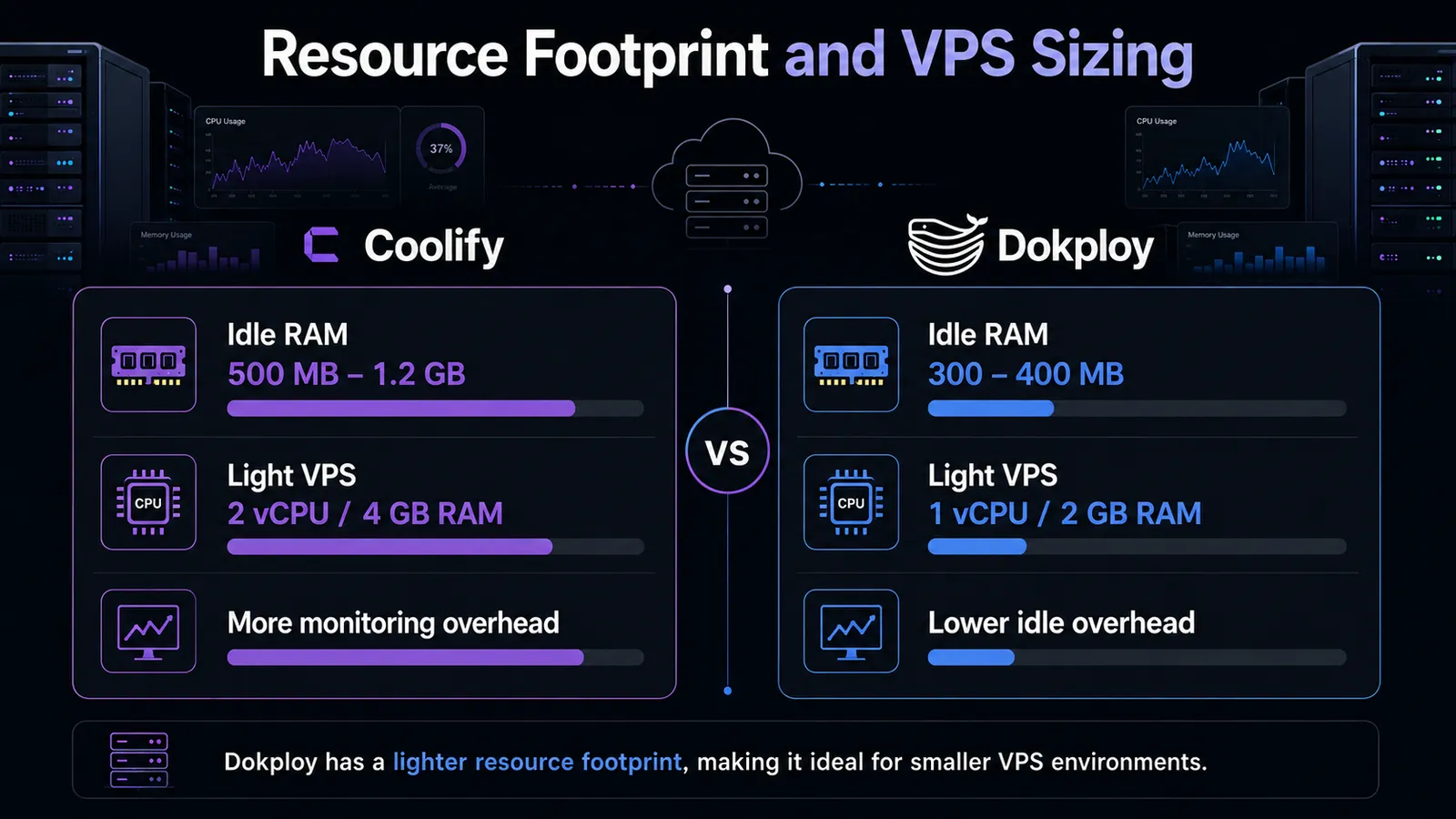
A self-hosted PaaS can save you the cost of Heroku. If the orchestration layer eats 1.5 GB of your 2 GB VPS at idle, you have nothing left to deploy onto. So the first practical question on a small server is: how much does each tool cost you before you've deployed a single app?
Coolify's idle RAM usage depends on what monitoring is enabled, with a 5–7% baseline CPU footprint that spikes when the metrics scrape runs. Coolify's own documentation uses a representative production workload of 8 GB RAM, 4 cores, and 150 GB of storage running 3 Node.js apps, 4 static sites, and a few databases. That's a reasonable sizing reference if your stack looks similar.
Dokploy, in contrast, runs much lighter, well under 2% CPU when nothing is deploying.
A LogRocket production write-up running both tools side by side reached the same directional conclusion: a docker stop && docker start on a Dokploy app does not trigger a full rebuild, while the same operation on Coolify does. That alone shifts the steady-state cost in Dokploy's favor, especially on smaller VPS plans where rebuild storms eat your CPU budget.
For sizing, here's the VPS setup I'd recommend:
- Coolify, light workload: 2 vCPU / 4 GB RAM / 120 GB NVMe is the practical starting point for Coolify plus a couple of small apps.
- Coolify, production-reference workload: 4 vCPU / 8 GB RAM / 160 GB NVMe to match Coolify's own documented 3 Node.js + 4 static sites + databases example.
- Dokploy, light workload: 1 vCPU / 2 GB RAM / 60 GB NVMe is comfortable for a single small app.
- Dokploy, production headroom: 2 vCPU / 4 GB RAM / 120 GB NVMe gives you room for a small production stack.
Pro tip: Coolify's idle RAM scales with monitoring config. If you're tight on memory, dial back the metrics scrape interval (or disable the built-in monitoring entirely if you already run Prometheus/Grafana elsewhere) before you provision a bigger server.
Deployment Reality: Docker Compose, Dockerfile, and Zero-Downtime
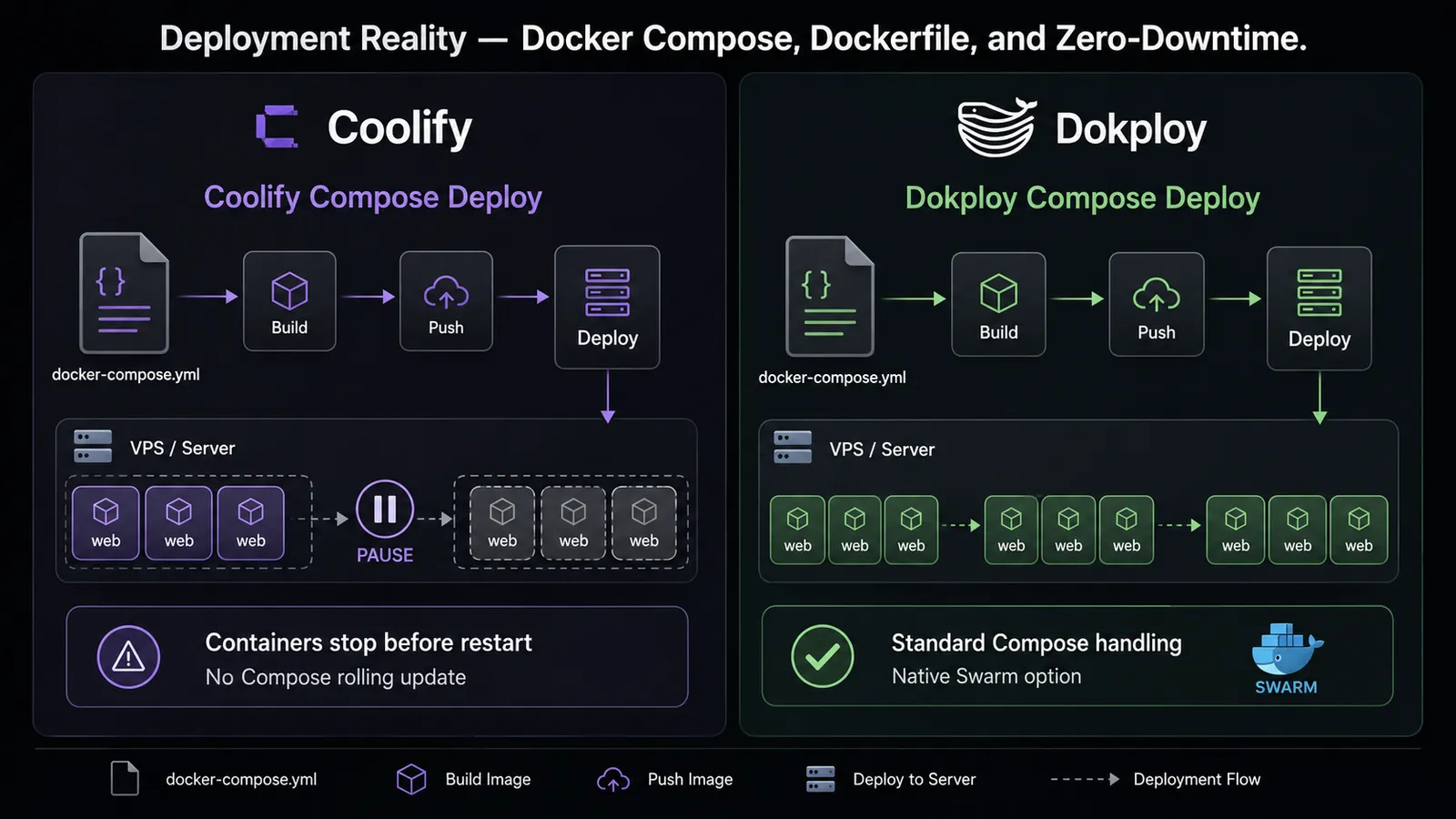
Most teams arrive at one of these tools with an existing docker-compose.yml and an expectation: paste the file, click deploy, see the app come up. How each platform handles standard Compose, and what happens to in-flight requests during the next deploy, is where the practical distinction appears.
Coolify supports Docker Compose, Dockerfile, Nixpacks (auto-detect from project files), and direct Docker image deployments. There is, however, a catch, which is worth being explicit about: zero-downtime deployments (rolling updates, blue/green) work in Coolify only via Dockerfile, Nixpacks, or single-image deploys. They do not work via Docker Compose. A Coolify maintainer confirmed in a GitHub discussion that "for compose based deployments, all containers are stopped before starting the new ones, there is no rolling update for compose based deployments currently." Rolling support for Compose is on the roadmap for v5; v4 will not get it. The workaround the maintainer suggests is to split a Compose stack into individual Coolify services, which is a non-trivial migration if your Compose file expresses real inter-service relationships.
The user-facing consequence shows up in a Hacker News thread on Coolify, where one operator put it bluntly: "any pending request when you update an app is simply killed." That's accurate for Compose deploys today.
Coolify's Compose layer also adds what the project calls "magic variables." That means automatic injection of helper images, network rewrites, and environment overrides. The intent is to be more efficient; the side effect is that a docker-compose.yml that runs cleanly on your laptop sometimes needs adjustment to run cleanly on Coolify. The same Hacker News thread surfaces a representative case: "Added 8 variables inside docker-compose, only 7 get recognized." If your Compose stack is small and standard, you may not hit these. If it's large or unusual, you will.
Dokploy's posture is different. LogRocket's hands-on write-up found that Dokploy "can deploy an existing docker-compose.yml with little to no modification" and stays close to Docker's native label-based routing model. The same write-up notes that container stop/start in Dokploy does not trigger a full rebuild, whereas the same action on Coolify does. This is a directional signal about runtime behavior rather than a formal "zero-downtime guarantee" from the Dokploy docs, but it tracks with what self-hosters report on smaller VPS instances.
Dokploy also supports Heroku Buildpacks, Paketo Buildpacks, and Railpack in addition to Nixpacks and Dockerfile. For teams arriving from Heroku with heroku.yml or buildpack-based workflows, that's the path of least resistance.
Section key takeaway: if your existing services are a real Docker Compose stack, Coolify will require you to either restructure your deployment strategy or accept brief downtime per push. Dokploy will not.
Security: The January 2026 Coolify CVE Disclosures
I read the broader story this way: Coolify is safe to run today if you keep it updated and you don't expose the dashboard to the public internet. The disclosure does not disqualify the project. Responsible disclosure was followed and the patches went out. What it does reveal is that the attack surface available to a low-privileged authenticated user was wider than it should have been. That's a design lesson for the project and an operational lesson for the operator: tighten the exposure model now.
Pro tip: even after patching, treat your Coolify dashboard like SSH. Bind it to a private network, sit it behind a VPN, or front it with Tailscale. Don't expose port 8000 to the public internet just because the install script makes it easy.
Dokploy isn't exempt from this kind of issue either. The v0.29.3 release notes acknowledge a security vulnerability identified in Dokploy and ship a security patch script you're expected to run alongside the upgrade. Smaller surface, shorter project history, but the same operational discipline applies: update on the day patches drop, don't leave the dashboard on the public internet.
Section key takeaway: the CVE story is a yellow flag for Coolify's operational practice, not a red flag against the project, but it raises the bar on update discipline and on how you expose the dashboard.
Licensing: What's Free, What's Not
Dokploy's license restructured on January 21, 2026. Here's what changed and what it means for self-hosters.
Dokploy is now standard Apache 2.0 for the core, replacing the earlier non-standard adapted Apache 2.0 that confused users about what was open source and what wasn't. A separate Dokploy Source Available License now governs code in proprietary/ directories: visible source, paid for production use. The features Dokploy says will live behind that license:
- Single Sign-On (SSO/SAML) and advanced access controls
- Custom branding and white-labeling
- High availability, auto-scaling, and disaster recovery
- Advanced monitoring, integrations, and compliance features
The project has explicitly committed to never moving an existing open-source feature into the paid tier; future paid functionality is targeted at organizations that need enterprise glue. 2FA today already sits behind the Startup tier on Dokploy's pricing page.
Coolify's situation is straightforward. The project is Apache 2.0 on GitHub; every feature in the self-hosted version is free. There is a Coolify Cloud offering for teams who want the maintainer to host it, but the self-hosted version is a complete product with no feature gates and no upgrade path to a paid tier you don't have today.
My read: for solo developers and small teams self-hosting on their own VPS, Dokploy is functionally free and will remain so. For an organization that eventually needs SSO, fine-grained RBAC, audit logs, or white-labeling, Dokploy will eventually push you toward a paid tier. Coolify won't, because Coolify doesn't have that tier on the roadmap.
A cross-source clarification worth making: Dokploy's self-hosted build does include basic resource metrics (CPU, memory, storage, network), and v0.29.0 added AI-powered log and build error analysis. Dokploy's monitoring system is cloud only for the more advanced monitoring features. The monitoring, however, still runs locally on a self-hosted install for basic pre-container resource metrics.
Multi-Server and Clustering: Reality vs Marketing
Sooner or later a single VPS isn't enough, and both projects market multi-server support prominently on their landing pages. The reality on the ground is not the same.
Coolify's official scalability docs are direct about it: Docker Swarm support is labeled experimental. The standard multi-server pattern uses validated remote servers connected over SSH with a Docker Registry shared between them, and Traefik instances running per server. Swarm mode requires a minimum of three servers in the same architecture (all ARM, or all AMD64). Kubernetes? "Just planned, but not in the roadmap yet, so no ETA." If you read Coolify's own page on this, the short version is: multi-server works, Swarm is a beta, and Kubernetes is a vision.
Dokploy ships Docker Swarm as a first-class mode without an experimental flag. Traefik handles routing in both single-server and Swarm setups. The v0.29.0 release added non-root multi-server support, which closes a real gap (no more root-only SSH for adding remote nodes).
If multi-node clustering is something you'll need in the next six months, not "someday on a slide deck," Dokploy is the lower-risk choice today.
Section key takeaway: if clustering is on your near-term roadmap, the Swarm difference flips the recommendation toward Dokploy regardless of the other axes.
Build Systems and Language Support
Teams arriving from Heroku will care most about which buildpack ecosystems each tool supports, because that decides how much rewriting your project needs before its first deploy.
Coolify's build path is Nixpacks (default, auto-detected from your project files), Dockerfile, or a pre-built Docker image. Nixpacks is solid for the common cases (Node, Python, PHP, Go, Rust), but the auto-detection has rough edges. Worth verifying for your stack: a January 2026 Nixpacks issue affecting Laravel projects with both composer.json and package.json produced duplicate Nginx location blocks, which broke a class of deployments until upstream fixed it.
Dokploy supports Nixpacks, Dockerfile, and Docker image, and adds Heroku Buildpacks, Paketo Buildpacks, and Railpack on top. If your project already builds cleanly with heroku.yml or a buildpack, Dokploy lets you keep that workflow. Coolify will ask you to convert.
On the surface both tools look the same: Git-push deployments from GitHub, GitLab, Bitbucket, automatic Let's Encrypt SSL, a web UI for environment variables and database management. The build-system breadth is one of the few places Dokploy clearly stretches further.
One-Click App Catalogs
For non-technical operators who want to deploy known open-source services (n8n, Plausible, Supabase, Ghost, Listmonk, the usual self-hosted stable), the size of the one-click template library is a real differentiator. For some users, that is more important than other areas like performance or being lightweight.
Coolify offers 300+ one-click services across roughly 40 categories: AI, analytics, automation, databases, security, storage, and the rest. It is the larger library by a wide margin and the practical answer for non-developers who want a service deployed without writing a Compose file.
Dokploy's template library is smaller. The current Dokploy docs do not publish a clean count, so I'm not going to give you a number.
The practical answer: if your workflow is "deploy n8n, Supabase, and Plausible in two clicks each," Coolify wins this axis cleanly. If you write your own apps and just want them deployed, the catalog size doesn't matter and the other axes do.
How to Pick: Use-Case Recommendations
There's no single winner here. There are matches between a tool and a deployment shape:
- Non-technical team that wants a service library: Coolify. The 300+ template catalog is a meaningful edge.
- Docker-native developer who wants lightweight + standard Compose handling: Dokploy.
- ARM64 hardware (Raspberry Pi, ARM-based VPS): Coolify. Dokploy doesn't advertise ARM64 support in current docs; if you're on ARM, default to Coolify until you've confirmed otherwise.
- Multi-node clustering you'll use this quarter: Dokploy. Native Swarm vs. experimental Swarm is the swing factor.
- Pure Apache 2.0, no possible future paid tier: Coolify.
- Migrating from Heroku and want to keep Heroku Buildpacks: Dokploy.
- Worried about the January 2026 CVEs: an updated Coolify (v4.0.0+) is fine. The real question is your exposure model. If you can't bind the dashboard to a private network or VPN, Dokploy is the lower-stress choice: smaller surface and a shorter history of high-severity disclosures.
A Note on Deploying Either Tool
Once you've picked, the install itself is one command on either project, but there's a shortcut worth knowing about. Both Coolify and Dokploy are available as one-click deployments in our marketplace, with Ubuntu 24.04 and Docker preinstalled and the dashboard already accessible. If you want to skip the manual setup, the marketplace listings for Coolify and Dokploy are the fastest path. If you'd rather start from a clean OS and run the official installer yourself, both projects publish a one-line script; pick whichever fits your provisioning workflow.
Frequently Asked Questions
Is Dokploy Still Open Source After the 2026 License Change?
Yes for the core platform. Effective January 21, 2026, Dokploy's core is standard Apache 2.0. A separate Dokploy Source Available License now governs code in proprietary/ directories, currently scoped to future enterprise features (SSO/SAML, fine-grained RBAC, audit logs, white-labeling). For solo and small-team self-hosted use, Dokploy is functionally open source.
Are the January 2026 Coolify Security Vulnerabilities Still a Concern?
The 11 disclosed CVEs are patched in Coolify v4.0.0 (released April 27, 2026). If you are running v4.0.0 or newer, the disclosed vulnerabilities are addressed. What's left is exposure: keep Coolify updated and don't expose the dashboard to the public internet. Bind it to a private network or sit it behind a VPN.



Discussion
Comments
Sign in to join the discussion.